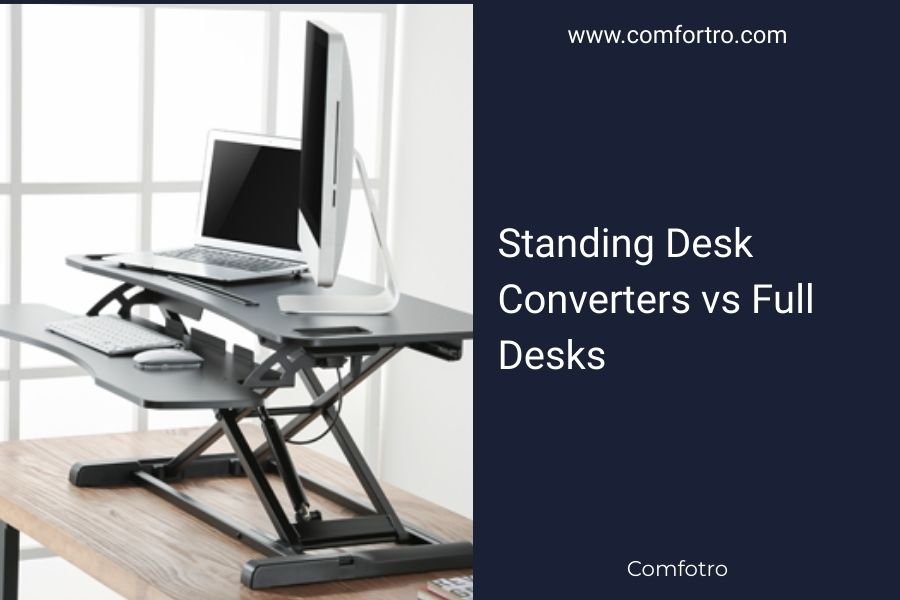
Standing desk converters are add-on units that sit on your existing desk, while full standing desks replace your entire workspace. Converters cost $100-500 and work with any desk, but full desks offer more surface area and better stability for $300-1200.
The choice between standing desk converters vs full desks depends on your budget, space, and how much you plan to stand during work.
What Are Standing Desk Converters?
Standing desk converters are portable platforms that transform your regular desk into a sit-stand workstation. You place them on top of your current desk surface.
Think of them like a laptop stand on steroids. They lift your monitor and keyboard to standing height when you want to work upright.
Types of Desk Converters
I found several main types when researching converters online:
- Desktop risers that hold just your monitor
- Keyboard tray models with separate monitor and typing surfaces
- All-in-one platforms that lift everything together
- Corner units designed for L-shaped desks
Manual vs Electric Converters
Manual converters use gas springs or counterbalance systems. You lift or lower them by hand. Electric models have motors that adjust height with the push of a button.
Electric converters cost more but feel smoother to operate daily.
What Are Full Standing Desks?
Full standing desks are complete furniture pieces that replace your existing desk. They have adjustable legs that raise and lower the entire desktop surface.
You get a fresh start with your workspace layout and design.
Fixed vs Adjustable Standing Desks
Fixed standing desks stay at one height. They’re cheaper but you can’t sit down without adding a tall stool.
Adjustable desks move up and down so you can alternate between sitting and standing. Most people prefer this flexibility.
Manual vs Electric Full Desks
Manual standing desks use hand cranks to adjust height. Electric versions have motors built into the legs.
From what I read, electric desks are much more convenient for daily height changes.
Space and Installation Differences
Converters work in tight spaces because they use your existing desk footprint. You just plop them down and start using them.
Full desks need assembly and often require more floor space. But you get to design your workspace from scratch.
Setup Time Comparison
Desk converters take 5-10 minutes to unpack and position. No tools needed in most cases.
Full standing desks require 1-3 hours of assembly. You’ll need basic tools and maybe a friend to help lift the desktop.
Rental and Temporary Spaces
If you rent your home or office, converters make more sense. You can take them with you when you move.
Full desks work better when you own your space and plan to stay put for years.
Cost Analysis
I researched pricing across major retailers and found clear cost differences.
| Product Type | Low End | Mid Range | High End |
|---|---|---|---|
| Desktop Converters | $100-200 | $250-400 | $450-500 |
| Full Standing Desks | $300-500 | $600-900 | $1000-1200+ |
Hidden Costs to Consider
Converters might need a monitor arm if your screen doesn’t fit well. That adds $50-150.
Full desks often need new desk accessories since you’re starting fresh. Cable management, desk pads, and storage can add $100-300.
Long-term Value
Converters have lower upfront costs but limited upgrade options. If you outgrow yours, you’ll need to buy something else.
Full desks cost more initially but last longer and adapt better to changing needs.
Workspace Surface Area
This is where full desks really shine. You get the entire desktop for standing work.
Converters eat up desk space even when lowered. Your work area shrinks compared to a regular desk.
Multi-Monitor Setups
Full standing desks handle multiple monitors easily. You have room for two or three screens plus other equipment.
Most converters max out at two monitors. Large ultrawide screens might not fit at all.
Storage and Organization
Full desks offer drawers, shelves, and built-in cable management. Your workspace stays cleaner and more organized.
Converters add clutter since they sit on top of your existing desk setup.
Stability and Weight Capacity
I found that stability varies widely between products and price ranges.
Budget converters wobble when you type or move your mouse. This gets annoying during long work sessions.
Weight Limits
Most converters hold 15-35 pounds total. That covers a laptop or single monitor with keyboard.
Full standing desks support 80-200 pounds. You can load them with multiple monitors, speakers, and office supplies.
Typing Experience
Good full desks feel rock solid when typing. The whole surface moves as one unit.
Converters with separate keyboard trays can flex or bounce as you type. This varies by model quality.
Health and Ergonomics
Both options help you stand more during work. Research shows that alternating between sitting and standing reduces back pain and improves energy levels (Mayo Clinic).
The key is proper setup regardless of which type you choose.
Monitor Height Adjustment
Your screen should sit at eye level when standing. Full desks make this easier since you control the entire surface height.
Some converters struggle with monitor positioning, especially for taller or shorter people.
Keyboard and Mouse Position
Your arms should hang naturally with elbows at 90 degrees when typing. Full desks keep everything aligned as one surface.
Converter keyboard trays sometimes end up at awkward angles or distances from the monitor.
Who Should Choose Converters
Desk converters work best if you:
- Have a tight budget under $300
- Rent your workspace or move frequently
- Like your current desk and don’t want to replace it
- Only need space for a laptop or single monitor
- Want to test standing work before committing fully
Best Converter Scenarios
I heard from ergonomic experts that converters suit people who stand less than 3 hours per day. They’re perfect for occasional standing rather than full-time use.
Who Should Choose Full Desks
Full standing desks make sense when you:
- Plan to stand 4+ hours daily
- Need space for multiple monitors or equipment
- Want the cleanest, most organized workspace
- Don’t mind assembly and higher costs
- Own your home or office space
Full Desk Advantages
People who commit to full desks usually report better long-term satisfaction. The extra surface area and stability make daily use more comfortable.
Making Your Decision
Start with your budget and space constraints. Those factors eliminate many options quickly.
Then think about how much you actually plan to stand. Be honest about your work habits and commitment level.
Try Before You Buy
Many office furniture stores have display models you can test. Spend 10-15 minutes at each type to feel the difference.
Some companies offer return policies that let you test products at home for 30-60 days.
Conclusion
Standing desk converters offer an affordable way to test standing work without major commitment. They’re perfect for renters, tight budgets, and light computer use.
Full standing desks provide better long-term value for serious standing workers. The extra cost buys you more space, better stability, and cleaner organization.
Your choice comes down to budget, space, and how much you plan to stand. Start with a converter if you’re unsure, then upgrade to a full desk once you know standing work fits your routine.
Can I use a standing desk converter with a glass desk?
Yes, but check the weight limits carefully. Glass desks typically handle 50-80 pounds total, and converters add 15-25 pounds before you put anything on them. Make sure your desk can support the combined weight safely.
How long does it take to adjust to standing while working?
Most people need 2-4 weeks to build up comfort standing for longer periods. Start with 15-30 minutes at a time and gradually increase. Your legs and back will strengthen as you adapt to the new position.
Do standing desk converters damage existing desks?
Quality converters use rubber pads or felt feet that protect desk surfaces. Cheap models might scratch or dent soft wood finishes. Always check that your converter has proper protective padding on the bottom.
What’s the ideal height range for an adjustable standing desk?
Most people need 28-48 inches of height adjustment range. This covers sitting height around 30 inches and standing height up to 46 inches. Taller people over 6 feet should look for desks that reach 50+ inches.
Are electric standing desks worth the extra cost over manual ones?
Electric desks cost $200-400 more but save significant time and effort if you adjust height daily. Manual cranks take 1-2 minutes and physical effort each time. Electric adjustment happens in 15-30 seconds with the push of a button.