The best corner desk for back and neck pain is typically an ergonomic, adjustable standing desk with ample space. This type of desk allows you to change positions often, which is crucial for spine health. It helps prevent discomfort from long sitting hours.
You spend many hours at your desk. Poor posture can lead to chronic pain. A well-designed corner desk can significantly reduce this risk. We found that flexibility and adjustability are key features to look for.
- Adjustable height for sitting and standing
- Ample workspace for monitor and accessories
- Ergonomic design promotes good posture
- Supports various body types and needs
- Helps relieve and prevent back and neck pain
Below, we break down everything you need to know about choosing the perfect corner desk to support your back and neck health.
Choosing the Right Corner Desk for Your Spine
You’re looking for a desk that won’t make your back and neck scream. We found that the best solution for spine health is an adjustable standing desk. It allows you to change positions often.
Why is changing positions so important? Remaining in one posture, even a “good” one, can lead to stiffness and pain. Your body thrives on movement, even subtle shifts (NIH).
Understanding the Pain Problem
Many of us spend hours sitting at a desk. This can put a lot of stress on your spine. Think of your spine like a stack of blocks. If they’re always in the same position, pressure builds up.
Neck pain often comes from craning your head forward. This adds weight to your neck, like holding a bowling ball with outstretched arms. Back pain can stem from poor lumbar support or a rounded spine.
The “Sitting is the New Smoking” Analogy
You might have heard the phrase, “sitting is the new smoking.” While a bit dramatic, it highlights a real concern. Prolonged sitting can impact your health, not just your back. It affects your circulation and metabolism too.
Imagine your car always parked in the same spot. Parts might seize up. Your body is similar. It needs movement to stay lubricated and flexible.
Key Features of a Back-Friendly Corner Desk
When you’re shopping, focus on adjustability and ergonomics. These two elements are your best friends for pain relief. A good desk works with you, not against you.
Adjustable Height: Your Movement Hero
This is the most critical feature. An adjustable height desk lets you switch between sitting and standing. This simple act can make a world of difference for your comfort.
- Electric Adjustment: These desks move with the push of a button. They are super convenient.
- Manual Crank: A more budget-friendly option. It takes a little effort but gets the job done.
- Pneumatic: Uses gas springs for quick, lever-controlled adjustments.
Why stand sometimes? Standing engages different muscles. It can improve blood flow and reduce pressure on your discs (Cleveland Clinic).
Desktop Space: Don’t Cramp Your Style
A corner desk offers more surface area than a straight desk. This is a big plus. You need room for your monitor, keyboard, mouse, and maybe a document holder.
When your workspace is cramped, you tend to hunch. This puts your neck and shoulders in awkward positions. More space equals more comfort and better posture.
Ergonomic Design: The Science of Comfort
Ergonomics is all about designing spaces for human comfort and efficiency. For a desk, this means features that support good posture. You want a desk that fits your body.
Look for features that allow proper monitor height and keyboard placement. Your elbows should be at a 90-degree angle when typing. Your monitor should be at eye level.
What Makes a Corner Desk Special?
A corner desk uses space efficiently. It fits snugly into a room’s corner, opening up the center. But it also gives you a unique working area.
Many corner desks are L-shaped. This provides two distinct work zones. You might have your computer on one side and a writing area on the other. This can reduce clutter and mental strain.
| Feature | Benefit for Back/Neck Pain | Consideration |
|---|---|---|
| Adjustable Height | Allows sit-stand changes, reduces static load. | Motorized vs. Manual; Lifting capacity. |
| Ample Surface Area | Prevents hunching, better monitor placement. | Measure your space carefully. |
| Sturdy Construction | No wobbling, supports heavy equipment. | Material quality, weight rating. |
| Cable Management | Reduces clutter, improves safety. | Built-in trays, grommets. |
| Memory Presets (Electric) | Quick, effortless height changes. | Essential for multiple users or frequent shifts. |
Setting Up Your Corner Desk for Optimal Comfort
Buying the right desk is half the battle. Setting it up correctly is the other half. Even the best desk won’t help if it’s not adjusted for you.
The 90-90-90 Rule
This is a classic ergonomic guideline. When sitting, your elbows should be at a 90-degree angle. Your hips should be at 90 degrees. And your knees should also be at 90 degrees with your feet flat on the floor.
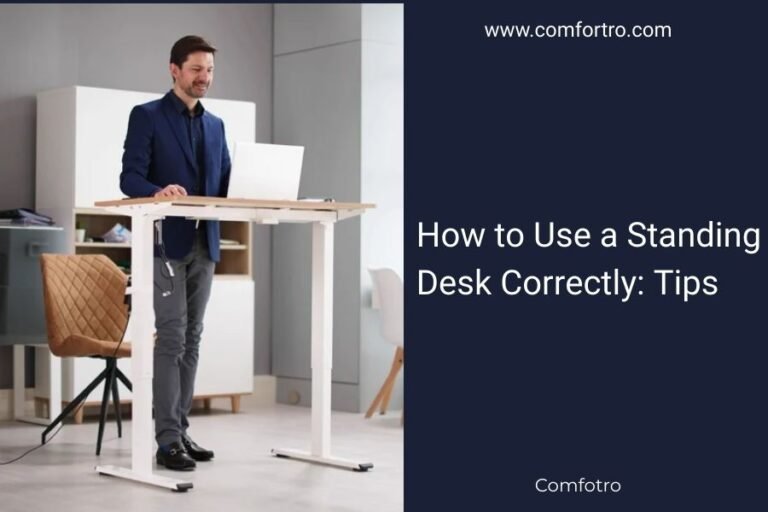
When standing, maintain the same elbow angle. Your monitor should still be at eye level. This promotes a neutral spine position.
Monitor Placement: Eyes Forward, Neck Happy
Your monitor should be about an arm’s length away. The top of the screen should be at or slightly below eye level. This keeps your head in a natural, neutral position.
If you use multiple monitors, place your primary monitor directly in front of you. Angle secondary monitors slightly inward. Avoid constantly turning your head.
Your Corner Desk Checklist for a Pain-Free Day
Before you commit to a purchase, run through this quick checklist. It will help ensure you’re getting a desk that truly supports your health.
- Is it an adjustable standing desk (electric preferred)?
- Does it have enough surface area for all your gear?
- Is it sturdy and stable at all heights?
- Does it fit well in your corner space?
- Does it have memory presets for easy adjustments?
Remember, this desk is an investment in your well-being. Take your time, do your research, and choose wisely. Your back and neck will thank you.
Conclusion
Choosing the right corner desk is more than just a furniture decision; it’s an investment in your daily comfort and long-term health. We’ve seen that an adjustable standing desk, with ample space and ergonomic design, is your best ally against back and neck pain. Prioritizing features like electric height adjustment and sufficient desktop area will make a significant difference. Remember, setting up your desk correctly, following guidelines like the 90-90-90 rule, is just as important as the desk itself. Your well-being at work depends on these thoughtful choices.
Start your search today, keeping these key features in mind. Your back and neck will thank you for making an informed decision.
Frequently Asked Questions
How often should I switch between sitting and standing at my corner desk?
Experts generally recommend changing positions every 30 to 60 minutes. This could mean sitting for 30 minutes, then standing for 30 minutes, or even just making minor adjustments. Regular movement helps prevent stiffness and reduces spinal pressure.
Can a corner desk really help with existing chronic back pain?
Yes, an ergonomically designed corner desk, especially an adjustable standing one, can significantly help. By allowing you to frequently change posture and maintain proper alignment, it can alleviate pressure points. This helps manage and reduce chronic back and neck pain over time.
What if I can’t afford an electric adjustable corner desk? Are there other options?
Absolutely. If an electric desk is out of budget, consider a manual crank or pneumatic adjustable desk. Desktop converters that turn a fixed desk into a standing one are also a great alternative. The key is still the ability to change your working position.
Do I need special accessories for my ergonomic corner desk?
While not strictly necessary, some accessories can enhance comfort. Consider an ergonomic chair with good lumbar support, a monitor arm for precise placement, or a keyboard tray to maintain proper wrist angles. A comfortable anti-fatigue mat can also be beneficial when standing.
How do I know if my corner desk setup is truly ergonomic for my body?
Pay attention to how you feel at the end of the day. You should experience less strain, not more. Check that your elbows, hips, and knees are all at roughly 90-degree angles when sitting. Your monitor should be at eye level, and your head should be in a neutral position.