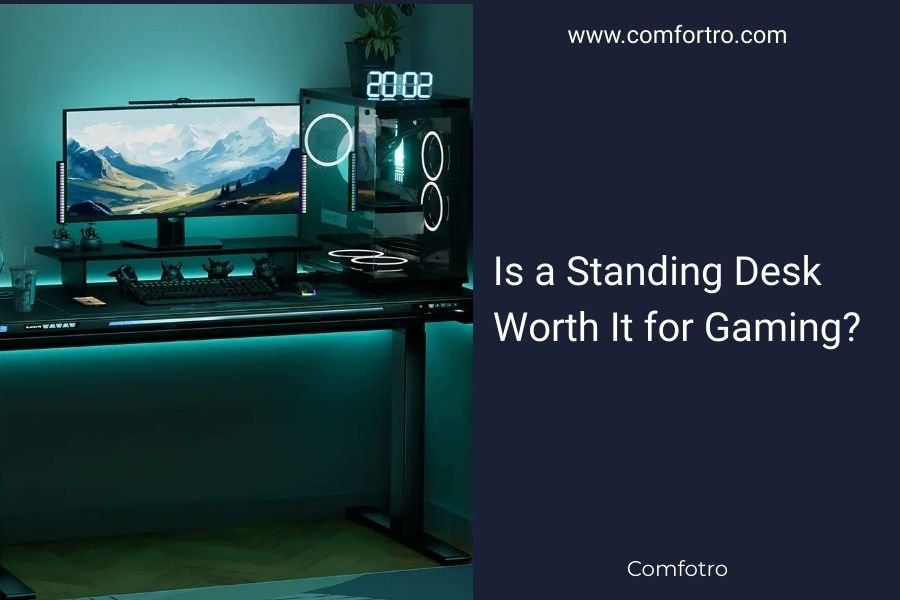
Standing desks can be worth it for gaming if you prioritize health benefits and don’t mind adjusting to new comfort levels during long gaming sessions.
Gaming at a standing desk offers better posture and circulation, but may initially cause fatigue and requires proper setup for optimal comfort.
What Makes Standing Desks Different for Gaming
Gaming puts unique demands on your workspace that regular office work doesn’t. You need quick reflexes, steady hands, and comfort during those marathon gaming sessions.
Unlike typing emails or browsing spreadsheets, gaming requires precise movements and split-second reactions. Your desk setup directly affects your performance.
The Gaming Challenge
When you’re deep in a competitive match, the last thing you want is discomfort breaking your focus. Standing desks change how you interact with your setup completely.
Your monitor height, keyboard position, and mouse placement all shift when you go from sitting to standing. Getting these right takes time and adjustment.
Health Benefits of Standing While Gaming
Research shows that prolonged sitting increases risks of back pain, poor circulation, and muscle weakness. Gaming sessions often stretch for hours, making these concerns real.
Better Posture Support
Standing naturally engages your core muscles and keeps your spine aligned. You avoid the slouched position that comes with long gaming sessions in chairs.
Many physical therapists recommend standing as a way to reduce lower back strain. Your body stays more active even during intense gaming moments.
Improved Blood Flow
Standing keeps blood moving through your legs and reduces the pooling that happens when sitting. This means less stiffness and better alertness during gaming.
Better circulation also helps with focus and reaction times. Your brain gets more oxygen, which can actually improve your gaming performance.
Calorie Burning Advantage
You burn roughly 50 more calories per hour standing versus sitting. Over a long gaming session, this adds up to meaningful activity.
It’s not a workout replacement, but standing gaming does keep your metabolism slightly more active than traditional seated gaming.
Potential Drawbacks for Gamers
Standing desks aren’t perfect for gaming. You’ll face some real challenges that sitting gamers don’t deal with.
Fatigue During Long Sessions
Your legs and feet will get tired, especially when you’re new to standing. This fatigue can hurt your gaming performance when it matters most.
Most people need weeks to build up standing stamina. During this adjustment period, you might find yourself more distracted by physical discomfort.
Stability and Precision Issues
Standing can make precise mouse movements slightly harder. Your body naturally sways a bit, which can affect aim in first-person shooters.
Professional esports players typically use seated setups for maximum stability. If competitive gaming is your focus, this matters.
Setup Complexity
Getting everything at the right height takes more work with standing desks. You need proper monitor positioning, keyboard angles, and footrest placement.
The learning curve is steeper than just plopping down in a gaming chair and starting to play.
Essential Features for Gaming Standing Desks
Not every standing desk works well for gaming. You need specific features to make the experience worthwhile.
Height Adjustability Range
Your desk should adjust from standard sitting height (around 28-30 inches) to proper standing height for your build. Most people need desks that go up to at least 48 inches.
Electric vs Manual Adjustment
Electric desks let you switch between sitting and standing quickly between gaming sessions. Manual cranks work but take more effort to adjust.
Stability at Full Height
Gaming involves quick movements and sometimes enthusiastic reactions. Your desk needs to stay rock-solid even when fully extended.
Look for desks with wobble ratings under 1 inch at maximum height. Anything more will affect your gaming accuracy.
Desktop Size Considerations
Gaming setups need space for multiple monitors, speakers, and accessories. Plan for at least 48 inches wide and 30 inches deep.
You also want room for your arms to move freely without hitting desk edges during intense gaming moments.
Ergonomic Setup Tips
Getting your standing gaming setup right makes the difference between success and frustration.
Monitor Positioning
Your screen’s top should be at or slightly below eye level when standing. This prevents neck strain during long gaming sessions.
Position monitors about arm’s length away. You should be able to touch the screen with your fingertips when your arm is extended.
Multiple Monitor Arrangements
Angle side monitors slightly inward to create a natural viewing curve. Keep your primary gaming monitor directly in front of you.
Keyboard and Mouse Setup
Your elbows should hang naturally at your sides with forearms parallel to the floor. This usually puts your hands about 42-46 inches off the ground.
Some gamers need keyboard trays to get the perfect height. Don’t compromise on comfort for the sake of simplicity.
Foot Support and Comfort
Anti-fatigue mats reduce leg strain significantly. Look for mats with slight cushioning but firm support.
A footrest lets you shift weight and change positions throughout your gaming session. This prevents muscle fatigue.
Gaming Performance Impact
Standing affects different types of gaming in various ways. Your mileage will vary depending on what you play.
Competitive Gaming Considerations
Fast-paced competitive games might suffer initially while you adjust to standing. Your muscle memory needs time to adapt to the new position.
However, some gamers report better alertness and faster reactions once they’re used to standing. The improved circulation might help with focus.
Reaction Time Changes
Early research suggests standing can improve reaction times due to better blood flow and increased alertness. But this varies between individuals.
Casual Gaming Benefits
Story-driven games, strategy games, and casual gaming work great with standing desks. These don’t require pixel-perfect precision.
You can enjoy longer gaming sessions without the back pain that comes from slouching in chairs for hours.
Cost-Benefit Analysis
Standing desks range from $300 for basic models to over $1500 for premium gaming-focused options.
| Price Range | Features | Best For |
|---|---|---|
| $300-500 | Manual adjustment, basic stability | Casual gamers, budget builds |
| $500-800 | Electric adjustment, better stability | Regular gamers, mixed use |
| $800-1500+ | Premium stability, memory presets, large surfaces | Serious gamers, professional setups |
Return on Investment
If you game more than 2 hours daily, the health benefits alone might justify the cost. Avoiding back pain and improving posture has long-term value.
Compare the desk cost to what you’d spend on ergonomic chairs, physical therapy, or other health-related expenses down the road.
Alternatives to Consider
Full standing desks aren’t your only option for healthier gaming.
Desk Converters
These sit on top of your existing desk and convert it to standing height. They’re cheaper but offer less stability for gaming.
Sit-Stand Combinations
Many gamers use adjustable desks to alternate between sitting and standing throughout their gaming sessions. This gives you the best of both worlds.
Timing Your Transitions
Try standing during less competitive moments like loading screens, menus, or story cutscenes. Switch to sitting for intense competitive matches.
Who Should Consider Standing Desks for Gaming
Standing gaming desks work best for specific types of gamers and situations.
Ideal Candidates
- Gamers with existing back pain or posture issues
- People who game 3+ hours at a time regularly
- Casual and strategy gamers who don’t need pixel-perfect precision
- Gamers willing to invest time in proper setup and adjustment
Who Should Skip Them
- Competitive esports players who prioritize stability above all
- Gamers on tight budgets who’d rather spend money on hardware
- People with foot or leg conditions that make standing difficult
- Gamers who prefer the “settled in” feeling of chair gaming
Conclusion
Standing desks can be worth it for gaming, but they’re not right for everyone. If you prioritize health benefits and don’t mind an adjustment period, they offer real advantages for long gaming sessions.
The key is realistic expectations and proper setup. You won’t become a better gamer overnight, but you might avoid the aches and pains that come with hours of seated gaming.
Start with your specific needs. Do you have back pain? Game for hours daily? Prefer casual over competitive gaming? These factors matter more than following trends.
Remember that the best gaming setup is one you’ll actually use consistently. If standing desks fit your style and budget, they can be a solid investment in your long-term gaming comfort.
Is it harder to aim accurately while gaming at a standing desk?
Initially yes, but most gamers adapt within 2-3 weeks. Standing can cause slight body sway that affects precision, but proper footwear and anti-fatigue mats help minimize this. Competitive players often stick with sitting for maximum stability.
How long should I stand while gaming before taking breaks?
Start with 30-45 minute standing periods and gradually increase. Most people can comfortably stand for 1-2 hours once adjusted. Listen to your body and sit when you feel leg fatigue affecting your gaming performance.
Do I need special accessories for standing desk gaming?
An anti-fatigue mat is almost essential for comfort. A footrest helps reduce strain, and you might need a keyboard tray to get proper ergonomics. Good supportive shoes also make a significant difference during long gaming sessions.
Can standing desk gaming actually improve my reaction times?
Some research suggests better circulation from standing can improve alertness and reaction times, but results vary by individual. You’re more likely to see benefits in sustained attention rather than raw reaction speed, especially during longer gaming sessions.
What’s the minimum desk height range needed for gaming?
Your standing desk should adjust from about 28 inches (standard sitting height) to at least 45-50 inches for most people. Taller gamers may need desks that go up to 52+ inches to maintain proper ergonomics while standing.