9 Best Computer Desks with Hutches (November 2026)
The best computer desks with hutches include the Aquzee Computer Desk with Shelves for balanced storage, the Lufeiya Computer Desk with File Drawers Cabinet for file storage, and the DLisiting White Computer Desk with Hutch for built-in charging.
On this page (4 sections)
The best computer desk with hutch for most home offices is the Aquzee Computer Desk with Shelves. It combines a 47 in work surface with 3 wide upper shelves, an under-desk bookshelf and a metal frame, so you get storage without adding a separate bookcase.
This is a strong starting point for a home office or study room because the storage sits where you use it every day. The wide upper shelves can hold books and supplies, while the desktop stays free for a laptop, monitor and writing work.
Choose Lufeiya if your main need is file storage. Choose DLisiting or SEDETA if built-in outlets matter, and choose the 55 in Aquzee when you have more wall space.
Other options on this list suit different priorities, from drawers and cabinets to a large shared layout. The right choice depends on whether you want open display space, hidden storage, charging or a deeper desktop.
A hutch adds above-desk storage to a complete computer workstation. It can lift books, plants and small supplies off the main surface, which helps in a compact room.
Before you choose, measure the wall, check the desk depth, plan cable paths and decide whether open shelves or drawers will keep your supplies easier to manage. Height matters too, so check that a tall hutch will fit under shelves, windows or low ceilings.
Think about your chair as well as the desk. You need room to sit, stand if you use a tall chair, and open any drawers or cabinet doors without bumping the wall.
If you want more shelf space without focusing on a hutch, compare these best computer desks with shelves. For a taller user, see our guide to the Best Desk With Hutch For Tall People.
Our picks at a glance
-
1

-
2
 Best for file storage
Lufeiya Computer Desk with File Drawers Cabinet
9.6/10 our score
See it on Amazon -
3
 Best for built-in charging
DLisiting White Computer Desk with Hutch
9.6/10 our score
See it on Amazon
- 4
 Check it
SEDETA Farmhouse Computer Desk with Hutch
Best for farmhouse storage - 5
 Best for a wide desktopCheck it
- 6
 Check it
Aquzee Computer Desk with Hutch and Bookshelves
Best for open book storage - 7
 Check it
Sauder Harbor View Home Office Computer Desk
Best for classic enclosed storage - 8
 Check it
SEDETA L Shaped Computer Desk with Hutch
Best for large shared workspaces - 9
 Check it
YOMILUVE 52" Computer Desk with Bookshelf
Best for reversible small-space storage
The best computer desks with hutches for different workspaces
The Aquzee Computer Desk with Shelves is the strongest all-around choice because it gives you wide open storage, a useful work surface and a frame rated for up to 500 lb. The other desks stand out for files, charging, drawers, classic storage or larger layouts.
We compared the stated dimensions, storage parts, materials, power features and assembly notes against the needs of a home computer workstation. Our score weighs specs, features and buyer feedback against what you're shopping for.
Aquzee Computer Desk with Shelves: Best for balanced storage
- 47 in wide desk
- 3 storage shelves
- 23.6 in depth
- Metal frame
Three 47 in wide shelves add upper storage without requiring a separate bookcase. The 23.6 in deep work surface gives a practical place for a laptop, monitor, books and office supplies.
Pros
- 3 wide storage shelves
- 500 lb support claim
- Adjustable leg studs
Cons
- No drawers
- Requires assembly
The Aquzee Computer Desk with Shelves suits a home office or study room where books and supplies need to stay visible. Its 47.2 in wide desk and 23.6 in depth give you room for a laptop, monitor, books and writing materials.
The hutch has 3 storage shelves, each stated as 47 in wide and 6 in deep. That layout works well for lighter items such as notebooks, office supplies, plants and decor.
The desktop uses 0.6 in thick FSC-certified engineered wood, while the frame uses 1.18 in wide metal. Aquzee states that the frame can support up to 500 lb, and adjustable leg studs help level the desk on uneven floors.
There are no drawers, so choose baskets or small organizers if you need hidden storage. Assembly takes about 20 minutes for most users and is recommended for 2 people.
For daily care, wipe the surface with a soft, lightly damp cloth and dry it after cleaning. Keep the shelves for items you can reach easily, and save the desktop for your main computer setup.
This desk suits adults and teens who want a tidy, open workstation without a separate bookcase. It is less suited to paperwork that needs a file drawer or a locked cabinet.
Lufeiya Computer Desk with File Drawers Cabinet: Best for file storage
- 47 in desk
- 3 fabric drawers
- Reversible cabinet
- Legal and letter file drawer
The reversible cabinet can sit on either side, and its adjustable file drawer holds legal or letter files. This is a strong fit when paperwork matters more than upper hutch shelves.
Pros
- Reversible storage cabinet
- 3 fabric drawers
- About 20 minute assembly
Cons
- No upper hutch
- Shallower desktop
The Lufeiya Computer Desk with File Drawers Cabinet is the better match when documents are central to your work. Its 46.6 in wide desktop is 19.7 in deep, so it uses less front-to-back space than the Aquzee desks.
The reversible cabinet can sit on the left or right. It includes 3 fabric drawers, with an adjustable file drawer sized for legal or letter files and 2 smaller drawers for office supplies.
For paperwork you want secured, compare desks with locking drawers.
The P2 particle wood desktop has a scratch-resistant, anti-collision and waterproof surface. For solid wood options with drawer storage, see solid wood desks with drawers.
A black metal frame, fixed steel brackets and adjustable leg pads help keep the desktop level.
This desk has no upper hutch, so it is best for buyers who prefer lower file storage to above-desk shelves. Assembly takes about 20 minutes, with instructions and a tool included.
DLisiting White Computer Desk with Hutch: Best for built-in charging
- 47.2 in desk
- 3 fabric drawers
- 3 AC outlets
- 2 USB ports
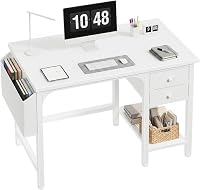
Built-in charging gives this white desk a useful role in a bedroom or compact home office. The hutch and 3 fabric drawers keep books, documents and small supplies close to the work surface.
Pros
- 3 AC outlets and 2 USB ports
- Hutch storage
- 3 fabric drawers
Cons
- Shallow 18.9 in depth
- Power feature needs careful cable planning
The DLisiting White Computer Desk with Hutch is the strongest choice for a compact workstation that needs charging close to the desktop. It measures 47.2 in wide, 18.9 in deep and 56.1 in high with the hutch.
Three AC outlets and 2 USB ports are built into the desk. Plan cable routes before assembly so the power strip works with your monitor, laptop, phone or other devices without crossing the main writing area.
The desk also has 3 fabric drawers and hutch storage for books, documents and personal items. Its thick P2 particle wood surface is described as scratch-resistant, anti-collision and waterproof.
The shallow 18.9 in depth saves floor space, but it gives you less room front to back for a large monitor and keyboard. Assembly takes about 20 minutes for most users.
This layout suits a bedroom, student room or small home office where floor space is tight. It also suits remote work, because charging stays near the desk instead of reaching across the floor.
Keep heavier items low and use the hutch for books, documents and small personal items. Wipe the surface with a soft cloth and avoid leaving water sitting on the finish.
SEDETA Farmhouse Computer Desk with Hutch: Best for farmhouse storage
- 47.2 in desktop
- 3 drawers
- Storage cabinet
- 4 AC outlets and 2 USB ports
The farmhouse-style desk combines a hutch, storage cabinet and 3 drawers for a more enclosed workstation. Its outlet strip helps charge a phone, tablet, printer or gaming gear.
Pros
- 3 file sizes supported
- 4 AC outlets and 2 USB ports
- 1.2 in thick tabletop
Cons
- More involved storage layout
- White finish may need careful room matching
The SEDETA Farmhouse Computer Desk with Hutch fits a home office that needs drawers, a cabinet and charging in one furniture piece. Its desktop is 47.2 in long and 21.7 in wide.
The storage system includes a hutch, 3 drawers and a cabinet. The file drawer can hold legal, letter and A4 files, while the box drawer can hold smaller home or office items.
Four AC outlets and 2 USB charging ports support phones, tablets, printers or gaming gear. The white engineered wood desk has a farmhouse finish and a 1.2 in thick tabletop.
This is a better match for enclosed storage than for a minimalist setup. Loosen the screws first during assembly, level the tabletop, then tighten the screws after the parts are aligned.
The enclosed layout helps if cables, files and small items would otherwise clutter open shelves. It also suits a room where you want a more finished, traditional look.
Plan the drawer and cabinet opening space before you place the desk against a wall. Leave enough clearance so drawers pull out fully and the cabinet door can open without hitting your chair.
Aquzee Desk with Hutch: Best for a wide desktop
- 55 in wide desk
- Open hutch and bookshelf
- 23.6 in depth
- 500 lb support claim
The 55 in width gives monitors, books and writing materials more room than the smaller Aquzee desk. Open shelves keep items visible, but the desk has no drawers.
Pros
- Widest standard desktop here
- Open upper and lower storage
- Adjustable leg studs
Cons
- Needs more wall space
- No drawers
The Aquzee Desk with Hutch is best when you want a wider desktop for more than one screen or for work that spreads across books and papers. Its 55 in width is the largest standard desktop among the straight desks here.
The desk is 23.6 in deep and 65 in high. An open hutch and bookshelf provide visible storage, while the 0.6 in thick FSC-certified engineered wood top pairs with a 1.18 in wide metal frame.
Aquzee states that the frame can support up to 500 lb. Adjustable leg studs help balance the desk on uneven surfaces.
There are no drawers, so this desk favors open organization. Confirm that your wall can handle the 55 in width and that the 65 in height works with shelves, windows or other furniture.
The extra width can help with a larger monitor, a notebook and a keyboard at the same time. It also gives you room to spread out study materials without pushing supplies onto the shelves.
Use the upper hutch for books and items you use often, and keep the desktop clear for active work. Wipe the top with a soft, lightly damp cloth and dry it after cleaning.
Aquzee Computer Desk with Hutch and Bookshelves: Best for open book storage
- 47 in wide desk
- 2-tier upper rack
- Under-desk bookcase
- 500 lb support claim
Two upper storage tiers and an under-desk bookcase create a clear place for books, papers, plants and decor. The layout suits buyers who prefer visible storage over drawers.
Pros
- Large leg room
- Open storage on 3 levels
- Scratch-resistant surface
Cons
- No drawers
- Assembly may take 20 to 30 minutes
The Aquzee Computer Desk with Hutch and Bookshelves works for buyers who want books and decor within reach at several levels. The 47 in wide desk is 23.62 in deep and 64.96 in high.
Its 2-tier upper rack and under-desktop bookcase create open storage for books, papers, plants, craft supplies and family photos. The large leg room also leaves more space beneath the desktop than a cabinet-style desk.
The 0.7 in FSC-certified wood desktop is described as waterproof and scratch-resistant. The heavy-duty metal frame is 1.18 in by 1.18 in, and Aquzee states that it supports up to 500 lb.
This desk has no drawers, so use labeled bins if loose items would make the shelves look crowded. Assembly takes about 20 to 30 minutes with the instructions or assembly video.
The open layout suits study, work and craft use where you want supplies visible. It is a good fit for a home office or study room that needs storage at several heights.
Keep the most used items at desk level and place lighter decor higher up. Wipe the surface with a soft cloth and check the leg studs if the desk feels uneven after a move.
Sauder Harbor View Home Office Computer Desk: Best for classic enclosed storage
- Hutch
- Keyboard tray
- 2 small drawers
- Salt Oak finish
The Salt Oak desk uses a slide-out keyboard shelf, drawers and hutch storage for a more traditional home office layout. Choose it when enclosed organization matters more than a metal frame.
Pros
- Slide-out keyboard shelf
- File drawer
- Salt Oak finish
Cons
- Exact overall dimensions are not stated here
- Assembly needs a screwdriver and hammer
The Sauder Harbor View Home Office Computer Desk suits a traditional room where a hutch, keyboard shelf and enclosed storage matter more than a modern metal frame. For a related traditional desk style, see drop-front secretary desks.
Its Salt Oak finish adds a warm look to a home office, study or living room corner.
A slide-out keyboard shelf keeps the keyboard and mouse below the main desktop when you need more writing room. The desk also has 2 small drawers, a file drawer, cubbyhole storage and vertical hutch storage.
The engineered wood construction uses a cam lock or cam bolt frame joint. Assembly instructions and hardware are included, and the recommended tools are a screwdriver and hammer.
The exact overall dimensions are not stated here, so measure your intended space before ordering. Choose this desk when its classic storage layout fits your room better than open shelving.
SEDETA L Shaped Computer Desk with Hutch: Best for large shared workspaces
- 66.1 in L-shaped desk
- Convertible 94.5 in layout
- 7 open shelves
- 3 fabric drawers
The convertible layout can work as an L-shaped workstation or a 94.5 in straight desk for 2 people. Seven shelves, a pegboard and 3 drawers give it the most varied storage system here.
Pros
- Convertible layout
- 7 open shelves
- 2 outlets and 2 USB ports
Cons
- Largest footprint
- More parts to assemble
The SEDETA L Shaped Computer Desk with Hutch is the pick for a large workstation, a shared desk or a room that needs a convertible layout. The L-shaped desktop measures 66.1 in by 47.2 in and can convert into a 94.5 in straight desk.
The storage system includes 7 open shelves, 3 fabric drawers, 1 pegboard, a CPU stand and a hutch. The file drawer holds legal, letter and A4 files, while the 2 box drawers hold smaller items.
A built-in power strip has 2 outlets and 2 USB ports. The desk also includes an RGB LED light strip with remote control through an app, more than 60,000 colors and 29 flashing modes.
This is the most complex layout here, so measure the entire L-shaped footprint and plan the assembly area first. For a gaming-focused comparison, see the Best Computer Desk For Gaming.
YOMILUVE 52" Computer Desk with Bookshelf: Best for reversible small-space storage
- 52 in desk
- Reversible bookshelf
- 3 fabric drawers
- Printer space
The reversible tree-shaped bookshelf and printer shelf can move to either side. Three drawers and 2-layer open shelves add storage without making the desk deeper than 18.9 in.
Pros
- Reversible layout
- Printer space
- 3 fabric drawers
Cons
- Shallow desktop
- Engineered wood construction
The YOMILUVE 52" Computer Desk with Bookshelf is a good fit for a narrow room that still needs a printer area and drawers. It measures 52 in wide, 18.9 in deep and 59 in high.
The reversible tree-shaped bookshelf and printer stand can sit on either side. Two open storage shelves, 3 fabric drawers and the separate bookshelf give you places for books, files, magazines, documents and small office items.
The engineered wood desk has a rustic brown finish. Its 29 in minimum height and 59 in maximum height describe the stated desk range, while the freestanding design lets you set the storage side around your room.
The shallow depth saves floor space but leaves less room for a large monitor setup. Measure your monitor stand and keyboard together before choosing this desk.
The reversible side is useful if a door, window or bed limits where storage can go. Test both sides on paper first, then choose the layout that leaves your chair and walking path clear.
This desk suits a small bedroom or home office where a printer needs a set place. Use the drawers for small supplies and keep the open shelves for books and items you reach for often.
How to choose a computer desk with hutch
The best computer desk with hutch depends first on the space available. Measure the wall width, desk depth, finished height and chair clearance, then compare those numbers with the desk dimensions.
Should you choose open shelves or drawers?
Open shelves work best when you want books, plants and supplies visible and easy to reach. Drawers and cabinets are better for paperwork, cables and smaller items that make an open workstation look crowded.
The Aquzee desks focus on open shelves. Lufeiya, DLisiting, SEDETA and YOMILUVE add drawers or cabinet storage.
If you specifically want both upper storage and drawers, compare these best desks with hutches and drawers.
How much desk depth do you need?
A desk depth of about 23.6 in gives more front-to-back room for a monitor, keyboard and notebook. The 18.9 in desks save floor space but require more careful placement.
Put the monitor toward the back, leave enough room for your keyboard and keep frequently used supplies within reach. Measure your own equipment rather than choosing by width alone.
Do built-in outlets matter?
Built-in outlets can reduce cable reach, but they also need a clear power plan. DLisiting has 3 AC outlets and 2 USB ports, while SEDETA has 4 AC outlets and 2 USB ports.
SEDETA's L-shaped desk has 2 outlets and 2 USB ports. Keep power cords away from chair wheels and walkways, and follow the desk's assembly instructions for routing.
Is a hutch useful for a gaming setup?
A hutch can hold books, speakers, decor and smaller gaming supplies while leaving the desktop available for a monitor and keyboard. It does not replace a purpose-built gaming layout when you need a large mouse area or multiple screens.
For gaming, desk depth and legroom matter as much as storage. You need space for a keyboard, mouse and chair movement without the hutch shelves crowding your view.
The SEDETA L-shaped desk offers the most gaming-oriented storage here, including a CPU stand, pegboard, power strip and RGB LED light strip. Compare it with our guide to the Best Computer Desk For Tall People if desk height and legroom are your main concerns.
A pegboard can keep controllers or cables off the desk, while a CPU stand can lift a tower off the floor. Open shelves can hold games, figures and collectibles, but keep items you grab mid-session within easy reach.
Check the total height before you add speakers or decor to upper shelves. A tall hutch can block light or make a small room feel crowded if it is placed too close to the chair.
If you mainly play on a laptop, a shallower desk may be enough. If you use a desktop PC and a large monitor, measure the full setup before you choose a hutch layout.
How to set up and care for a desk with hutch
Assemble the frame on a clear floor and sort the parts before tightening screws. For desks with a tall hutch, check that the desktop is level before loading the shelves.
Use the upper shelves for items that are easy to lift and often used. Keep bulky equipment on the desktop or lower storage unless the instructions for your desk say otherwise.
Wipe engineered wood and particle wood surfaces with a soft, lightly damp cloth, then dry them. Avoid placing wet items on the desk even when the surface is described as waterproof.
Leave space for the chair to move and for drawers or cabinet doors to open fully. Recheck the leg pads if the desk rocks after moving it.
Sort hardware and panels first so you do not have to lift the desk once it is partly built. A second person can help hold a tall hutch steady while you tighten the frame.
Load shelves gradually and keep the weight spread across the desk. Place books and heavier items lower, and save the top shelves for light supplies and decor.
Plan cables before you push the desk into place. Route cords behind the desk or along the back edge so they stay clear of chair wheels and walkways.
Check the finished height against shelves, curtains and ceiling lights. A tall hutch needs clear space above it as well as room for you to stand and reach the top shelves.
If the desk has drawers, test that each one opens fully in its final position. Move the desk a little if a drawer hits a wall or a cabinet door hits your chair.
Clean spills quickly and avoid abrasive cleaners on finished wood surfaces. A soft cloth and mild cleaning are usually enough to keep the top looking tidy.
Verdict: which computer desk with hutch should you buy?
The Aquzee Computer Desk with Shelves is the best computer desk with hutch for most buyers because it balances a 47 in workspace, 3 wide upper shelves and a metal frame.
Pick Lufeiya for reversible file storage, DLisiting for built-in charging in a shallow desk, SEDETA for farmhouse-style drawers and outlets, and the 55 in Aquzee for more desktop room. Choose the SEDETA L-shaped model when you need a shared or convertible workstation.
If you want open shelves for books and decor, the Aquzee models are the clearest match. If you want hidden storage for files and small items, look at the desks with drawers or a cabinet.
Measure your wall, desk depth and chair space before you order any of them. A desk that fits the room will feel easier to use every day than a larger desk that crowds the space.
For students who need compact storage, compare the Best Desk With Hutch For Students before choosing a final layout. Students often need a shallow desk, a place for books and a clear writing surface.
Choose the Aquzee 47 in model if you want the most balanced mix of storage and work space. Choose a drawered model if paperwork matters more than display space.
Choose the L-shaped SEDETA if two people need to share a workstation or if you want a layout that can change. Check the full footprint first, because it needs more floor space than the straight desks.
In short, match the desk to the work you do most. Open shelves suit visible storage, drawers suit files and supplies, and built-in outlets suit charging heavy setups.
Our top 3 picks at a glance
-
1
-
2
Best for file storage
Lufeiya Computer Desk with File Drawers Cabinet
9.6/10 our score
See it on Amazon -
3
Best for built-in charging
DLisiting White Computer Desk with Hutch
9.6/10 our score
See it on Amazon
Frequently asked questions
What is the best computer desk with hutch for a small room?
The best computer desk with hutch for a small room should match both wall width and depth. The DLisiting desk is 47.2 in wide and 18.9 in deep, while the YOMILUVE desk is 52 in wide and 18.9 in deep.
Measure chair clearance and walking space before choosing.
Are computer desks with hutches good for monitors?
Yes, a computer desk with hutch can hold a monitor on the desktop while upper shelves store books, speakers or supplies. Check the desk depth and keep the screen at a comfortable viewing position.
The Aquzee desks offer 23.6 in of stated depth, giving more front-to-back room than the 18.9 in models.
What should go in a computer desk hutch?
Use a computer desk hutch for items you want close but off the main work surface, such as books, documents, plants and office supplies. Keep heavy equipment on the desktop or lower storage unless the desk instructions state otherwise.
Open shelves also make frequently used items easier to reach.
Do computer desks with hutches need to be anchored?
Follow the assembly and safety instructions for your exact desk. A tall hutch should sit level on a suitable surface, and the desk should have enough clearance for drawers, doors and chair movement.
Check the finished height before placing it under shelves, windows or low ceilings.