Label Maker vs Label Printer: Which Should You Choose? (November 2026)
Choose a label maker for small organized labels and a label printer for larger, faster production. The right choice depends on label size, device support, printing volume and where you work.
On this page (10 sections)
- Label maker vs label printer: what is the main difference?
- Should you choose a label maker for home organization?
- Is a label maker a printer for office work?
- When is a label printer better for shipping?
- Do label makers use ink?
- Which label maker is easiest to use?
- What label size should you choose?
- What should you check before buying?
- Which device should you choose?
- Which label maker vs label printer is right for you?
Choose a label maker for small organization labels and a label printer for larger, repeated output. In this label maker vs label printer comparison, label size, connection method and printing volume matter more than the names used for the devices.
A label maker and printer both produce adhesive labels, but they serve different daily jobs. Pocket models fit drawers, classrooms and supply bags, while desktop thermal printers are better for shipping, warehouse and small-business workflows.
The 4 products below show the split clearly. The Phomemo D30 and Nelko P21 are compact Bluetooth label makers, while the JADENS and NULLTONEX are desktop thermal label printers built around wider labels.
 Best for portable label design
Phomemo D30 Label Maker Machine with Tape
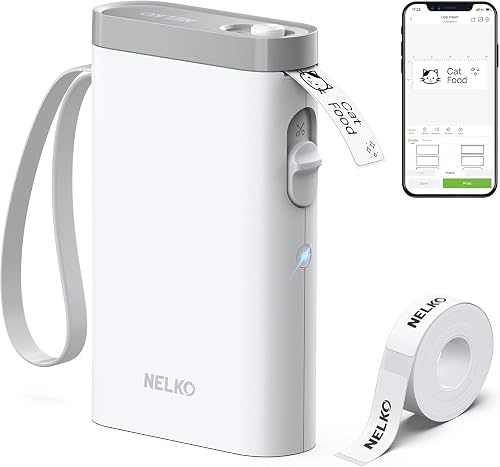 Best for fixed-size organization labels
Nelko P21 Label Maker Machine with Tape
Label maker vs label printer: what is the main difference?
A label maker is usually the better fit for short, small labels, while a label printer is better for wider media and repeated batches. The best choice depends on what you label most often.
A compact label maker may sit in a drawer and connect to a phone when needed. It can handle pantry bins, school supplies, folders, cables and small business tags without requiring a permanent desk setup.
A desktop label printer takes more space but supports larger label widths and a more regular workflow. That makes it useful for shipping labels, addresses, barcodes and orders that need to be produced in batches.
The category names can overlap. The key question is not whether a device is called a label maker or printer, but whether its media, connection method and output match your work.
Should you choose a label maker for home organization?
Choose a label maker for home organization when you need compact labels for bins, containers, folders and personal items. A phone-controlled model can be easy to store and use in different rooms.
The Phomemo D30 supports both continuous label tapes and fixed-length labels. Its Bluetooth connection, rechargeable battery and 160 g weight make it suitable for moving between a kitchen, office, classroom or craft area.
The Nelko P21 also targets home and school organization, but its fixed-length labels are the main format. It supports sizes including 14 x 40 mm, 14 x 50 mm and 14 x 75 mm, so it suits repeatable small tags rather than custom-length strips.
For more ideas on tape formats and household use, see our guide to the best label maker for home organization.
Phomemo D30 vs Nelko P21 for daily labels
Pick the Phomemo D30 for more flexible tape formats, and pick the Nelko P21 for a simpler fixed-length workflow. Both print black text through direct thermal technology and connect to mobile devices.
The D30 app includes tools for icons, borders, fonts, templates, barcodes, QR codes, images, timestamps, batch data and document scanning. The P21 app includes templates, icons, borders, materials, images, time and barcode tools across 29 languages.
The D30 works with smartphones and tablets through Bluetooth. The P21 works with iOS and Android phones, but it does not work with computers.
The P21 includes a roll of white label paper and a Type C charging cord. The D30 includes the label maker, a charging cord and a user manual, with 80 pre-cut 12 x 40 mm white labels described for the package.
Is a label maker a printer for office work?
Yes, a label maker is a printer, but its design may limit the type and amount of office labeling it can handle. Compact models work well for file codes, notebook tags, storage bins and small equipment marks.
If you only label a few folders or cables at a time, a pocket device may be more convenient than a desktop printer. The D30 and P21 both use app-based control, so you can design labels from a phone instead of typing on a built-in keyboard.
For a wider office workflow, compare the device with other equipment in our desktop printers buying guide. A general printer may be better when you also need regular documents, while a label printer keeps adhesive-label work separate.
For larger color documents, compare color laser printers for 11x17 paper.
The P21 has an important limitation for office buyers: it does not work with computers. The D30 supports smartphones and tablets, but its listed control method is also an app.
When is a label printer better for shipping?
Choose a desktop label printer when you need standard 4 x 6 shipping labels, computer connections or repeated batches. These features reduce the need to resize small labels for packages.
The JADENS supports 4 x 6 media and label widths from 1.57 to 4.1 inches. It works with roll and fanfold labels, connects by USB to Windows and Mac computers, and supports wireless printing for Windows 8 or later and Mac.
The NULLTONEX supports standard 4 x 6 labels and other sizes from 1.57 to 4.3 inches wide. It connects to laptops, Mac, PCs, smartphones and tablets through Bluetooth or USB, with the FlashLabel Pro app available for wireless printing.
Both use 203 DPI direct thermal printing and produce black-and-white output. That is suitable for addresses, barcodes and text, but neither should be treated as a color shipping printer.
JADENS vs NULLTONEX for a small business
Choose the JADENS for a shipping setup centered on roll or fanfold labels, and choose the NULLTONEX when device flexibility and batch output matter more. Both are desktop tools rather than pocket label makers.
The JADENS includes the printer, power cord, USB cable, user manual and 50 test labels. Its stated uses include shipping platforms such as Amazon, Shopify, eBay, ShipStation and Shippo.
The NULLTONEX includes the printer, power cord, USB cable, 25 sheets of 4 x 6 thermal labels, a flash drive and a USB A to C adapter. Its app includes 1,800 or more templates and 300 or more fonts, and it can store templates and designs locally.
The NULLTONEX lists up to 100 copies per run and up to 72 labels per minute. The JADENS also lists 72 pages per minute in its specifications, but actual output depends on the label format, connection and job.
Do label makers use ink?
Direct thermal label makers do not use ink, toner or ribbons. For an overview of how they work, see what a thermal label maker is.
They heat compatible thermal media to create the printed mark.
The Phomemo D30, Nelko P21, JADENS and NULLTONEX all use direct thermal printing. This can simplify routine care because there is no ink cartridge to replace.
Thermal media still matters. Use the label type intended for the device, load it in the correct direction and choose the matching size in the app or driver.
The D30 prints black text only, although patterned color label tapes can create a more colorful result. The P21 also prints black text and can use color pattern label tapes.
Read our explanation of do label makers use ink before choosing between thermal and ink-based equipment. For an inkjet supply example, see EcoTank printers using 502 ink.
Which label maker is easiest to use?
The easiest model is the one that matches the device you already use and the label format you buy most often. App-based printing is convenient when your phone is always nearby, but it adds a setup step.
The D30 uses the Print Master app and supports Android and iOS devices. The P21 uses the Nelko app and supports iOS and Android phones, with iOS 13 or above required.
The JADENS can use USB with Windows and Mac, while mobile printing uses the JADENS printer app. The NULLTONEX supports Bluetooth through FlashLabel Pro and USB for a direct computer connection.
Keep the app or driver current, connect through the printer's supported software and select the correct media size before printing. For a fixed-size label, the wrong template can cause poor alignment or wasted tape.
What label size should you choose?
Choose the smallest label that fits the information clearly, then confirm the device supports that width or length. Small labels suit names and short categories, while wider labels give addresses, barcodes and longer descriptions more room.
The P21's listed maximum media size is 14 x 75 mm. The D30 supports continuous and fixed-length tape, so it gives more flexibility for changing label lengths.
The JADENS supports widths from 1.57 to 4.1 inches, with 4 x 6 inches as its maximum media size. The NULLTONEX supports widths from 1.57 to 4.3 inches and standard 4 x 6 shipping labels.
If your main need is oversized text or wider organization labels, compare our guide to the best label makers for large labels. Measure the label area first, especially on narrow bins, shelves and package surfaces.
What should you check before buying?
Check label format, device support, connection method and workspace before choosing. These details reveal whether the tool will fit your routine.
Start with the job:
- Choose a pocket label maker for small household, school and office tags.
- Choose a desktop label printer for shipping, addresses and repeated batches.
- Choose continuous tape when label length changes often.
- Choose fixed-length labels when you want consistent tags.
- Choose USB when you prefer a direct computer connection.
- Choose Bluetooth when you need flexible placement or mobile printing.
Next, check the space around the device. The D30 measures 1.14 x 2.95 x 5.17 inches, while the NULLTONEX measures 8.08 x 4.73 x 6.9 inches.
A desktop printer needs a stable place near power and your computer or phone.
Also check care needs. Clean the print head and platen roller with suitable alcohol pads when print quality drops, and follow the device instructions for loading and calibrating media.
Which device should you choose?
Pick the Phomemo D30 if you want the broadest small-label flexibility, and pick the Nelko P21 if fixed-length phone labels are enough. The D30 is the stronger fit for changing label lengths and mobile design tools, while the P21 keeps the workflow focused on compact tags.
Pick the JADENS if your work centers on 4 x 6 shipping labels with roll or fanfold media. Its USB support for Windows and Mac makes it a practical desktop option for online selling and package preparation.
Pick the NULLTONEX if you need Bluetooth and USB, wider media support and larger repeated jobs. Its listed batch and speed specifications make it the better match for a small business that prints many labels at a desk.
For buyers comparing a label maker with a built-in typing experience, our guide to the best label maker with a keyboard covers a different style of workflow. The main rule remains simple: choose the label maker for compact organization, and choose the label printer for wider, faster production.
Which label maker vs label printer is right for you?
Choose the label maker when portability and small organization labels come first. Choose the label printer when 4 x 6 shipping labels, computer support and repeated batches matter more.
The Phomemo D30 is the most flexible compact choice here. The Nelko P21 is a focused fixed-length option.
The JADENS suits roll and fanfold shipping media, while the NULLTONEX adds broad device support and larger batch output.
Once you decide between those formats, check the exact label width, connection method and available workspace. That prevents the common mistake of buying a capable printer that does not fit the labels or devices you use every day.
Frequently asked questions
Is a label maker a printer?
Yes. A label maker is a specialized printer that places text or designs on label tape or sheets.
Many small models use direct thermal printing, so they need no ink, toner or ribbon.
They are built for labels rather than general documents, photos or large paper jobs.
What is the difference between a label maker and a label printer?
A label maker usually focuses on small organizational labels, portable use and tape formats. A label printer is often a larger desktop device for wider media, shipping labels and repeated batches.
The boundary is not exact, but label size and production volume are useful buying guides.
Do label makers use ink?
Many label makers do not use ink. Direct thermal models create black marks with heat on compatible thermal media, so they do not need ink, toner or ribbons.
The tape or label material still needs to match the printer, and colored results may come from patterned tape rather than colored ink.
Can a label maker print shipping labels?
Some can print small mailing or address labels, but standard 4 x 6 shipping labels are better suited to a desktop thermal label printer. The JADENS and NULLTONEX models here support 4 x 6 media, while the Phomemo D30 and Nelko P21 focus on smaller label formats.


