What Is the Best Task Chair for Long Work Hours?
On this page (3 sections)
The best task chair for long work hours is typically an ergonomic chair with extensive adjustability. We found that features like lumbar support, armrest options, and seat depth adjustment are essential. These chairs help you maintain good posture and reduce discomfort throughout your workday.
Working long hours demands a chair that supports your body’s natural curves and promotes circulation. We know it can be a real pain, literally, to sit in a bad chair all day. Investing in the right chair is about your long-term health and productivity, not just comfort. Many experts say a good chair can prevent aches and pains.
- Ergonomic design is key for support.
- Look for multiple adjustment options.
- Proper posture prevents pain.
- Comfort boosts your focus and productivity.
- Investing in a good chair is investing in you.
Let’s dive into what makes a task chair truly great for those marathon work sessions. We’ll help you understand what features matter most.
Choosing Your Task Chair for Extended Use
The right task chair for long hours will support your body and keep you comfortable. We found that it’s all about adjustability and ergonomic design. Think of it as an investment in your daily well-being.
Your work setup directly impacts your health. Sitting for long periods in a poorly designed chair can lead to various issues. Many experts point to back pain and neck strain as common complaints (NIH).
Key Features to Look for in a Long-Hour Task Chair
When you’re shopping for a task chair, it’s easy to get overwhelmed by options. Focus on the features that truly make a difference for long work sessions. We’ll break down the most important components.
Ergonomic Support Systems
Ergonomics is about designing a workspace for efficiency and comfort. A truly ergonomic chair moves with you and supports your natural posture. It’s not just a buzzword; it’s a design philosophy.
Lumbar Support
Your lower back needs consistent support. We found that adjustable lumbar support is non-negotiable. It should allow you to move it up, down, in, and out to perfectly fit the curve of your spine. This helps maintain your natural S-shape (Mayo Clinic).
Without proper lumbar support, your spine can round, putting stress on discs and muscles. This often leads to that familiar ache after a few hours. Does your current chair leave your back feeling tired? It might be the culprit.
Seat Depth Adjustment
The seat pan should allow you to sit with your back against the backrest while leaving about two to four inches between the front edge of the seat and the back of your knees. This prevents pressure on your circulation. We found that many people overlook this crucial adjustment.
If the seat is too deep, it can cut off circulation to your legs. Too shallow, and you won’t get proper thigh support. A sliding seat pan is a simple but effective feature.
Adjustable Armrests
Your armrests should support your arms without making your shoulders hunch. Look for armrests that adjust in height, depth, and pivot. This allows you to keep your elbows at a 90-degree angle when typing. This helps prevent shoulder and neck tension.
We found that 4D armrests offer the most flexibility. They move up/down, forward/backward, in/out, and pivot. Do your armrests constantly get in the way, or are they too low? They might be causing strain.
Material Quality and Comfort
The materials your chair is made from impact both its durability and your comfort. High-quality materials often mean a longer lifespan for your chair. They also affect how you feel hour after hour.
Breathable Fabric vs. Leather
For long work hours, breathable fabric like mesh is often preferred. It allows air circulation, keeping you cooler. Leather can look luxurious but might get hot and sticky. We found that mesh chairs are particularly popular for warmer climates or offices.
Think about where you’ll be using the chair. Will your office get warm? Do you tend to get warm easily? These factors can help you decide between mesh, fabric, or leather upholstery.
High-Density Foam Cushioning
Don’t confuse a soft seat with a supportive one. A good task chair uses high-density foam that provides firm support without bottoming out. It should contour to your body over time but retain its shape. We found that cheap foam can flatten quickly, leading to discomfort.
A simple test: press your hand into the seat. Does it spring back quickly, or does it leave a lasting impression? Good foam recovers well.
The Importance of Adjustability
A chair isn’t ergonomic if you can’t adjust it to fit your unique body. We found that the more adjustment points a chair has, the better. You should be able to fine-tune it to your exact needs. This personalized fit is what prevents discomfort.
| Adjustment Feature | Benefit for Long Hours | Why it Matters |
|---|---|---|
| Seat Height | Keeps feet flat on the floor, thighs parallel. | Prevents pressure on legs, promotes circulation. |
| Seat Depth | Supports thighs, avoids pressure behind knees. | Ensures proper circulation and leg comfort. |
| Lumbar Support | Maintains natural spinal curve. | Reduces lower back pain and strain. |
| Armrest Height | Supports arms, keeps shoulders relaxed. | Prevents neck and shoulder tension. |
| Backrest Tilt Tension | Controls recline resistance. | Allows for active sitting and postural changes. |
Active Sitting and Movement
Even in the best chair, sitting still for eight hours isn’t ideal. A kneeling chair for long work hours is another seating style to compare. Your body needs movement. We found that chairs promoting active sitting can be beneficial. Look for features that let you shift and recline easily. Small movements throughout the day can make a big difference.
Many experts recommend taking short breaks to stand and stretch every 30-60 minutes (CDC). A good chair supports these breaks, but it also allows for subtle changes in posture while seated.
Budgeting for Your Task Chair
You might be wondering about the cost. A high-quality ergonomic task chair is an investment. Prices can range widely, but we found that paying a little more upfront often saves you money and pain in the long run. Consider it an investment in your productivity and health.
Think about the cost of potential doctor visits or lost productivity due to discomfort. A good chair usually pays for itself over its lifespan. Don’t cheap out on something you use for a third of your day.
Testing Chairs Before You Buy
If possible, try before you buy. Visit a showroom or a friend’s office. Sit in the chair for at least 15-20 minutes. Adjust all the settings. How does it feel? Does it support you everywhere it should? This personal test is invaluable.
Even if you can’t physically try a chair, read reviews that mention specific body types or work habits. Pay attention to feedback about long-term comfort. Does it sound like it would work for you?
Your Checklist for the Best Task Chair
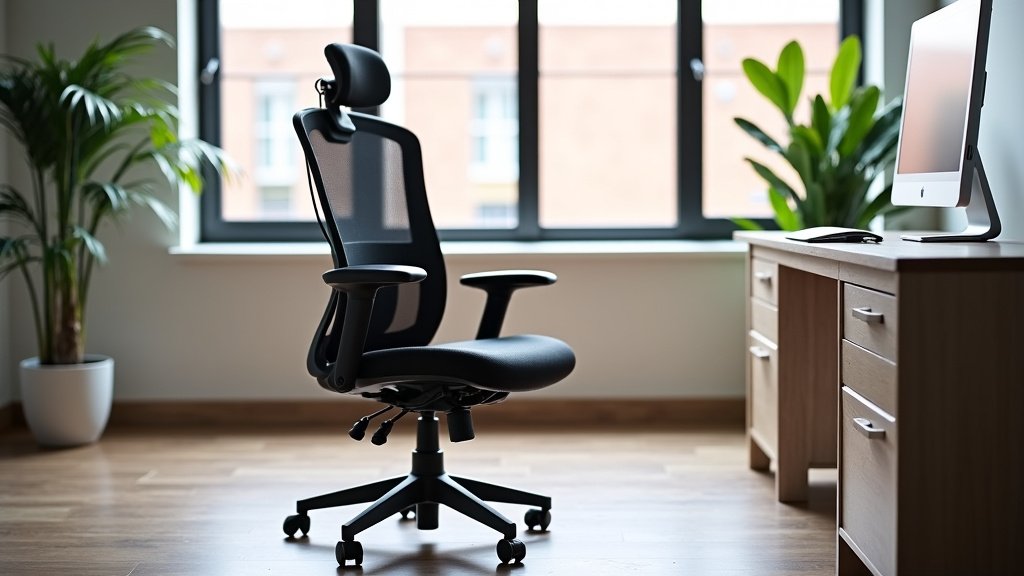
To help you narrow down your choices, here’s a quick checklist. Use this when you’re comparing different models. Does the chair meet these essential criteria?
- Adjustable Lumbar Support: Does it move up/down and in/out?
- Seat Depth Adjustment: Can you slide the seat pan?
- Adjustable Armrests: Do they move in multiple directions (at least up/down and pivot)?
- Breathable Material: Is the fabric or mesh comfortable for long periods?
- High-Density Foam: Does the seat feel supportive, not just soft?
- Stable Base and Smooth Casters: Does it feel sturdy and move easily?
Conclusion
Choosing the best task chair for long work hours truly boils down to finding a chair that fits your unique body and work habits. We’ve shown that features like adjustable lumbar support, seat depth, and multi-directional armrests aren’t luxuries—they’re necessities for sustaining comfort and preventing pain. Prioritize adjustability and quality materials, as these will directly impact your long-term health and productivity. Don’t view this as just another purchase; see it as a smart investment in your well-being. Take the time to research, compare, and ideally, test chairs to find your perfect fit.
Frequently Asked Questions
How often should I adjust my ergonomic chair throughout the day?
You should make small adjustments to your chair settings throughout the day. This helps promote active sitting and prevents static postures. Even minor changes in tilt or height can reduce pressure points and keep you more comfortable.
Can a good task chair really prevent back pain?
Yes, a well-chosen ergonomic task chair with proper adjustments can significantly reduce the risk of back pain. It supports your spine’s natural curve and helps you maintain good posture. However, it works best when combined with regular movement and breaks.
What’s the ideal way to sit in an ergonomic chair?
When sitting, your feet should be flat on the floor or a footrest, with your knees forming a 90-degree angle. Your back should be supported by the lumbar support, and your arms should rest comfortably on the armrests, keeping elbows at 90 degrees. Your monitor should be at eye level.
Is a more expensive ergonomic chair always better?
Not always, but higher-priced chairs often offer better build quality, more adjustability, and more durable materials. These factors contribute to a longer lifespan and superior comfort. We found that balancing features with your budget is important.
How long do ergonomic task chairs typically last?
A high-quality ergonomic task chair can last anywhere from 5 to 10 years, or even longer, depending on use and manufacturer. Cheaper chairs might only last 1-3 years before showing significant wear. Investing in a good warranty can also provide peace of mind.