9 Best FlexiSpot Standing Desks (November 2026)
The best FlexiSpot standing desks include the FLEXISPOT EN1 55"x28" One-Piece Standing Desk for deep workspaces, the FLEXISPOT EN1 One-Piece Standing Desk for compact one-piece setups, and the FLEXISPOT 71"x32" Electric Standing Desk for wide multi-device setups.
On this page (6 sections)
The best FlexiSpot standing desk for most workspaces is the EN1 55 x 28 in, with a one-piece desktop and 4 memory presets. The 48 x 24 in EN1 fits a tighter footprint, while the 71 x 32 in model is for setups that need more surface area.
If you plan to walk while working, compare standing desks for a walking pad.
A standing desk should fit the room and the equipment you actually use. Compare desktop depth, width, charging and storage before choosing a model.
If budget is the main constraint, see standing desks under 200 dollars.
If you're weighing brands as well as sizes, start with our guide to the best standing desk brands. This roundup also compares several FlexiSpot sizes with a converter and other brands for context.
For a brand-specific comparison, see Vari standing desks.
Our picks at a glance
-
1
 Best for deep workspaces
FLEXISPOT EN1 55"x28" One-Piece Standing Desk
9.6/10 our score
See it on Amazon -
2
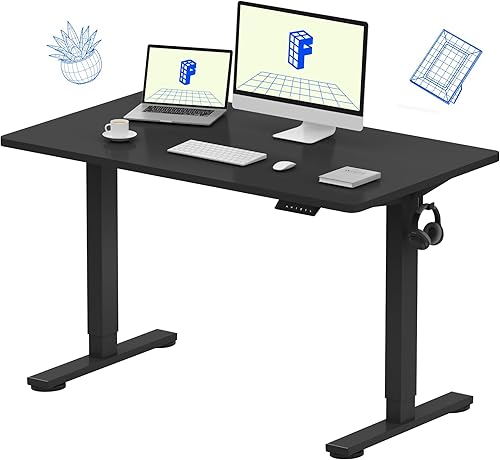 Best for compact one-piece setups
FLEXISPOT EN1 One-Piece Standing Desk
9.6/10 our score
See it on Amazon -
3
 Best for wide multi-device setups
FLEXISPOT 71"x32" Electric Standing Desk
9.4/10 our score
See it on Amazon
- 4
 Check it
FLEXISPOT EN2 55"x28" Standing Desk with Power
Best for built-in charging - 5
 Check it
FLEXISPOT EN2 55"x28" Whole-Piece Standing Desk
Best for a maple finish and charging - 6
 Check it
FLEXISPOT 60"x24" Electric Standing Desk
Best for a long, shallow workspace - 7
 Check it
FLEXISPOT Comhar 48" Electric Standing Desk
Best for a built-in drawer - 8
 Check it
FEZIBO Standing Desk 48 × 24 Inch
Best for a Maple alternative - 9
 Check it
VIVO Manual Height Adjustable Standing Desk Converter
Best for keeping your existing desk
The best FlexiSpot standing desks for different workspaces
The EN1 55 x 28 in is the strongest all-around FlexiSpot choice here, while other models add charging, storage or more surface area. The picks below are ordered by score, with the higher-scoring compact alternatives included for comparison.
FLEXISPOT EN1 55"x28" One-Piece Standing Desk: Best for deep workspaces
- 55 x 28 in one-piece desktop
- Electric adjustment from 28.1 to 45.7 in
- 4 memory presets
- 1 in thick top
A deeper, one-piece top provides room for monitors, drawing tablets or other work gear. Four saved heights make it easier to return to your preferred sitting and standing positions.
Pros
- One-piece desktop
- 28 in depth
- 4 memory presets
Cons
- Needs more floor space than a 24 in deep desk
The EN1 55 x 28 in is a strong fit if your current desk feels cramped front to back. Its 28 in depth gives a monitor, keyboard and writing space more room than a 24 in deep surface.
The one-piece top avoids a center seam, and the 1 in thick desktop is described as sag-resistant. Electric height adjustment runs from 28.1 to 45.7 in, with 4 memory presets for saved positions.
Check the footprint before you commit. At 55 in wide and 28 in deep, this desk needs more room than a compact workstation.
Choose it for a deep work surface and saved height settings. For desk options from other brands, compare FEZIBO standing desk picks and VIVO standing desks.
FLEXISPOT EN1 One-Piece Standing Desk: Best for compact one-piece setups
- 48 x 24 in one-piece desktop
- Electric adjustment from 28.9 to 46.5 in
- 4 memory presets
- 176 lb capacity
The 48 x 24 in EN1 keeps the one-piece top and electric adjustment in a smaller footprint. It suits a laptop or monitor setup that doesn't need the deeper workspace of the 55 x 28 in model.
Pros
- One-piece desktop
- Compact 48 x 24 in footprint
- 4 memory presets
Cons
- Less desktop depth than the 55 x 28 in EN1
This EN1 keeps the one-piece surface and electric height adjustment in a 48 x 24 in size. It suits a smaller room or a setup that uses one monitor and doesn't need the extra depth of the 55 in version.
The desk adjusts from 28.9 to 46.5 in and has 4 memory presets. Its capacity is 176 lb, and the top has room for a laptop, monitor and everyday accessories.
Choose it when the compact footprint is more useful than a deep tabletop. FlexiSpot's stated 5-year frame and motor warranty and 2-year controller and electronics warranty may also matter when comparing purchase terms.
FLEXISPOT 71"x32" Electric Standing Desk: Best for wide multi-device setups
- 71 x 32 in desktop
- Dual motors
- 198 lb capacity
- Memory controller
The extra-wide, deep surface gives multiple monitors and creative tools more room. Its dual motors and 198 lb capacity suit a larger workstation, provided your room can fit the footprint.
Pros
- Largest desktop here
- Dual motors
- 198 lb capacity
Cons
- Requires substantial floor and desktop space
The 71 x 32 in FlexiSpot is the choice for a wide setup with multiple monitors or creative tools. Its large desktop provides substantially more surface than the EN1 options above.
Dual motors adjust the desk, and the frame supports up to 198 lb. The model includes a memory controller, though the available details don't specify the number of saved positions.
Measure your room carefully before choosing it. At 71 in wide and 32 in deep, it calls for a generous footprint and a clear path for moving the desktop into place.
FLEXISPOT EN2 55"x28" Standing Desk with Power: Best for built-in charging
- 55 x 28 in one-piece desktop
- 3 outlets and 2 USB ports
- 4 memory presets
- Cable management
The EN2 bundles a clamp-on power strip with its one-piece desktop, so charging access is close at hand. Its 55 x 28 in surface gives a multi-monitor setup room to spread out.
Pros
- Desktop power strip included
- One-piece 55 x 28 in top
- 4 memory presets
Cons
- Assembly may require an electric drill, which isn't included
The EN2 55 x 28 in adds a clamp-on power strip to the deeper, one-piece desktop. It has 3 outlets and 2 USB charging ports, plus a cable management device to help keep charging gear in order.
Four memory presets save sitting and standing positions, and the motorized frame adjusts from 28.1 to 45.7 in. The desktop supports up to 176 lb, and the motor runs below 50 dB according to FlexiSpot.
Assembly may require an electric drill, which isn't included. The desk arrives in two packages that may ship separately, so plan for the desktop and frame to arrive at different times.
FLEXISPOT EN2 55"x28" Whole-Piece Standing Desk: Best for a maple finish and charging
- 55 x 28 in one-piece desktop
- Maple top with white frame
- 3 outlets and 2 USB ports
- 4 memory presets
This EN2 pairs the one-piece top and clamp-on power strip with a maple surface and white frame. It fits buyers who want those features in a lighter finish.
Pros
- Maple top and white frame
- One-piece desktop
- 3 outlets and 2 USB ports
Cons
- Assembly may require an electric drill, which isn't included
This EN2 combines a maple top and white frame with a one-piece desktop and clamp-on power strip. For a darker finish, compare black standing desks.
It has 3 outlets, 2 USB ports and 4 memory buttons.
The electric height range is 28.1 to 45.7 in, and the top measures 55 x 28 in. As with the other EN2, check your assembly tools before starting because an electric drill may be needed and isn't included.
Choose this finish if you want the EN2's charging features in a lighter color scheme. If you're comparing desk types, our guide to hand crank standing desk pros and cons explains the tradeoff between manual and powered adjustment.
FLEXISPOT 60"x24" Electric Standing Desk: Best for a long, shallow workspace
- 60 x 24 in one-piece desktop
- 1 in thick top
- 176 lb capacity
- Electric height adjustment
A 60 in wide but 24 in deep surface provides room to spread out along a wall without using the depth of the 55 x 28 in models. The one-piece top is 1 in thick.
Pros
- Long 60 in desktop
- One-piece 1 in thick top
- 176 lb capacity
Cons
- 24 in depth may limit front-to-back monitor spacing
The 60 x 24 in model gives you more width than the 48 in EN1 without adding depth. Its one-piece, 1 in thick desktop is a good match for a longer wall or a desk setup that needs room side to side.
It adjusts electrically and supports up to 176 lb. The stated maximum height is 45.7 in, though the minimum height is given in centimeters, so confirm the full range in the setup details if that measurement matters to you.
Pick this when width matters more than front-to-back space. A deeper surface may work better if you keep a monitor arm, keyboard and writing area on the same desk.
FLEXISPOT Comhar 48" Electric Standing Desk: Best for a built-in drawer
- 48 in desktop
- Pull-out drawer
- USB-A and USB-C ports
- 4 height presets
The Comhar adds a pull-out drawer and integrated USB charging to a 48 in standing desk. It's a useful fit when small supplies need a dedicated place close to the work surface.
Pros
- Built-in drawer
- USB-A and USB-C charging
- 4 height presets
Cons
- Capacity and desktop depth aren't stated here
The Comhar stands out for its built-in pull-out drawer and USB charging. For more storage layouts, see standing desks with storage.
The drawer stores small office supplies, while the integrated USB-A and USB-C ports can charge up to 3 devices.
The desk adjusts from 28.9 to 46.5 in and includes 4 programmable height presets. Its anti-collision system is designed to stop and reverse the desktop when it detects an obstacle, and a child lock helps prevent accidental adjustments.
For a child-sized setup, compare standing desks for kids.
Choose it if compact storage matters as much as sit-stand adjustment. The available details don't give desktop depth or a weight capacity, so check those points if your equipment is heavy or your room is tight.
FEZIBO Standing Desk 48 × 24 Inch: Best for a Maple alternative
- 47.2 x 23.6 in desktop
- Electric adjustment
- 3 memory presets
- Maple finish
This FEZIBO option offers a compact maple-finish desktop with electric adjustment and 3 memory presets. It provides a useful comparison if you're weighing FlexiSpot against another brand.
Pros
- Compact footprint
- Maple finish
- 3 memory presets
Cons
- Desktop is a splice design rather than one piece
This FEZIBO desk offers a 47.2 x 23.6 in maple-finish surface with electric height adjustment and 3 memory presets. It's a useful comparison if you're considering a compact FlexiSpot model but also want another brand in the mix.
The height range is 28.3 to 46.5 in, and the frame supports up to 176 lb. Its desktop is a splice design, so it differs from the one-piece tops on the FlexiSpot EN1 and EN2 options.
Choose it for a compact footprint and maple finish. If you want another compact electric desk option, compare it with the Mount-It! standing desk guide.
VIVO Manual Height Adjustable Standing Desk Converter: Best for keeping your existing desk
- 31.5 x 15.7 in top
- Manual adjustment from 4.5 to 20 in
- Keyboard tray
- 33 lb lift assist
This manual converter raises your monitor and keyboard on an existing desk, instead of replacing the desk. Its keyboard tray moves with the top surface.
Pros
- Uses an existing desk
- Keyboard tray included
- Minimal assembly
Cons
- Manual riser, not a full standing desk
The VIVO converter is for people who want to keep their current desk and raise the work surface when they stand. For compact desktops, compare standing desk converters for small desks.
Its 31.5 x 15.7 in top moves with a keyboard tray that measures 31.3 x 11.8 in.
Manual adjustment runs from 4.5 to 20 in, with a 33 lb lift assist. The steel riser requires minimal assembly: place it on the existing desk and attach the keyboard tray.
This isn't a full standing desk, so it won't raise your whole desktop or make more floor space. If you are assembling a desk from separate parts, compare standing desk legs.
Choose it when replacing your desk isn't practical and the converter's surface can hold your monitor and keyboard.
How to choose a FlexiSpot desk size
Choose a desktop based on the gear you need to keep within reach and the room available around the desk. Width describes side-to-side space, while depth determines how much room sits between you and the monitor.
The 48 x 24 in EN1 uses the smallest FlexiSpot footprint in this guide. The 55 x 28 in models give you more depth, and the 71 x 32 in desk is the widest and deepest option.
Measure both the desk area and the route to the room. A desktop that fits the wall may still be difficult to move through a hallway or doorway.
For a desk that stores away between sessions, compare folding standing desks.
Is the EN1 or EN2 a better fit?
Choose the EN1 if you want a one-piece desktop and saved height positions without the EN2 power strip bundle. Choose an EN2 if its 3 outlets and 2 USB ports would make charging easier at your desk.
Both EN2 models here measure 55 x 28 in and include 4 memory presets. The maple-and-white EN2 offers a lighter finish; the other listed EN2 is black.
Do you need a one-piece desktop?
A one-piece desktop gives you a continuous surface without a center seam. That can help when you write, draw or arrange equipment across the middle of the desk.
The EN1 and EN2 options in this roundup have one-piece tops. If the desk must fit through a narrow passage, measure the desktop and the path before ordering.
Is a FlexiSpot desk right for gaming?
A FlexiSpot desk can work for gaming if the top has enough room for your monitors, keyboard and accessories. The 55 x 28 in EN1 adds depth, and the 71 x 32 in desk offers the most surface area in this roundup.
For a smaller setup, the 48 x 24 in EN1 takes up less room. Compare your equipment footprint with the desktop dimensions before deciding; our guide to the best standing desk for gaming covers more gaming-focused choices.
Which FlexiSpot standing desk should you choose?
Choose the EN1 55 x 28 in if you want a deeper, one-piece desktop with 4 saved heights. Pick the 48 x 24 in EN1 for a compact setup, the EN2 for built-in charging, or the 71 x 32 in model for a wide workstation.
If your main goal is raising an existing desk, the VIVO converter offers a different path. Compare size, adjustment and features against the setup you already have before choosing.
Our top 3 picks at a glance
-
1
Best for deep workspaces
FLEXISPOT EN1 55"x28" One-Piece Standing Desk
9.6/10 our score
See it on Amazon -
2
Best for compact one-piece setups
FLEXISPOT EN1 One-Piece Standing Desk
9.6/10 our score
See it on Amazon -
3
Best for wide multi-device setups
FLEXISPOT 71"x32" Electric Standing Desk
9.4/10 our score
See it on Amazon
Frequently asked questions
Which FlexiSpot standing desk size should I choose?
Choose by the space you have and the depth your work setup needs. The 48 x 24 in EN1 suits a smaller footprint, while the 55 x 28 in EN1 adds depth for monitors or creative work.
The 71 x 32 in model offers the broadest surface here, but needs more floor space.
What is the difference between FlexiSpot EN1 and EN2 desks?
The EN2 options here include a clamp-on power strip with 3 outlets and 2 USB ports. The EN1 options focus on a one-piece desktop and electric height adjustment, with the 55 x 28 in model offering 4 memory presets.
Compare the exact size and finish as well as the power features.
Is a one-piece standing desk top useful?
A one-piece top has no center seam, which gives you a continuous surface for writing, drawing or arranging equipment. FlexiSpot EN1 and EN2 models in this guide have one-piece desktops.
If you need to carry the top through a narrow doorway, measure the path before choosing a large desk.
Can a standing desk converter replace a FlexiSpot desk?
A converter can add standing height to an existing desk, but it doesn't replace the desk itself. The VIVO option here has a 31.5 x 15.7 in top, a moving keyboard tray and manual adjustment.
Choose a full standing desk if you want the whole work surface to rise.
Are FlexiSpot standing desks good for gaming?
A FlexiSpot desk can suit gaming if its desktop fits your monitor, keyboard and other gear. The EN1 55 x 28 in offers a deeper top, while the 71 x 32 in model gives a multi-device setup more room.
See our guide to the best standing desk for gaming for more gaming-focused options.


