9 Best Standing Desk Converters for Laptops (November 2026)
The best standing desk converters for laptops include the VIVO Standing Desk Converter for most laptop workstations, the VIVO Standing Desk Converter for dual monitors, and the VIVO Standing Desk Converter for the widest setup.
On this page (6 sections)
- Which standing desk converter for laptop work is best?
- How we chose the best standing desk converter for laptop setups
- Best standing desk converter for laptop setups
- How to choose a standing desk converter for laptop use
- How to set up and use a laptop standing desk converter
- Which standing desk converter for laptop users should you buy?
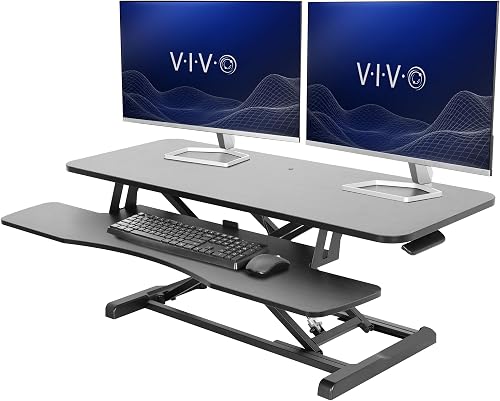
The VIVO 36-inch standing desk converter is the best fit for most laptop users. Its 36 x 15.7-inch desktop gives a laptop, monitor and keyboard more room than a compact riser, while the 33 lb capacity supports a typical workstation setup.
The keyboard tray holds up to 4.4 lb and rises with the desktop, keeping the screen and typing area together as you switch positions. Its 4.5 to 20-inch adjustment range provides room for both seated and standing heights, although your desk, chair and body dimensions still determine the best setting.
A converter adds sit-stand flexibility to an existing desk without requiring a full desk replacement. The VIVO model needs enough width for its desktop and enough space in front for the tray, so measure your desk before ordering.
It also uses manual adjustment rather than an electric motor.
Read What Is a Standing Desk Converter? for a quick explanation of how desktop risers compare with replacing your workstation.
This roundup compares 9 models by surface size, height range, capacity, keyboard support and laptop setup. It includes compact single-surface risers, wider options for dual monitors and models with different lift systems, so you can weigh the available space against the equipment you need to place.
Our picks at a glance
-
1

-
2
-
3

- 4
 Check it
TechOrbits Black 32 in Standing Desk Converter
Best for a dual-monitor starter setup - 5
 Check it
JOY worker 32" Standing Desk Converter
Best for a white workspace - 6
 Check it
FLEXISPOT 32" Standing Desk Converter
Best for spring-assisted adjustment - 7
 Check it
FLEXISPOT Standing Desk Converter 36" Desk Riser
Best for a 36-inch FLEXISPOT surface - 8
 Check it
VIVO Single Top Standing Desk Converter
Best for small desks - 9
 Check it
Hoodutric Standing Desk Converter Height Adjustable
Best for a compact single monitor
Which standing desk converter for laptop work is best?
The VIVO 36-inch model is the strongest general choice because it balances workspace, capacity and height range. A laptop can share the desktop with a monitor, while the synchronized keyboard tray gives you a separate typing area instead of forcing every device onto one surface.
The compact VIVO Single Top works better when desk width is limited or the laptop is your only screen. Its smaller platform and lower capacity make it less suitable for heavier equipment, but its five lockable settings and low resting height suit a focused workstation.
The VIVO 42-inch and 48-inch models are better for wider layouts. They give you more side-to-side room for dual monitors, a laptop and accessories, but they also need more desk width and careful placement.
Our score weighs specs, features and buyer feedback against what you're shopping for. The scores are not a promise of comfort or performance in every workspace, because your desk height, device weight and available room affect the result.
| Product | Best for | Desktop | Height range | Capacity | Our score |
|---|---|---|---|---|---|
| VIVO Standing Desk Converter | most laptop workstations | 36 x 15.7 in | 4.5 to 20 in | 33 lb desktop, 4.4 lb tray | 9.7 |
| VIVO Standing Desk Converter | dual monitors | 42 x 15.7 in | 4.5 to 20 in | 9.5 | |
| VIVO Standing Desk Converter | the widest setup | 47.6 x 15.7 in | 4.5 to 20 in | 9.4 | |
| TechOrbits Black 32 in Standing Desk Converter | a dual-monitor starter setup | 4.3 to 19.7 in | 33 lb | 9.4 | |
| JOY worker 32" Standing Desk Converter | a white workspace | 31.5 x 15.7 in | 4.9 to 19.3 in | 9.0 | |
| FLEXISPOT 32" Standing Desk Converter | spring-assisted adjustment | 8.9 | |||
| FLEXISPOT Standing Desk Converter 36" Desk Riser | a 36-inch FLEXISPOT surface | 8.8 | |||
| VIVO Single Top Standing Desk Converter | small desks | 26.4 x 18.5 in | 17.6 lb | 8.8 | |
| Hoodutric Standing Desk Converter Height Adjustable | a compact single monitor | 24 x 13.8 in | 2.4 to 15.7 in | 8.0 |
How we chose the best standing desk converter for laptop setups
The most useful factor is the surface area available after your laptop, keyboard and mouse are in place. A 24-inch or 26.4-inch platform can work for a single laptop or monitor, but a 36-inch or wider converter gives you more room to separate the screen from the typing area.
Height range matters because your desk, chair and body dimensions are different from another reader's. A lower starting height can help on a low desk; compare low-profile standing desk converters.
The VIVO wide models adjust from 4.5 to 20 inches, while the Hoodutric model adjusts from 2.4 to 15.7 inches.
Capacity is another practical check. A laptop is only one part of the load when you add a monitor, keyboard, dock or speakers.
Keep the combined weight within the stated desktop capacity, and check the separate tray limit when a converter has one.
For laptop ergonomics, the screen and keyboard can create a trade-off. Raising the laptop screen may force your hands too high, so an external keyboard can help you keep the screen higher while typing at a more natural level.
OSHA's computer workstation guidance covers general monitor, keyboard and posture considerations.
Best standing desk converter for laptop setups
The top picks below are ordered by score, with each one aimed at a different desk size or working pattern.
VIVO Standing Desk Converter: Best for most laptop workstations
- 36 x 15.7 in desktop
- 33 lb desktop capacity
- 4.5 to 20 in height range
- 36 x 11.8 in keyboard tray
The 36-inch VIVO gives a laptop and monitor setup room to spread out while keeping a synchronized keyboard tray below. Its 4.5 to 20-inch range covers a broad range of seated and standing positions.
Pros
- Wide work surface
- 33 lb desktop capacity
- Minimal assembly
Cons
- Needs more desk width than compact risers
- Manual height adjustment
The VIVO 36-inch model is the best all-around fit for a laptop and monitor workstation. Its 36 x 15.7-inch desktop gives you more room than a compact riser without taking up as much width as the 42-inch and 48-inch options.
The desktop holds up to 33 lb, and the keyboard tray holds up to 4.4 lb. The tray measures 36 x 11.8 inches, with a 10.2-inch center, and rises with the top surface.
The 4.5 to 20-inch adjustment range gives you room to set a seated position and a standing position. Its steel frame and black finish suit a simple office setup, while partial assembly means you attach the keyboard tray before placing it on your desk.
Choose it when you want one converter for a laptop, monitor and keyboard. If you need more height guidance, compare it with our Best Standing Desk Converter For Tall People guide.
VIVO Standing Desk Converter: Best for dual monitors
- 42 x 15.7 in desktop
- 33 lb desktop capacity
- 4.5 to 20 in height range
- 42 x 11.8 in keyboard tray
The 42-inch VIVO adds width for dual monitors and laptop accessories without changing the 20-inch maximum height. It fits buyers who have desk space to spare and want one broad platform.
Pros
- Largest keyboard tray among the 42-inch-style picks
- Wide dual-monitor surface
- Minimal setup
Cons
- Takes more desk width
- Manual adjustment
The VIVO 42-inch model is the better choice when you want extra width for two monitors or a laptop beside a monitor. Its 42 x 15.7-inch top keeps the same 33 lb desktop capacity and 4.5 to 20-inch height range as the 36-inch version.
The keyboard tray is also wider, measuring 42 x 11.8 inches, with a 10.2-inch center. That gives you more side-to-side room for a full-size keyboard and mouse while the laptop or monitors remain on the top.
The frame uses alloy steel, and the surface uses particle board with a laminated black finish. Assembly is required, with instructions included, so plan a short setup step before arranging your devices.
Pick this model when your existing desk can support a 42-inch riser. It is less suitable for a narrow desk where the extra width would reduce usable space around the converter.
VIVO Standing Desk Converter: Best for the widest setup
- 47.6 x 15.7 in desktop
- 33 lb desktop capacity
- 4.5 to 20 in height range
- 47.6 x 11.8 in keyboard tray
The 48-inch VIVO is the roomiest choice for a laptop, dual monitors and accessories on one surface. Its width makes it useful for large desks, but it needs careful measuring before setup.
Pros
- Most desktop width here
- 33 lb desktop capacity
- Synchronized keyboard tray
Cons
- Largest footprint
- Tray capacity is 4 lb
The VIVO 48-inch model is the widest option here and suits a large desk with several devices. For more broad platforms, compare large standing desk converters.
Its 47.6 x 15.7-inch surface can give a laptop, dual monitors and accessories one broad work area.
The desktop holds up to 33 lb, while the keyboard tray holds up to 4 lb. The tray measures 47.6 x 11.8 inches and rises with the desktop, so the keyboard position changes with the main surface.
The adjustment range is 4.5 to 20 inches, matching the other wide VIVO models. Its alloy steel frame and laminated finish support a straightforward office arrangement, but the large footprint makes measuring essential.
Choose it if the width solves a real layout problem. If your laptop is your only screen and your desk is compact, the VIVO Single Top uses much less space.
TechOrbits Black 32 in Standing Desk Converter: Best for a dual-monitor starter setup
- 32 in wide work area
- 4.3 to 19.7 in height range
- Particle board desktop
- Dual monitor stand and keyboard tray included
TechOrbits pairs a 32-inch desktop with a dual monitor stand and keyboard tray. It suits a laptop user who wants a bundled dual-screen arrangement without moving to one of the widest risers.
Pros
- Dual monitor stand included
- 33 lb capacity
- Mostly assembled
Cons
- Work area is narrower than the VIVO wide models
- Maximum height is 19.7 in
The TechOrbits 32-inch model is a practical choice for a laptop user who wants a dual-monitor stand included with the converter. Its 32-inch work area sits between the compact and wide options, giving you room for a laptop, screens and basic accessories without needing the widest platform.
The height range runs from 4.3 to 19.7 inches. That gives you useful flexibility for seated and standing positions, though it stops slightly below the 20-inch maximum offered by the wide VIVO models.
The particle board desktop and aluminum frame support up to 33 lb. Keep the laptop, monitors and accessories within that combined limit, and arrange the heavier items so the riser remains comfortable to use.
The included keyboard tray gives you a separate place for typing. TechOrbits also includes a dual monitor stand, which makes this option different from the single-platform risers.
The converter comes mostly assembled, with the keyboard tray attached using the provided tools. Choose it when the bundled monitor arrangement fits your desk plan, then measure the stand position and laptop footprint together before loading the surface.
JOY worker 32" Standing Desk Converter: Best for a white workspace
- 31.5 x 15.7 in top tier
- 4.9 to 19.3 in height range
- 28.6 lb top capacity
- Removable keyboard tray
The white JOY worker gives a laptop and monitor a two-tier workspace with a removable keyboard tray. It is a good match for buyers who want a lighter visual finish and do not need a 33 lb desktop capacity.
Pros
- White finish
- Removable tray
- Two-tier layout
Cons
- Lower desktop capacity than several picks
- Maximum height is 19.3 in
The JOY worker 32-inch converter suits a laptop setup that benefits from a white finish and two working levels. Its 31.5 x 15.7-inch top tier supports up to 28.6 lb, while the keyboard tray supports up to 4.4 lb.
The height range is 4.9 to 19.3 inches, giving you room to move between sitting and standing without taking up the width of a larger riser. It does not reach the 20-inch maximum of some VIVO models, so compare that limit with your desk and body height.
The removable 24.4 x 11.8-inch keyboard tray raises with the top board. Keep it attached when you want a separate typing level, or remove it when your desk arrangement needs a more open single surface.
Its engineered wood construction and white finish give it a different look from the black models in this group. The riser arrives mostly assembled, with a 2-step keyboard tray installation.
Pick it if the white finish and removable tray matter more than a 33 lb desktop capacity. For a student setup with limited space, see Best Standing Desk Converter For Students.
FLEXISPOT 32" Standing Desk Converter: Best for spring-assisted adjustment
- 32 in desktop
- 33 lb load capacity
- Mechanical spring lift system
- 4.4 lb keyboard tray
FLEXISPOT uses a mechanical spring lift system and a reinforced steel frame for this 32-inch riser. It suits laptop users who want a standard-size platform with room for a second screen and office accessories.
Pros
- Mechanical spring system
- 33 lb capacity
- Almost fully assembled
Cons
- Exact height range is not stated here
- Heavier than some compact risers
The FLEXISPOT 32-inch converter suits laptop users who want a mechanical spring lift system. Its reinforced steel frame supports up to 33 lb on the desktop, while the keyboard tray holds 4.4 lb.
The 32-inch surface gives a laptop room to sit beside a monitor or accessories without requiring the width of a 36-inch or larger riser. Its black engineered wood top keeps the setup simple, and the spring system is designed for smooth, stable height adjustment.
The converter arrives almost fully assembled, with the keyboard tray added before use. Keep the desktop and tray within their separate weight limits when arranging your equipment.
The available data does not state an exact height range, so confirm that detail before buying if your desk requires precise adjustment. Choose it when the spring lift, 33 lb capacity and middle-size desktop match your priorities.
FLEXISPOT Standing Desk Converter 36" Desk Riser: Best for a 36-inch FLEXISPOT surface
- 36 in desktop
- Mechanical spring lift system
- 33 lb top capacity
- 4.4 lb keyboard tray
This FLEXISPOT gives the same spring-lift approach a wider 36-inch surface. It fits a laptop setup that needs more side-to-side room while keeping the desktop capacity at 33 lb.
Pros
- 36-inch surface
- Mechanical spring system
- Metal frame
Cons
- Exact height range is not stated here
- Heavier 34.5 lb unit
The FLEXISPOT 36-inch desk riser gives the spring-lift design more side-to-side space for a laptop and monitor setup. Its 36-inch desktop supports up to 33 lb, and the keyboard tray holds 4.4 lb.
That width gives you more freedom to place the laptop beside a monitor rather than directly in front of it. It can also leave room for a mouse and small office accessories, provided the total load stays within the desktop limit.
The metal frame and engineered wood surface are suited to a home office arrangement. At 34.5 lb, the unit is heavier than the compact VIVO single-top model, so plan the placement before loading your devices or trying to reposition the riser.
FLEXISPOT describes the mechanical spring system as a stable way to change height. The converter comes with a keyboard tray and is designed for home office use, but the available information does not state the exact height range.
Choose it when you want a 36-inch surface and a FLEXISPOT spring system. Confirm the height range first if your standing position depends on reaching a particular maximum, especially when the converter will sit on a tall desk.
VIVO Single Top Standing Desk Converter: Best for small desks
- 26.4 x 18.5 in desktop
- 5 lockable height settings
- 1.8 in resting height
- 17.6 lb desktop capacity
The compact VIVO single top keeps a laptop and full-size keyboard on a smaller platform. Five lockable settings and a 1.8-inch resting height make it a practical choice where desk depth and width are limited.
Pros
- Small footprint
- No assembly
- Five lockable settings
Cons
- Lower capacity
- No separate keyboard tray
The VIVO Single Top is the best fit for a small desk or a laptop-only workstation. Its 26.4 x 18.5-inch desktop leaves room for a laptop and full-size keyboard while using less width than the wide converters.
It has 5 lockable settings at 8.5, 10.4, 12, 14.4 and 15.9 inches. Those fixed positions are simple to understand, although they give you fewer choices than a continuously adjustable model.
The resting height is only 1.8 inches, so the riser stays relatively low when you are sitting. Its alloy steel support holds up to 17.6 lb on the desktop, making it better suited to a laptop or single monitor than a heavier multi-screen arrangement.
There is no separate keyboard tray, so the laptop and keyboard share the single surface. That keeps the design compact, but raising the laptop screen also raises the keyboard, which can create an ergonomic trade-off for long typing sessions.
The riser arrives pre-assembled, so there is no tray installation to handle. Choose it when your desk is small and your equipment load is modest.
If you need room for a laptop, dual monitors and accessories, move up to a 36-inch or wider model.
Hoodutric Standing Desk Converter Height Adjustable: Best for a compact single monitor
- 24 x 13.8 in desktop
- 2.4 to 15.7 in height range
- Gas spring mechanism
- Mobile phone holder included
Hoodutric is the smallest stated desktop in this roundup and is designed for a laptop or single monitor. Its 2.4 to 15.7-inch range suits buyers who need a compact sit-stand platform rather than a large multi-screen surface.
Pros
- Small desktop
- Gas spring adjustment
- Mobile phone holder included
Cons
- Less room for accessories
- Lower maximum height
The Hoodutric converter is built for a compact laptop or single-monitor workstation. Its 24 x 13.8-inch desktop is the smallest stated surface in this roundup, so it suits a focused setup rather than a wide collection of devices.
The gas spring mechanism adjusts from 2.4 to 15.7 inches. The low starting point can help when the riser sits on an existing desk, while the maximum height is more limited than the 20-inch range available on several VIVO models.
Its metal frame supports the desktop, and a mobile phone holder is included. The surface can suit a laptop or single monitor, but you should keep the available width and depth in mind before adding a full-size keyboard or other accessories.
The compact structure is useful when a desk is shallow or crowded. It has a black finish and instructions for lifting and lowering, with no complex installation steps described.
Choose it when a small platform matters more than a high maximum position or extra accessories. Check your laptop dimensions and typing space carefully because the desktop is narrower than the other picks.
How to choose a standing desk converter for laptop use
Choose the converter by the space your laptop setup needs, then check the height range and capacity. A laptop-only setup can work on a 24-inch or 26.4-inch platform, while a laptop plus monitor often makes a 32-inch or 36-inch surface easier to use.
What size standing desk converter fits a laptop?
A 24-inch to 26.4-inch converter can fit a laptop and keyboard when you keep the setup simple. The 32-inch to 36-inch models give you more room to place a laptop beside a monitor, and the 42-inch and 48-inch models suit wide multi-screen layouts.
Measure the laptop's width and depth, then add space for the keyboard, mouse and charging cable. Leave enough room to avoid pushing devices against the front or rear edge.
How much height do you need?
A converter with a 4.5 to 20-inch range gives more adjustment room than one that stops at 15.7 inches. Your ideal setting depends on the height of your existing desk and the position of your chair.
Set the laptop screen near eye level, then check that your shoulders stay relaxed while typing. If the laptop keyboard sits too high when the screen is comfortable, use an external keyboard at the lower typing position.
Is a keyboard tray useful?
A keyboard tray helps separate screen height from typing height. The VIVO wide models, TechOrbits, JOY worker and FLEXISPOT options include a tray, while the VIVO Single Top uses one shared surface.
A tray also changes the total depth of the setup. Check whether your desk has enough room for the converter, tray and your chair position before buying.
Should you buy a compact or wide converter?
Buy compact when the desk is shallow, the laptop is your only screen or you need space for other desk items beside the riser. Buy wide when you use a second monitor, dual monitors or several accessories.
For portability and smaller work areas, compare the options in our guide to the best portable standing desk converter. Portable needs often favor a smaller surface over a wider desktop.
How to set up and use a laptop standing desk converter
Place the converter on a stable, level desk and check its full footprint before loading equipment. Look at the desktop depth, the position of the keyboard tray and the space behind the riser so the platform can move without striking a wall or nearby items.
Attach the keyboard tray or other included part according to the instructions. Models with minimal or partial assembly still need the supplied pieces fitted securely, so check the connections before placing a laptop or monitor on top.
Arrange the laptop so the screen is easy to view and the typing position feels natural. If raising the laptop makes the keyboard too high, an external keyboard can help separate the screen height from the hand position.
Keep the combined device weight within the stated desktop capacity. For models with separate trays, treat the tray capacity as its own limit rather than adding it to the desktop limit.
Change positions during the day instead of standing continuously. A converter is most useful when you can move between sitting and standing without losing a comfortable screen and keyboard position.
Keep cables with enough slack for the full height range. Lower the platform before moving the desk setup, and keep the lifting area clear of objects that could catch under the frame.
Which standing desk converter for laptop users should you buy?
Pick the VIVO 36-inch model for the best balance of laptop space, keyboard support and height range. Its 36 x 15.7-inch desktop holds a laptop, monitor and accessories, while the 33 lb capacity covers many ordinary workstation layouts.
The synchronized keyboard tray rises with the desktop, keeping the typing surface aligned as you change positions. Its 4.5 to 20-inch range provides useful flexibility for seated and standing work, but measure your desk before ordering.
Choose the VIVO 42-inch model when dual monitors or extra side-to-side room matter most. It keeps the 33 lb capacity and 4.5 to 20-inch range, but needs more desk width.
The VIVO 48-inch model is the widest choice for a laptop, dual monitors and accessories. Its 47.6-inch surface offers the most room, while the 4 lb keyboard tray limit should be checked separately.
For a small desk or laptop-only setup, the VIVO Single Top is easier to fit. Its 26.4 x 18.5-inch desktop, 1.8-inch resting height and five lockable settings keep the arrangement compact, though its 17.6 lb capacity and shared surface limit heavier equipment.
The Hoodutric model is suited to an even smaller workstation. Its 24 x 13.8-inch desktop and 2.4 to 15.7-inch height range work for a laptop or single monitor, but leave less room for accessories and offer less maximum height than the wide VIVO models.
TechOrbits is a useful middle option when you want a dual monitor stand included. Its 32-inch work area, 33 lb capacity and 4.3 to 19.7-inch range sit between compact single-screen risers and wider converters.
The JOY worker suits a white workspace and includes a removable keyboard tray. Its 31.5-inch top supports up to 28.6 lb, making it a better match for buyers who value the finish and two-level layout over higher capacity.
FLEXISPOT suits buyers who prefer a mechanical spring lift. The 32-inch model provides a 33 lb capacity, while the 36-inch version adds width.
Neither model has an exact height range stated in the available data, so confirm that detail if precise standing height matters.
Measure your desk, laptop and monitor footprint first. Include the keyboard tray in the depth calculation, leave room for cables and confirm that the desk can support the converter.
Then choose the smallest model that provides a comfortable screen position, enough typing space and a suitable height range. Compact risers save room, while wider models are more forgiving when a laptop shares the surface with one or more monitors.
Our top 3 picks at a glance
-
1
-
2
-
3
Frequently asked questions
What is the best standing desk converter for a laptop?
The VIVO 36-inch standing desk converter is the best fit for most laptop users in this group. It has a 36 x 15.7-inch desktop, a 33 lb capacity, a synchronized keyboard tray and a 4.5 to 20-inch height range.
Choose a smaller model when desk space is tight, or a 42-inch or 48-inch model when you need more width.
Can a standing desk converter hold a laptop and monitor?
Yes, several converters here are designed around laptop and monitor setups. The VIVO 36-inch, 42-inch and 48-inch models each have a 33 lb desktop capacity, while the TechOrbits model has a 32-inch work area and includes a dual monitor stand.
Measure your devices and leave room for typing before choosing.
How tall should a laptop standing desk converter be?
The right height puts your screen near eye level while your shoulders stay relaxed and your elbows remain close to your body. A wide range helps you fine-tune that position, such as the 4.5 to 20-inch range on the VIVO 36-inch model.
Use a separate laptop stand or external keyboard if the laptop screen and keyboard cannot sit comfortably together.
Are standing desk converters good for small desks?
Yes, compact converters can add standing positions without replacing the desk. The VIVO Single Top measures 26.4 x 18.5 inches, while the Hoodutric desktop measures 24 x 13.8 inches.
Check the full depth, height and clearance around your desk before ordering, especially if the desk is against a wall.
How long should you stand at a standing desk?
Change positions regularly instead of standing for one long block. Start with short standing periods, sit when your legs or back feel tired, and adjust the converter so your screen and keyboard stay comfortable.
Our guide on how long to stand at a standing desk covers a simple sit-stand routine.