9 Best Standing Desk Converters for Dual Monitors (November 2026)
The best standing desk converters for dual monitors include the Vari Pro Plus 36 Standing Desk Converter for a polished all-around setup, the VIVO Dual Tier Standing Desk Converter for a wide manual riser, and the VIVO Manual Height Adjustable Standing Desk Converter for a higher lift range.
On this page (6 sections)
- The best standing desk converters for dual monitors
- How wide should a dual-monitor desk converter be?
- Is a keyboard tray useful with two monitors?
- Manual or electric: which dual-monitor converter is better?
- How do you set up a standing desk converter for dual monitors?
- What is the best standing desk converter for dual monitors?
The best standing desk converter for dual monitors is the Vari Pro Plus 36 for its two-tier layout, 36 in upper tier and spring-assisted lift. The VIVO Dual Tier is another strong manual choice, while the VERSADESK PowerPro 40 is the better fit if you want push-button height changes.
A dual-monitor converter needs enough width for both screens, enough depth for their stands or mounts, and a lift range that places the displays at a comfortable viewing height. If you want a complete powered workstation, compare dual-motor electric standing desks.
The keyboard tray also matters because it keeps typing lower than the screens when you stand.
If you want motorized adjustment, compare these picks with our guide to the best electric standing desk converter dual monitor. For a three-screen arrangement, see the best standing desk converter for 3 monitors.
Our picks at a glance
-
1
 Best for a polished all-around setup
Vari Pro Plus 36 Standing Desk Converter
9.7/10 our score
See it on Amazon -
2
 Best for a wide manual riser
VIVO Dual Tier Standing Desk Converter
9.7/10 our score
See it on Amazon -
3
 Best for a higher lift range
VIVO Manual Height Adjustable Standing Desk Converter
9.6/10 our score
See it on Amazon
- 4
 Check it
TechOrbits Black 32 in Standing Desk Converter
Best for a simple 32 in workspace - 5
 Check it
Rocelco 46" X-Frame Standing Desk Converter
Best for a very wide monitor layout - 6
 Check it
VERSADESK PowerPro 40 Inch Electric Standing Desk
Best for push-button height changes - 7
 Check it
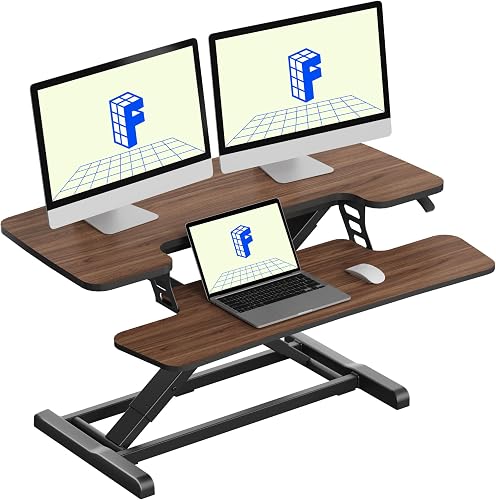
FLEXISPOT 36" Standing Desk Converter
Best for a spring-lift walnut finish - 8
 Check it
SANODESK 36" Standing Desk Converter
Best for a modern black workspace - 9
 Check it
FLEXISPOT Standing Desk Converter 40" Wide Desk
Best for extra multitasking room
The best standing desk converters for dual monitors
The Vari Pro Plus 36 is the best all-around choice, while the VIVO models offer different height ranges and widths. Larger options make sense when you also need room for a laptop, speakers or desk tools.
We compared width, depth, height range, lift design, capacity, keyboard layout and setup requirements. Our score weighs specs, features and buyer feedback against what you're shopping for.
| Product | Best for | Upper tier | Material | Included | Our score |
|---|---|---|---|---|---|
| Vari Pro Plus 36 Standing Desk Converter | a polished all-around setup | 36 x 12.25 in | Alloy steel base with laminated finish | Keyboard tray | 9.7 |
| VIVO Dual Tier Standing Desk Converter | a wide manual riser | 9.7 | |||
| VIVO Manual Height Adjustable Standing Desk Converter | a higher lift range | 9.6 | |||
| TechOrbits Black 32 in Standing Desk Converter | a simple 32 in workspace | Particle board, steel and aluminum frame | 9.4 | ||
| Rocelco 46" X-Frame Standing Desk Converter | a very wide monitor layout | 9.3 | |||
| VERSADESK PowerPro 40 Inch Electric Standing Desk | push-button height changes | 9.2 | |||
| FLEXISPOT 36" Standing Desk Converter | a spring-lift walnut finish | Keyboard tray | 9.1 | ||
| SANODESK 36" Standing Desk Converter | a modern black workspace | 9.0 | |||
| FLEXISPOT Standing Desk Converter 40" Wide Desk | extra multitasking room | Engineered wood with metal frame | 8.1 |
Vari Pro Plus 36 Standing Desk Converter: Best for a polished all-around setup
- 36 in upper tier
- 12.25 in depth
- Two-tier workspace
- Spring-assisted lift
- Fully assembled
The Vari Pro Plus 36 gives dual-monitor users a wide upper tier and a lower keyboard deck. Its spring-assisted lift and fully assembled design make it a strong general choice.
Pros
- Two-tier workspace
- Spring-assisted lift
- Fully assembled
Cons
- Manual height adjustment
- 12.25 in upper-tier depth
The Vari Pro Plus 36 is the strongest general-purpose choice because its 36 x 12.25 in upper tier gives two monitors a dedicated surface. The lower deck holds the keyboard and mouse, creating a two-level arrangement for sitting or standing.
Its alloy steel base, metal frame and laminated black finish suit a permanent home-office setup. Dual stability bars and a heavy base are part of the design, while the spring-assisted lift helps with manual height changes.
This converter arrives fully assembled, so setup is limited to placing it on an existing desk or table. The included keyboard tray gives you a lower typing surface without adding a separate accessory.
Choose it when you want a ready-to-use dual-monitor riser with a polished two-tier layout. If you need more upper-tier depth for large monitor stands, measure those stands before choosing a 12.25 in surface.
VIVO Dual Tier Standing Desk Converter: Best for a wide manual riser
- 36 in desktop
- Dual pneumatic springs
- 17 in maximum height
- Keyboard tray
- Alloy steel frame
This VIVO model pairs a 36 in top with a keyboard tray that rises with the desktop. Its pneumatic lift suits shoppers who want a wide manual converter with minimal setup.
Pros
- Wide 36 in top
- Dual pneumatic lift
- Keyboard tray raises with top
Cons
- Manual adjustment
- Tray and feet need attachment
The VIVO Dual Tier gives you a 36 in wide desktop with a keyboard tray that raises alongside the top surface. That layout keeps screens on the upper level while typing stays lower and closer to the body.
The desktop measures 91 x 56 cm, with room for two monitors plus small accessories. The 64 x 27 cm tray fits a keyboard and mouse for sitting and standing.
Dual pneumatic springs assist the lift across a 17 cm to 43 cm range. The touch height lock lets you stop at a height that suits your chair or standing posture.
The alloy steel frame and black finish give it a plain, sturdy look. It is manual, so you still guide each change despite the spring help.
Setup is light because the riser arrives almost ready to use. You attach the tray and feet, place it on your desk, and arrange the monitors on top.
The unit weighs 33 lb, so lift it into place before adding screens. That keeps setup safer than moving a loaded converter.
Choose it when a wide top and synchronized tray matter more than extra height. It suits a standard desk rather than a powered frame.
VIVO Manual Height Adjustable Standing Desk Converter: Best for a higher lift range
- 31.5 in surface
- 4.5 in to 20 in adjustment
- 33 lb desktop capacity
- Wide keyboard tray
- Alloy steel frame
The VIVO DESK-V000K offers a 20 in maximum height and a 31.5 in surface for dual monitors. It fits shoppers who want more lift without moving to an electric model.
Pros
- 20 in maximum height
- 33 lb desktop capacity
- Keyboard tray
Cons
- Narrower than 36 in models
- Manual adjustment
The VIVO Manual Height Adjustable converter is the best fit when you want a 20 in maximum height from a 32 in class riser. Its 31.5 x 15.7 in surface is designed for dual monitors, with a wide keyboard tray below.
The desktop supports up to 33 lb, and the alloy steel frame uses a straight-up lift design. The adjustment range runs from 4.5 in to 20 in, giving taller users more room to set a standing position.
The keyboard tray attaches during the minimal setup. Once assembled, the converter sits on your existing desk and gives you a manual sit-stand workstation.
Choose it when height range matters more than a 36 in or 40 in surface. For users who need more vertical reach, our guide to the Best Standing Desk Converter For Tall People covers the measurement questions to check.
TechOrbits Black 32 in Standing Desk Converter: Best for a simple 32 in workspace
- 32 in width
- 4.3 in to 19.7 in adjustment
- 33 lb capacity
- Dual monitor stand
- Particle board and steel
The TechOrbits converter provides a 32 in class work area with a dual monitor stand and keyboard tray. Its 19.7 in maximum height gives it useful range for alternating positions.
Pros
- Dual monitor stand included
- 19.7 in maximum height
- Mostly assembled
Cons
- Keyboard tray needs attachment
- Particle board work surface
The TechOrbits Black 32 in gives dual monitor users a 31.5 in wide work area with a dual monitor stand and keyboard tray. That combination is aimed at people who want the screens and typing surface ordered without buying separate parts.
Height adjusts from 4.3 in to 19.7 in through a pneumatic lift. The range suits sitting work and standing work, though taller users should check whether the top position feels high enough before they commit.
The work surface uses particle board, while the frame is aluminum and the material list also includes steel. That mix keeps the design lighter than an all steel frame, but the surface may feel less premium to some buyers.
The stated capacity is 33 lb, so the combined weight of monitors, stands and accessories needs to stay within that limit. Weighing a larger dual monitor setup first is a simple way to avoid overloading the top.
The converter comes mostly assembled, which keeps the job short. You attach the keyboard tray with the provided tools, then check that every part is secure and the desk underneath is stable.
Take a moment to test the lift with the screens in place before you settle into a routine. Cables should move without pulling, and the base should sit flat across the desk surface at each height.
Choose it for a straightforward 32 in workspace with a high maximum height. It suits a first dual monitor riser when a practical layout matters more than a metal work surface.
Rocelco 46" X-Frame Standing Desk Converter: Best for a very wide monitor layout
- 45.7 in width
- Up to 3 monitors
- 45 lb capacity
- 5 in to 20 in adjustment
- Retractable keyboard tray
The Rocelco 46 in gives dual-monitor users substantial room for a laptop and other work tools. Its vertical lift and retractable tray suit a large desk with limited front-to-back space.
Pros
- 45.7 in width
- 45 lb capacity
- Fully assembled
Cons
- 42 lb unit weight
- Uses more desk width
The Rocelco 46 in is the wide-space pick, with a 45.7 x 23.6 in work surface that supports up to three monitors. For two monitors, that extra room can hold a laptop and other work essentials without crowding the screens.
Its dual gas-assisted lift supports up to 45 lb and adjusts from 5 in to 20 in above the existing desktop. The straight vertical lift needs about 23 in of desk depth, which helps when front-to-back space is limited.
The retractable keyboard tray measures 25.6 x 11.25 in and can also hold a laptop. The converter arrives fully assembled, and its rear grommet helps route cables or supports an optional Rocelco monitor arm.
Choose it when width and capacity matter more than a compact footprint. If your desk cannot spare 45.7 in of width, a 32 in or 36 in model will be easier to place.
VERSADESK PowerPro 40 Inch Electric Standing Desk: Best for push-button height changes
- Electric height adjustment
- 40 in width
- 80 lb capacity
- Built-in USB port
- Three grommet holes
The VERSADESK PowerPro 40 is the electric pick for users who want push-button transitions. Its 80 lb capacity, split-level layout and USB port support a larger dual-monitor workstation.
Pros
- Electric lift
- 80 lb capacity
- Built-in USB port
Cons
- Monitor arms sold separately
- Heavier desktop converter
The VERSADESK PowerPro 40 is the electric choice because its push-button motorized lift removes the need to raise a loaded converter by hand. That matters most when you change positions several times during a workday.
The 40 in split level design supports dual monitors or up to three monitors plus a laptop. The extra width gives you room to spread screens out, and the lower level keeps the keyboard separate from the display surface.
Its stated load capacity is 80 lb, with carbon steel construction and a scratch resistant laminate surface. That higher limit suits heavier multi monitor setups, as long as every item stays within the stated total.
Three grommet holes help with cable routing and optional monitor arm setup. The built in USB port also keeps charging close to the desk, which reduces the need to run a separate hub for basic devices.
The monitor and monitor arms are sold separately, so budget for those parts if your current setup does not include them. The converter itself includes the motor, keyboard tray, USB port and grommet holes.
It arrives fully assembled, so setup is mainly about placing it safely and connecting power. Check that the desk underneath is level and strong enough for the converter at full height.
Choose it when frequent position changes are part of your routine. The larger electric frame needs enough width and depth on your desk, so measure first.
FLEXISPOT 36" Standing Desk Converter: Best for a spring-lift walnut finish
- 36 in width
- 33 lb top capacity
- 4.4 lb tray capacity
- Mechanical spring lift
- Walnut finish
The FLEXISPOT 36 in combines a walnut finish with a mechanical spring lift. It suits dual-monitor users who want a standard-width riser and a separate keyboard tray.
Pros
- Mechanical spring lift
- Walnut finish
- 36 in width
Cons
- 33 lb top capacity
- Tray needs attachment
The FLEXISPOT 36 in suits buyers who want a mechanical spring lift with a walnut finish. The warm wood tone can suit a home office where a plain black riser would look too stark.
Its 36 in surface is designed for dual monitors, while the included keyboard tray creates a lower place for typing. That separation helps keep wrists and arms in a more natural position when the screens rise for standing.
The top supports up to 33 lb and the keyboard tray supports 4.4 lb. Those limits frame what you can place on each level, so a laptop, speakers or extra accessories need to share the same budget as the monitors.
The reinforced steel frame and thickened square tubes are designed for stability during height changes. A steadier frame matters more when the converter is raised and you type with the monitors at eye level.
Setup is limited to attaching the keyboard tray. After that, the converter can sit on your existing desk and be ready for your screens.
The mechanical spring system uses steel spring wire, which FLEXISPOT describes as a way to avoid common gas spring issues such as air leakage or loss of tension. That design appeals to buyers who prefer a manual lift without relying on gas pressure.
Choose it when the walnut finish fits your room and you prefer a manual spring system. Keep the combined monitor load within the top capacity, especially if a laptop also sits on the surface.
SANODESK 36" Standing Desk Converter: Best for a modern black workspace
- 36 in width
- 4.7 in to 19.6 in range
- 33 lb main tier capacity
- 4.4 lb tray capacity
- Mechanical spring system
The SANODESK 36 in offers a black, 36 in workspace with a mechanical spring lift. Its broad keyboard tray raises with the main tier for a dual-monitor office setup.
Pros
- 36 in workspace
- Mechanical spring lift
- 19.6 in maximum height
Cons
- Keyboard tray needs screws
- 33 lb main tier capacity
The SANODESK 36 in is a good match for a modern black workspace with a 4.7 in to 19.6 in height range. The range gives you low seated positions and higher standing positions from one manual riser.
Its 36 x 16.3 in work area leaves room for dual monitors, while the wide keyboard tray raises with the main tier. The deeper surface can suit larger monitor stands better than a shallow top.
The main tier supports up to 33 lb, and the tray supports 4.4 lb. Those separate limits are worth checking before you load the top with two screens and add a laptop or speakers beside them.
The reinforced metal frame uses a mechanical spring lift for manual adjustment. You squeeze, raise or lower, and lock the height in place, which keeps the system simple and free of cords.
Setup requires attaching the keyboard tray with the included screws and your own screwdriver. The clear steps keep assembly limited to the tray rather than requiring a full desk build.
Once the tray is fitted, place the converter on a flat desk and test the movement empty first. That check shows whether the lift feels smooth at the heights you plan to use each day.
Choose it if you want a wide black converter with a deep work area and a manual spring lift. Compare the total monitor and accessory weight with the 33 lb main tier limit before loading it.
FLEXISPOT Standing Desk Converter 40" Wide Desk: Best for extra multitasking room
- 40 in width
- 33 lb top capacity
- 4.4 lb tray capacity
- Mechanical spring lift
- Rustic brown finish
This 40 in FLEXISPOT gives dual-monitor users more side-to-side room for a laptop and office accessories. Its mechanical spring lift keeps the adjustment manual.
Pros
- 40 in workspace
- Mechanical spring lift
- Rustic brown finish
Cons
- 33 lb top capacity
- Tray needs attachment
The FLEXISPOT 40 in gives you the most side to side room among the FLEXISPOT spring lift options here. Its 40 in workspace suits dual monitors plus a laptop or office accessories without forcing everything into one row.
The top supports up to 33 lb, while the keyboard tray supports 4.4 lb. That capacity is the same as the smaller FLEXISPOT 36 in, so the extra width adds space rather than extra weight allowance.
The engineered wood surface has a rustic brown finish, and the metal frame uses a mechanical spring system for manual adjustment. The finish suits rooms with warm wood tones, while the frame keeps the lift manual and straightforward.
The converter arrives almost fully assembled. You attach the keyboard tray before placing it on the desk and arranging the screens.
That short setup suits people who want to start using the riser quickly. Still, check that the tray screws are secure and that the base sits flat before you load the top.
Wipe the wood surface with a soft cloth and avoid harsh cleaners that could dull the finish. Keep monitor weight centered, and leave enough room for cables to move when the height changes.
Choose it when you need more width than a standard 36 in riser. If you have limited desk depth or a lighter monitor setup, the smaller FLEXISPOT 36 in may be easier to place.
How wide should a dual-monitor desk converter be?
A dual monitor desk converter should be wide enough for both screens and deep enough for their stands, with extra room for a keyboard or laptop when needed. The 31.5 in VIVO and 32 in TechOrbits models suit compact setups, while 36 in models leave more side to side room.
Measure the total width of both monitors, including their stands if you will not use monitor arms. Add space for the gap between screens and any device you want beside them.
Depth matters as much as width because deep monitor stands can eat into a shallow top. A laptop placed beside the screens also needs its own clear space.
For a large workspace, the Rocelco 46 in and FLEXISPOT 40 in offer more room. Read our guide to the best large standing desk converter if your setup includes a laptop, speakers or other desk tools.
A wider top is not always better if your desk is narrow. Match the converter to the desk you already own, not only to the monitors you plan to use.
Is a keyboard tray useful with two monitors?
A keyboard tray is useful because it separates typing height from monitor height. That matters when the converter raises screens for standing, since a keyboard on the same surface would sit too high.
When you stand, the top of the monitors should sit near eye level. If the keyboard rises to that level, your elbows may lift and shoulders may tighten.
A lower tray lets screens stay high while the keyboard stays closer to elbow height. That difference can make standing more comfortable and keep posture steadier.
The tray also frees the top for monitors, a laptop, speakers or notes. Without it, every tool competes for the same space above the frame.
Every model here includes a tray or lower deck. The Vari has a lower deck, while VIVO, TechOrbits, Rocelco, VERSADESK, FLEXISPOT and SANODESK use trays.
Tray depth affects room for a mouse, wrist rest or other tools. Measure your keyboard and mouse together before assuming a narrow tray will suit you.
Some trays raise in sync with the top, while others slide or retract. A synchronized tray keeps the typing angle consistent at each height.
A retractable tray helps when you want a laptop on the main surface. That flexibility suits people who switch between typing, writing and video calls.
Check the tray weight limit, since heavy keyboards or laptops may not belong on a small tray. A light tray load also helps the lift feel smoother.
If the tray matters to your setup, compare the best standing desk converter with keyboard tray for more layouts and sizing details. Think about chair and desk height together, and pick the tray that keeps your arms relaxed in both positions.
Manual or electric: which dual-monitor converter is better?
Manual converters are usually simpler for occasional position changes. Electric models suit users who switch between sitting and standing often, and the VERSADESK PowerPro 40 is the only electric option here.
Manual choices use spring, pneumatic or gas assisted lifting. Each system takes some effort out of raising monitors, but you still guide the motion.
Check capacity and height range, then consider the weight you will move each time. A heavily loaded manual riser may feel different from the same riser with one small monitor.
Pneumatic and gas systems rely on pressure, while mechanical springs use steel wire tension. Both can work well, but they may feel different as height changes.
Manual risers avoid cords and power outlets, which suits a crowded desk. That simplicity also helps placement in a small or shared space.
An electric model eases frequent transitions but adds motorized hardware and needs power. You will need an outlet and enough cable slack for the lift to move freely.
Push button control helps when you want to change height without handling a loaded top. That ease matters more if you switch often or carry heavy monitors.
Some electric models add a safety lock, which helps in shared or family workspaces. A lock is less important in a solo office but can reduce accidental movement.
Choose based on how often you will change height, not just monitor count. Manual suits a few changes a day, while electric suits a more active routine.
Keep the mechanism clean and check that cables do not snag during a full change. The right choice should make alternating positions easy rather than a task.
How do you set up a standing desk converter for dual monitors?
Set up the converter on a stable existing desk and keep screens centered. Adjust height so the top of each display sits near eye level.
Keep cables loose enough to follow the lift without pulling on ports or stands. A tight cable may tug hard once the converter rises.
Attach any tray, feet or included parts before loading screens. Even for fully assembled models, check that the converter sits flat and can move vertically.
Clear the area around the riser so the frame can rise without hitting shelves, lamps or wall items. A quick test with no screens shows whether the path is clear.
Start at the lowest comfortable position, then raise the converter in small steps. Small steps let you notice when your neck, shoulders or wrists strain.
Place the tray where your elbows stay relaxed. If your shoulders rise as you type, lower the converter or adjust your chair.
Center monitors so both screens share the viewing angle evenly. Two screens pushed to one side can twist your head and shoulders.
Leave space for a mouse and tools you use often. Crowding the tray can change arm position even when monitor height looks correct.
Route cables along the back or side where they can move with the lift. Avoid pinching cables between the frame and desk.
Test a full change from sitting to standing after everything is loaded. That reveals wobble, cable pull or items that slide.
Change height when you feel stiff, and sit again when legs need rest. Wipe surfaces regularly and check screws or tray fittings to keep the lift smooth.
What is the best standing desk converter for dual monitors?
The Vari Pro Plus 36 is the best standing desk converter for dual monitors for most users because it combines a wide upper tier, lower keyboard deck, spring assisted lift and fully assembled setup. That mix suits people who want a complete two tier workspace without separate parts.
Its 9.7 score ties with the VIVO Dual Tier, which offers similar 36 in width with pneumatic lift. Both suit dual monitors, but differ in lift feel, tray design and setup steps.
Pick the VIVO Manual 32 in if you need a 20 in maximum height. That taller range helps when your chair is high or screens need to rise well above the desk.
Choose the Rocelco 46 in or FLEXISPOT 40 in for more workspace. Extra width helps when a laptop, speakers or desk tools need room beside two monitors.
Select the VERSADESK PowerPro 40 when push button electric adjustment is the priority. Electric control suits people who change positions often and want less manual effort.
Consider total monitor weight before choosing any model. Capacity limits differ, and a laptop or speakers can push a setup past the stated limit.
Measure desk width and depth before ordering a wider riser. A converter that overhangs your desk will be hard to use safely.
Match lift type to your routine rather than chasing the tallest or widest option. Manual springs suit occasional changes, while electric lift suits frequent transitions.
Think about the keyboard tray as part of the whole setup. A tray that keeps typing at elbow height can make standing far more comfortable.
For a basic explanation of how these products work, read What Is a Standing Desk Converter?. Use the shortlist as a starting point, then check width, depth, height and capacity against your room.
Our top 3 picks at a glance
-
1
Best for a polished all-around setup
Vari Pro Plus 36 Standing Desk Converter
9.7/10 our score
See it on Amazon -
2
Best for a wide manual riser
VIVO Dual Tier Standing Desk Converter
9.7/10 our score
See it on Amazon -
3
Best for a higher lift range
VIVO Manual Height Adjustable Standing Desk Converter
9.6/10 our score
See it on Amazon


