6 Best Wireless Trackball Mouse (November 2026)
The best wireless trackball mice include the Nulea M501 Wireless Trackball Mouse Ergonomic Thumb for flexible multi-device work, the TECKNET Wireless Trackball Mouse for medium to large hands, and the Logitech Ergo M575S Wireless Bluetooth Trackball Mouse for long battery life.
On this page (4 sections)
The best wireless trackball mouse for most desk users is the Nulea M501, because it combines thumb control, 3-device switching, 4 DPI levels and a rechargeable battery. Logitech ERGO M575S models stand out for long AA battery life, while TECKNET and Yadkbo suit larger hands.
A trackball mouse changes how your hand moves all day. The body stays stationary while your thumb rolls the ball to move the cursor.
That saves desk space and can reduce repeated wrist movement compared with a conventional mouse. You do not need a clear patch of desk for sliding back and forth.
This suits a narrow desk, a messy surface, a couch, a bed or a small board on a chair. It also suits browsing, writing and moving between documents.
The learning curve is real, so do not judge the idea on your first hour. Most people need a short adjustment period while their thumb learns speed and stopping control.
Starting at a lower DPI setting usually makes that period easier. You can raise the speed later, once small movements feel predictable.
Every model here uses a right-hand design. A shaped body can support the palm, but a body that is too large or too angled may feel harder to control at first.
Battery choice is another practical split. Rechargeable models remove spare batteries from your desk, while AA or AAA models let you swap in a fresh set when power runs low.
Connection choice matters just as much if you use more than one computer. Bluetooth, a USB receiver or both can change how easily you move between a laptop, a PC, a tablet or another device.
If you are also choosing a desktop keyboard, match the keyboard width and mouse footprint before you set your final layout. A large trackball body beside a wide keyboard can leave less room for your arm than you expect.
For a different hand position, compare a vertical mouse with ball and read our guide to trackball vs mouse ergonomics. Those comparisons can help you decide whether thumb control, a tilted body or a conventional shape fits your posture best.
The picks below break down hand size, DPI range, connection options and battery type. Use them to narrow the field before you focus on colour, buttons or extra features.
Our picks at a glance
-
1
 Best for flexible multi-device work
Nulea M501 Wireless Trackball Mouse Ergonomic Thumb
9.6/10 our score
See it on Amazon -
2

-
3
 Best for long battery life
Logitech Ergo M575S Wireless Bluetooth Trackball Mouse
9.4/10 our score
See it on Amazon
- 4
 Check it
Logitech Ergo M575S Wireless Ergonomic Trackball Mouse
Best for broad device compatibility - 5
 Check it
ProtoArc EM02 Wireless Trackball Mouse
Best for an adjustable hand angle - 6
 Check it
Yadkbo Ergonomic Wireless Trackball Mouse
Best for replaceable batteries
The best wireless trackball mouse picks for different desks
The Nulea M501 is the best all-around match for multi-device users, while the other wireless trackball mouse picks focus on hand size, battery type, angle or operating-system range. Our score weighs specs, features and buyer feedback against what you're shopping for.
Nulea M501 Wireless Trackball Mouse Ergonomic Thumb: Best for flexible multi-device work
- Thumb control
- 4 DPI levels from 400 to 1600
- Bluetooth or USB receiver
- Rechargeable battery
- Connects to 3 devices
The Nulea M501 combines thumb control, 4 DPI levels and 3-device switching in a rechargeable wireless design. Its curved shape and right-hand layout suit users who want a stationary mouse for tight desks.
Pros
- 3-device connection
- Rechargeable battery
- 4 DPI settings
- 6 buttons
Cons
- Buttons are not programmable
- Forward and back buttons are not compatible with macOS
Nulea's M501 is the best wireless trackball mouse here for a desk that serves several devices. It connects to up to 3 devices through Bluetooth or its 2.4G USB receiver, with a switch on the bottom for changing connections.
The 4 DPI settings are 400, 800, 1200 and 1600. A lower setting gives you slower cursor movement for careful control, while a higher setting reduces the thumb movement needed to cross a large screen.
Its rechargeable lithium-ion battery removes the need for dry-cell batteries. Charge it with the included cable, a computer USB port or a 5V charger.
The charging light turns blue while charging and turns off when full.
The M501 has 6 buttons, including forward and back buttons, but its buttons are not programmable. Those forward and back buttons are not compatible with macOS, so Mac users should check whether basic cursor control meets their needs.
The right-hand curved design makes sense for users who want a palm-supported shape. It measures 5.51 x 4.37 in and weighs 4.51 oz, so check the available space before placing it beside a full-size keyboard.
TECKNET Wireless Trackball Mouse: Best for medium to large hands
- 16-degree vertical angle
- Bluetooth and 2.4G connection
- 5 DPI levels from 100 to 1200
- 500mAh rechargeable battery
- Up to 3 devices
TECKNET is shaped for medium to large hands and adds a 16-degree vertical angle. Its rechargeable battery, 3-device connection and 5 DPI levels make it a strong office pick.
Pros
- 16-degree angle
- 3-device connection
- 500mAh rechargeable battery
- 5 DPI levels
Cons
- Large body may not suit small hands
- Getting used to the shape may take 1 to 2 weeks
TECKNET is the strongest choice for medium to large hands. Its stated dimensions are 5.5 x 4.1 x 2 in, and the brand recommends allowing 1 to 2 weeks to get familiar with its shape.
The main feature is the 16-degree vertical angle, which changes how your palm and forearm sit on the mouse. Its thumb trackball keeps the body still while you move the pointer across documents and web pages.
You can connect it to up to 3 devices through BT1, BT2 and 2.4G wireless. The stated signal reaches up to 34 ft, which gives you room to place a computer away from the main work surface.
The 500mAh rechargeable battery is a fit for people who prefer charging over replacing batteries. TECKNET also gives you 5 DPI levels: 100, 200, 400, 800 and 1200.
Choose TECKNET when a larger body and angled shape are more important than a compact footprint. A smaller hand may find its dimensions harder to control during the adjustment period.
Logitech Ergo M575S Wireless Bluetooth Trackball Mouse: Best for long battery life
- Thumb control
- Bluetooth or Logi Bolt receiver
- Up to 18 months of AA battery life
- Quiet clicks
- Certified post-consumer recycled plastic parts
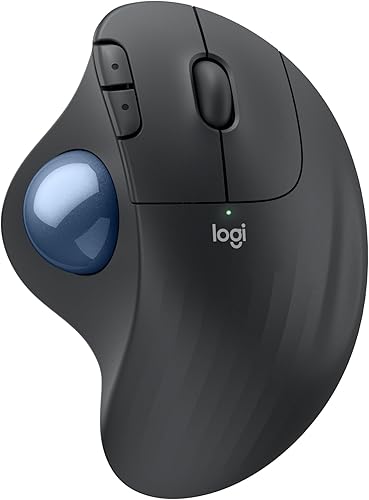
The Logitech ERGO M575S suits users who want thumb control without regular charging. Its sculpted right-hand shape, quiet clicks and included AA battery support long office sessions.
Pros
- Up to 18 months of battery life
- Bluetooth and Logi Bolt receiver
- Quiet clicks
- Works with PC and tablet
Cons
- Right-hand design
- Only 2 buttons are listed in the product data
The Logitech ERGO M575S is the best wireless trackball mouse here for people who want long battery life. Its included AA battery can last up to 18 months, so it needs less routine charging than the rechargeable models.
Bluetooth and the included Logi Bolt USB receiver give you two ways to connect. It works with Windows, macOS, personal computers and tablets, making it a practical fit for a mixed office setup.
The sculpted right-hand shape keeps the cursor under your thumb while the mouse stays in place. Logitech also describes the clicks as quiet, which can matter when your desk is close to another person.
The housing uses certified post-consumer recycled plastic in the listed Graphite color. The model has a Graphite finish with a blue ball and is described as a good fit for most hand sizes.
This is the better Logitech choice if you want a familiar, simple setup with a long-lasting AA battery. If you need the broader operating-system list and 3 customizable buttons, compare it with the other M575S version below.
Logitech Ergo M575S Wireless Ergonomic Trackball Mouse: Best for broad device compatibility
- Thumb control
- Bluetooth connection
- Included Logi Bolt receiver and AA battery
- Up to 18 months of battery life
- 3 customizable buttons
This Logitech M575S version is a useful match for households using laptops, PCs, smartphones and tablets. It keeps the same thumb-control idea while adding a broad operating-system range.
Pros
- Broad operating-system support
- Up to 18 months of battery life
- Included receiver and AA battery
- 3 customizable buttons
Cons
- Windows 10 is the minimum listed version
- Bluetooth is the listed connection technology
This Logitech ERGO M575S version is the better fit for users moving between Android, Windows, iOS and macOS devices. Its product data lists compatibility with laptops, personal computers, smartphones and tablets.
The package includes the mouse, Logi Bolt receiver, 1 AA battery and a document. You can also connect through Bluetooth, while the battery is rated for up to 18 months.
Its thumb-control layout keeps the mouse stationary as you move the pointer. The model supports up to 2000 DPI and includes 3 customizable buttons, time-saving shortcuts and Smart Actions through the Logi Options Plus app.
The black model measures 6 x 4.2 in. That larger stated length may suit a broad palm, but it also deserves a quick desk-space check before you order.
Choose this version when device variety and button customization matter. Choose the Graphite and Blue Ball M575S when you prefer its listed 2-button setup and a shorter stated battery-life description with the same 18-month figure.
ProtoArc EM02 Wireless Trackball Mouse: Best for an adjustable hand angle
- 0-degree or 15-degree adjustable angle
- Bluetooth or 2.4G wireless
- USB-C rechargeable
- 5 DPI levels from 200 to 1600
- 90-day standby time
ProtoArc gives you a choice between a flat 0-degree position and a tilted 15-degree position. It also offers quiet clicks, multi-device switching and USB-C charging.
Pros
- Adjustable angle
- USB-C charging cable included
- 90-day standby time
- Works with Linux, Mac and PC
Cons
- Forward and back buttons are not compatible with macOS
- Trackball cleaning is part of routine care
ProtoArc EM02 is the best wireless trackball mouse here for an adjustable hand angle. Its hinge lets you use the mouse flat at 0 degrees or tilted at 15 degrees, so you can compare both positions at your desk.
The connection options are Bluetooth and 2.4G wireless, with one-button switching between devices. It works with Linux, Mac and PC, as well as Android, Windows and tablets in the compatible-device data.
Its USB-C rechargeable design includes a Type-C charging cable, USB receiver, user manual and mouse. A full charge is described with up to 90 days of standby time.
Five DPI settings run from 200 to 1600: 200, 400, 800, 1200 and 1600. Starting at 200 or 400 DPI can make the adjustment period easier, then you can increase speed as your thumb control improves.
Quiet-touch buttons suit late-night work. ProtoArc notes that dust can collect on the ball and its 3 white rollers, so cleaning is part of normal trackball care when movement feels sticky or imprecise.
Yadkbo Ergonomic Wireless Trackball Mouse: Best for replaceable batteries
- 3-device connection
- 5 DPI levels from 100 to 1200
- Two AAA batteries required
- 30-degree tilt
- 33-foot wireless range
Yadkbo fits buyers who prefer replaceable AAA batteries over a built-in rechargeable cell. Its 30-degree tilt, 3-device connection and larger-hand design suit a spacious desk.
Pros
- Replaceable batteries
- 3-device connection
- 30-degree tilt
- 5 DPI settings
Cons
- AAA batteries are not included
- Large 5.5 x 5.5-inch footprint
Yadkbo is the best wireless trackball mouse here for users who want replaceable batteries. It needs 2 AAA batteries, which are not included, so keep a pair ready before setting up the mouse.
Its 30-degree tilt and 5.5 x 5.5 in dimensions make it a large, angled option. The design is aimed at medium to large hands, and the larger footprint needs more room than the Logitech models.
You can connect up to 3 devices through BT1, BT2 and 2.4G wireless. The stated range is 33 ft, and the mouse works with PCs, Macs, laptops, tablets, smartphones and gaming consoles in the product data.
Five DPI settings run from 100 to 1200. Use 100 or 200 DPI when you want slower thumb movement, then move to 800 or 1200 when you need the pointer to cross the screen faster.
Yadkbo suits a desk where battery replacement is easier than charging. Its main trade-off is the larger body and the need to buy 2 AAA batteries separately.
How to choose a wireless trackball mouse
The best wireless trackball mouse depends first on the ball position and hand fit. Compare wireless left-handed mice if a right-handed shape does not suit you.
Thumb-controlled designs keep the ball beside your thumb, while the body stays fixed on the desk.
Measure the space beside your keyboard before choosing a large model. TECKNET and Yadkbo list larger dimensions, while the Logitech models may be easier to place in a tighter office.
Should you choose a thumb-controlled trackball mouse?
A thumb-controlled trackball mouse suits users who want the pointer to move without sliding the mouse body. The Nulea M501, TECKNET, both Logitech M575S models, ProtoArc EM02 and Yadkbo all use thumb control.
Give yourself time to learn the movement. Start with a lower DPI setting, keep your elbow and palm relaxed, and raise the speed only after the cursor feels easy to control.
For a smaller body, see our guide to the best small trackball mouse. Users with larger palms can compare the best trackball mouse for large hands, while smaller hands may benefit from the best trackball mouse for small hands.
How many DPI levels do you need?
More DPI levels give you more ways to match cursor speed to the task. Nulea has 4 settings, TECKNET and ProtoArc have 5 settings, and the Logitech M575S models list sensitivity up to 2000 DPI.
Lower DPI can help when you are learning thumb control or selecting small interface targets. Higher DPI can reduce the thumb movement needed on a large monitor, but the best setting depends on your control and screen layout.
Is rechargeable or replaceable battery power better?
Rechargeable models reduce the need to keep spare batteries nearby. Nulea, TECKNET and ProtoArc use rechargeable designs, while both Logitech M575S models use an included AA battery and Yadkbo requires 2 AAA batteries that are not included.
Choose replaceable batteries if you want to restore use quickly with a fresh pair. Choose rechargeable power if you prefer charging from a USB port and do not want to buy dry-cell batteries.
Our wireless vs wired setup guide covers the wider trade-off between wireless freedom and cable simplicity.
Do wireless trackball mice work for gaming or travel?
A wireless trackball mouse can suit gaming setups that need a stationary pointing device, but the models here are selected for office control and ergonomic desk use. For a gaming-focused comparison, see the best trackball mouse for gaming.
Trackballs can also work in narrow temporary spaces because the body does not need to slide. If portability is your priority, compare the best travel trackball mouse before choosing a larger desktop model.
How do you clean and maintain a trackball?
Clean the ball and the 3 white rollers when cursor movement becomes sticky, rough or less precise. Dust, oil and skin buildup around the ball are common causes of drag.
Buildup is normal with regular use, even on a clean desk. Skin oil, dust and small particles collect where the ball rolls and can make movement feel uneven.
A sticky ball does not always mean the mouse has failed. Try cleaning the ball and rollers first, then test the mouse before you change settings or assume the sensor is at fault.
Keep the mouse on a stable surface and handle the ball gently while cleaning. Gentle care protects the ball and rollers and lets you check whether the ball rolls freely once debris is removed.
Follow the model's own instructions for removing the ball. The Logitech M575S allows the ball to be ejected from its cage, while other models may use a different method, so check the manual for your exact mouse first.
Low battery power can also cause lag or imprecise control on some models. If cleaning does not restore smooth movement, charge the mouse or replace its batteries next.
Try not to press hard on the ball or scrub the rollers with force. The goal is to remove buildup and restore a clean contact surface.
After cleaning, give the mouse a few minutes of normal use before you judge the result. Cursor control can feel different at first, especially if you also changed DPI settings during troubleshooting.
For replacement parts, see the best trackball mouse ball replacement guide. That guide can help if cleaning no longer restores smooth rolling or if the ball shows visible wear.
If hand comfort is your main concern, our comparison of the best trackball mouse for carpal tunnel offers another way to narrow the options. Hand position, body size and tilt can matter as much as cleaning when discomfort returns.
A stable surface also helps during daily use, not only during cleaning. When the mouse body stays put, your thumb can focus on cursor control instead of chasing a shifting device.
Replaceable and rechargeable models both need the same basic ball care. The power source changes, but dust and oil can still collect on the ball and rollers over time.
Do programmable buttons matter?
Programmable buttons matter when you want shortcuts for repeated actions. The Logitech M575S version with 3 customizable buttons is the clearest match here, while the Nulea M501 explicitly states that its buttons are not programmable.
Extra buttons are not always better. If you mainly browse, write and move between documents, a comfortable shape, stable tracking and a connection that suits your devices may matter more.
For shortcut-heavy work, compare the best trackball mouse with programmable buttons. Users interested in a specific brand can also review the best Kensington trackball mouse and best Sanwa trackball mouse guides.
More guides on this topic
- Best Trackball Mice for Mac
Which wireless trackball mouse should you choose?
Pick the Nulea M501 if you want the strongest mix of rechargeable power, 3-device switching and adjustable DPI. Choose TECKNET for a larger hand and 16-degree angle, Logitech for long AA battery life, ProtoArc for a selectable 0-degree or 15-degree position, or Yadkbo for replaceable AAA batteries.
Start with how you use your desk each day. If you move between several devices, multi-device switching may save more time than a small difference in shape.
If you work at one computer for long stretches, battery type and hand fit may matter more. A rechargeable mouse suits a steady charging routine, while replaceable batteries suit a setup where you prefer a quick swap.
Hand size is the next filter. TECKNET and Yadkbo are aimed at medium to large hands, so smaller hands may find the larger bodies harder to control during the adjustment period.
The best wireless trackball mouse is the one whose ball position, body size, battery type and connection options match your desk. Measure your available space, confirm your operating system and start at a slower DPI while you learn the thumb movement.
Operating system checks matter because a few models have limits on forward and back buttons. Mac users in particular should confirm that button behaviour before relying on those controls for browser navigation.
DPI range is worth comparing, but it should not override fit. A wider range gives you slower control for careful work and faster movement for a large screen, yet comfort comes first during the first weeks.
Tilt and angle are personal, so treat them as a posture choice rather than a guarantee. A flat position may feel natural to one person, while a tilted position may suit another hand and arm position.
Consider your desk space before you order a large model. A stationary trackball saves sliding room, but a wide or tall body still takes up fixed space beside your keyboard.
Also think about noise and shared spaces. Quiet clicks can be useful when another person is nearby, while a standard click may not matter in a private office.
Care needs should also factor into the final pick. Any trackball can collect dust and oil, so a model you are willing to clean regularly will serve you better than one you neglect.
If you are unsure between two close options, choose the one whose connection type and battery type fit your existing routine. Familiar power and pairing habits often matter more than a long feature list.
Buy for the desk you actually use, not an ideal desk you plan to build later. The right trackball mouse is the one that fits your hand, your devices and your daily workflow from the first week onward.
Our top 3 picks at a glance
-
1
Best for flexible multi-device work
Nulea M501 Wireless Trackball Mouse Ergonomic Thumb
9.6/10 our score
See it on Amazon -
2
-
3
Best for long battery life
Logitech Ergo M575S Wireless Bluetooth Trackball Mouse
9.4/10 our score
See it on Amazon
Frequently asked questions
What is the best wireless trackball mouse for most people?
The Nulea M501 is the strongest general pick here because it combines thumb control, 3-device switching, 4 DPI levels and a rechargeable battery. It also works with PC, laptop, iPad, Mac and Windows.
Choose a Logitech M575S instead if long AA battery life matters more than recharging.
Are wireless trackball mice good for small desks?
Yes. A trackball mouse stays in one place while your thumb moves the ball, so it needs less desk depth than a regular mouse.
The Nulea M501, Logitech ERGO M575S and ProtoArc EM02 are especially useful when your work area is tight or crowded.
Should you choose Bluetooth or a USB receiver?
Bluetooth is useful when you want to avoid a receiver, while a USB receiver can suit a computer with a free USB port. Several picks here support both connection types, including the Nulea M501, TECKNET, Logitech ERGO M575S and ProtoArc EM02.
How long does it take to get used to a trackball mouse?
Many people need a short adjustment period because the thumb moves the pointer while the mouse stays still. Start with a lower DPI setting, keep the mouse in a stable position and increase sensitivity after the movement feels predictable.