How to Make a Standing Desk
To make a standing desk, pair a sturdy desktop with an adjustable desk base, confirm their size and weight limits, then attach and level the base before setting your work heights.
On this page (9 sections)
- What parts do you need to make a standing desk?
- How do you choose a desktop and adjustable base?
- How do you assemble a standing desk?
- How do you set the desk height and test movement?
- How do you manage cables on a moving desk?
- Can you turn a regular desk into a standing desk?
- How do you choose a frame for your setup?
- How long should you stand at a standing desk?
- Which setup should you build?
To make a standing desk, pair a sturdy desktop with an adjustable base, confirm their size and weight limits, then attach and level the base before setting your working heights. An electric frame raises the whole work surface, so choose one that fits your top and everything you plan to place on it.
Building from separate parts gives you control over the top's size and shape. For a shared office, compare back-to-back standing desks before settling on a layout.
Start by measuring your room, desktop, and equipment before choosing a frame.
What parts do you need to make a standing desk?
You need a compatible desktop and an adjustable base. For an electric desk, plan for a power outlet and enough cable length to reach it as the desk moves.
A desktop can be new or one you already own, provided it's sound and compatible with the base. Check its length, depth, thickness, and material against the frame instructions.
A top that's too small, thin, or weak may not provide safe mounting points.
Decide whether you want manual or electric height adjustment. Electric frames use a motor and controller; check the required setup and keep the cord clear of moving parts.
You may also want a monitor stand or arm, a keyboard and mouse, and a cable tray. If you need built-in storage, compare standing desks with drawers.
Add these after the desk is assembled, so you can route cables around the final layout.
How do you choose a desktop and adjustable base?
Choose a base that supports the desktop dimensions and the full desk load. Count the top, frame-supported equipment, and accessories together, then leave a margin under the frame's stated capacity.
Measure the desktop rather than relying on a size label. Also check its thickness, underside shape, and material, since those affect whether the frame can attach securely.
Compare base height range with your intended seated and standing positions. The desk should adjust to both; a frame that doesn't reach your comfortable height won't suit your setup.
For a frame-only setup, VIVO's dual-motor frame supports up to 220 lb when connected to power and fits recommended tops 40–85 in long and 23–43 in wide, at least 3/4 in thick.
ErGear's electric frame is designed for tops 39.4–63.3 in long and 24–30 in deep. Its listed capacity is 176 lb, so include the desktop and equipment when checking the total.
If you want another VIVO option, its dual-motor frame fits recommended tops 40–77 in long and 23–43 in wide, at least 3/4 in thick, and supports up to 220 lb when connected to power.
The two VIVO frames have different listed frame sizes, column designs, and lift speeds. Compare those details alongside the fit and capacity when choosing between them.
For more options, see our guide to best standing desk legs. If you already own a desk, how to convert a regular desk to standing covers alternatives to building a new workstation.
How do you assemble a standing desk?
Follow the frame instructions in order, and attach the base to the desktop only after checking the layout. Instructions differ by frame, so use its specified hardware and tools instead of assuming every kit assembles the same way.
- Clear a flat work area and protect the desktop's finish.
- Lay out the frame parts and confirm the hardware matches the instructions.
- Assemble the legs and crossbars as directed.
- Center and align the frame under the desktop, leaving room for cables and controls.
- Mark and make pilot holes only if the instructions call for them.
- Secure the frame using the supplied or specified fasteners.
- Attach the controller and route its cables away from moving parts.
- Turn the desk upright with help if it is too heavy to lift safely.
Before drilling, check that each screw is shorter than the desktop thickness and that no wire, brace, or other obstacle sits beneath the planned hole. Don't overtighten fasteners, which can damage the top.
How do you set the desk height and test movement?
Set the desk so your arms and screen feel comfortable at both sitting and standing heights. Keep your shoulders relaxed, elbows near your sides, and wrists in a neutral position while typing.
Adjust the chair, keyboard, and monitor as a group. Your eyes should meet the screen comfortably without leaning forward or looking sharply down.
Before loading the desk, check that the frame is level and all fasteners are secure. Connect power as instructed and move the desk through its range with the area around it clear.
Watch for snagging cables, rocking, unusual sounds, or anything catching under the desktop. Stop if movement looks uneven; check the frame assembly and instructions before continuing.
How do you manage cables on a moving desk?
Leave enough slack for the full height range, while keeping cords away from the legs and crossbars. A cable that is taut at standing height can pull loose when you lower the desk.
Raise and lower the empty desk while checking every connection. Then add your equipment and repeat the check at your highest and lowest settings.
Group cords with reusable ties or a cable tray, but don't bind them so tightly that they can't move. Keep the power cord positioned so it won't catch on the frame or wheels.
Can you turn a regular desk into a standing desk?
Yes, if the existing desktop can attach securely to a compatible adjustable base and the combined load stays within capacity. Measure the top and inspect its underside before choosing a frame.
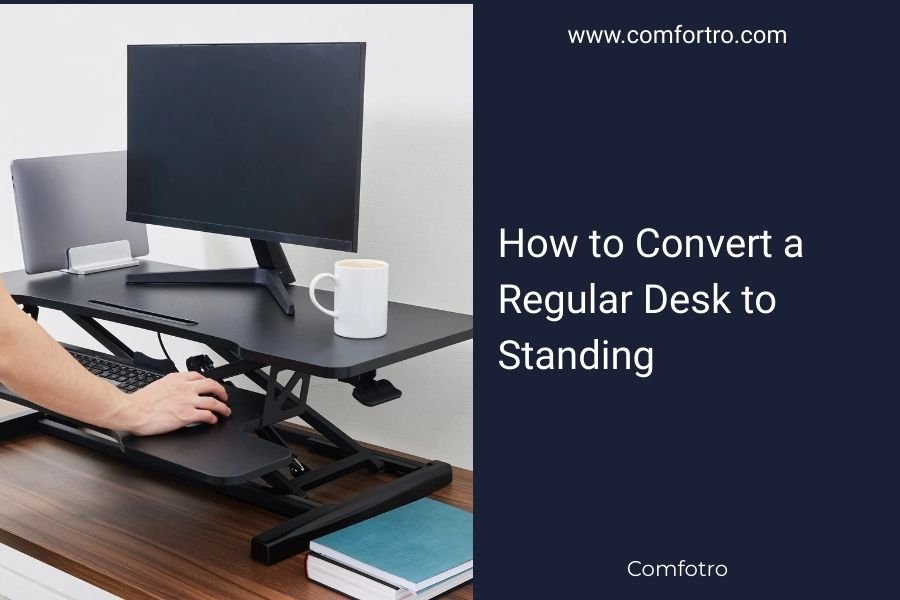
A converter that sits on top of a desk is another option when you don't want to replace the legs. Read can you convert a normal desk into a standing desk? to compare approaches and limits.
A new adjustable base makes more sense when the old desk is damaged, too small, or incompatible. Check the desktop fit before you buy parts.
How do you choose a frame for your setup?
Choose the frame based on desktop fit, height range, capacity, and the features you need. A larger top may need a wider frame, while a heavier setup calls for more capacity.
For a gaming setup, consider the computer, screens, speakers, and other gear as part of the total load. See our best standing desk for gaming guide for desk options for that use.
A four-leg frame may suit shoppers comparing a different support layout. Our guide to the best standing desk frame 4 legs covers that format.
Motor count is another comparison point, but check the full frame details rather than choosing on that number alone. Compare best dual motor standing desk legs and best electric standing desk frame for more frame choices.
How long should you stand at a standing desk?
Alternate between sitting and standing in a way that feels comfortable, and change position when you begin to feel tired or stiff. There isn't one schedule that suits every person or task.
Make small changes rather than trying to stand for a long stretch right away. Take short walks or stretch between work periods, and keep your monitor and keyboard at comfortable heights.
For more guidance on alternating positions, read how long should you stand at a standing desk?.
Which setup should you build?
Choose a desktop and base that fit together and support your complete setup. Measure first, check the height range and capacity, then assemble and test the desk with clear space around it.
Pick a frame with saved height settings if you want quick repeat adjustments. If you already own a suitable top, compare compatible frames before replacing it; if not, choose the desktop and base as a matched pair.
Frequently asked questions
What do I need to make a standing desk?
You need a desktop, an adjustable base that suits its size and weight, and the fasteners and tools specified by the base instructions. An electric frame also needs a nearby outlet.
Measure the top and check that it is thick and strong enough for the frame's mounting points.
Can I use any desktop with standing desk legs?
No. Check the frame's supported desktop length, depth, thickness, and total load before choosing a top.
The desktop, monitors, computer, and other items all add weight, so leave room below the frame's stated capacity and make sure its mounting points fit.
How do I choose the right height for a standing desk?
Set the desk so your shoulders can relax and your elbows stay near your sides while your forearms rest around desk height. Adjust the monitor separately so you can look ahead without tipping your head.
Recheck both positions while seated and standing.
Is it cheaper to build a standing desk?
It can be, especially if you already have a suitable desktop, but the cost depends on the top, frame, tools, and any cable or monitor accessories you need. Compare complete setups and check compatibility before buying parts separately.