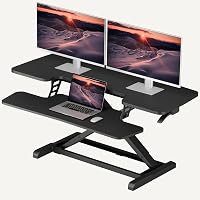
How to Use a VariDesk Standing Desk
To use a VariDesk standing desk, place it on a stable desk, arrange your monitor and keyboard, then raise or lower the converter with both handles. Switch gradually between sitting and standing, and keep hands clear of moving parts.
On this page (7 sections)
- How do you set up a VariDesk standing desk?
- How do you raise and lower a VariDesk safely?
- How do you set the right standing height?
- How should you switch between sitting and standing?
- How do you fit a VariDesk on a small or shared desk?
- What should you check before each adjustment?
- Which standing desk converter should you choose?
To use a VariDesk standing desk, place the converter on a stable desk, arrange your screen and keyboard, and use both handles to raise or lower it. Keep your hands clear of the moving frame, then alternate between sitting and standing at heights that let you work comfortably.
A VariDesk converter sits on an existing desk and moves your work surface up or down. If you prefer a DIY setup, see how to make a standing desk.
If you’re new to this style of setup, first learn what a standing desk converter is.
How do you set up a VariDesk standing desk?
Set the converter on a stable, level desk with room to move it through its full range. Follow the instructions for your model, especially if it needs assembly.
Place your monitor or laptop on the upper surface and your keyboard and mouse on the lower deck or keyboard tray. Center frequently used items so you can reach them without leaning.
The Vari Pro Plus 36 arrives fully assembled and has a two-tier surface, with space for monitors above and a keyboard and mouse below. Its spring-assisted lift has dual handles and foam-wrapped steel intended to help protect against pinch points.
Clear loose cords and objects from the converter’s path before adjusting it. The upper tier measures 36 x 12.25 in, so check that your monitors and accessories fit without crowding the edges.
How do you raise and lower a VariDesk safely?
Use both handles and move the converter smoothly, keeping fingers away from hinges and other moving parts. Follow your model’s instructions for its specific lift and height lock.
Before raising it, check that cords have enough slack and that nothing can tip or slide. Stand in front of the converter, hold both handles, and raise it only as far as needed for the task.
To lower it, keep control of both handles and guide the surface down. Don’t force a stuck or uneven mechanism; clear any obstruction and consult the instructions if it still doesn’t move smoothly.
The VIVO Manual Height Adjustable Standing Desk Converter uses a touch height-locking mechanism and lifts straight up. Its keyboard tray moves in sync with the top surface, so you can keep the keyboard and mouse together as you adjust it.
The VIVO model’s adjustment range is 4.5 to 20 in. Check that its 31.5 x 15.7 in top has enough room for your equipment before setting it up.
How do you set the right standing height?
Adjust the keyboard and monitor so you can work without hunching or reaching. A comfortable position depends on your height, chair, monitor, and the desk beneath the converter.
While standing, keep your elbows near your sides and your forearms roughly level as you type. Set the screen so you can look ahead with your neck relaxed, then make small adjustments to the converter or monitor.
A converter may not suit every body or desk. If you’re tall, compare the options in our guide to the best standing desk converter for tall people, and check the usable height range before choosing.
When seated, lower the converter and adjust your chair so your feet rest comfortably and your arms stay near the keyboard. Keep the monitor at a height that lets you look ahead while seated, too.
How should you switch between sitting and standing?
Change positions regularly and build standing time gradually. There’s no need to stand for a whole workday to use a converter.
Lower the surface when you want to sit, then raise it when you’re ready to stand again. Keep the transition calm and clear your hands and nearby items before moving the frame.
Standing for a long stretch can feel tiring, especially if you’re just starting. Use a chair and take movement breaks, and see how long you should stand at a standing desk for practical guidance.
How do you fit a VariDesk on a small or shared desk?
Measure the desk and the converter’s footprint before placing it. For a compact work surface, compare standing desk converters for small desks.
Leave enough room for the base, keyboard tray, cords, and anything else you use during work.
A larger converter can crowd a corner or leave little room for notebooks. For a corner setup, compare our guide to the best standing desk converter for a corner desk.
For a student desk, consider whether books, a laptop, and writing materials will still fit when the converter is in place. Our picks for the best standing desk converters for students may help you compare compact setups.
What should you check before each adjustment?
Make sure the converter is clear, stable, and free to move. These quick checks can help prevent a snag or a falling item.
- Keep hands away from the frame and pinch points.
- Check that cords won’t pull tight as the surface rises.
- Move cups and other loose objects before adjusting.
- Keep your keyboard and mouse within easy reach.
- Stop if the converter feels unstable or doesn’t move smoothly.
A manual converter may need some assembly. The 42 in VIVO Standing Desk Converter has a keyboard tray that raises with its top and requires assembly; follow its instructions before use.
The VIVO converter’s adjustment range is 4.5 to 20 in, and its desktop holds up to 33 lb. Keep the combined weight within the model’s stated limits and arrange heavier equipment securely.
Which standing desk converter should you choose?
Choose based on how you work and the space available on your desk. If a corner work surface suits your room, see L-shaped standing desk options.
A two-tier design can keep the keyboard below the monitor, while a wider top can suit a setup that needs more surface area.
Pick the Vari Pro Plus 36 if you want a fully assembled, two-tier converter with a spring-assisted lift. Consider the 32 in VIVO if you prefer a straight-lifting design with a touch height lock and a moving keyboard tray.
For button-controlled adjustment, compare electric standing desk converters.
Choose the 42 in VIVO if its wider top fits your desk and equipment. Measure first, follow the instructions, and keep the converter clear when you switch heights.
For gaming, compare the setup needs in our guide to the best standing desk for gaming. A converter works best when its surface, height range, and movement path suit the rest of your workspace.
Frequently asked questions
How do you raise a VariDesk standing desk?
Stand in front of the VariDesk, hold both handles, and use the lift mechanism to raise it to a comfortable height. Keep your hands clear of the moving frame and make sure the converter is stable before working.
Follow the instructions that come with your specific model.
How do you lower a VariDesk standing desk?
Hold both handles and guide the VariDesk down slowly, keeping fingers away from the frame and pinch points. Clear items that could shift or fall, and stop if the converter does not move smoothly.
Check your model's instructions for its exact lowering procedure.
How high should a standing desk converter be?
Set the keyboard so your elbows stay near your sides and your forearms are roughly level while typing. Raise the monitor so you can look ahead without tilting your neck down.
Adjust the converter and chair to suit your body, then change positions throughout the day.
How often should you switch between sitting and standing?
Switch when you feel ready to change position, and build standing time gradually if you are new to it. Alternate with seated work, take short movement breaks, and avoid staying in one posture for a long stretch.
See our guide to how long to stand at a standing desk.