Sihoo Doro C300 Pro Review: Worth It? (October 2026)
The SIHOO Doro C300 Pro suits desk users who want adaptive lumbar support and wide armrest adjustment. Its seat depth, backrest and recline can also be adjusted, while the C300 Pro V2 versions add different armrest and support features.
On this page (7 sections)
The SIHOO Doro C300 Pro is an adjustable ergonomic chair built around adaptive lumbar support and multi-direction armrests. Its seat depth, backrest and recline can be changed to suit your sitting position, while the C300 Pro V2 versions add a different support system and 8D armrests.
The main choice is between the original model’s 6D armrests and the V2 options’ 8D armrests. Compare the exact configuration and dimensions with your desk, body and preferred adjustments before you decide.
The SIHOO Doro C300 Pro at a glance
The original C300 Pro is a strong fit if you want adaptive lumbar support, adjustable seat depth and broad armrest positioning. Its flexible backrest also moves with upper-body movement, according to SIHOO’s product description.
SIHOO Doro C300 Pro Ergonomic Office Chair: Best for extensive armrest adjustment
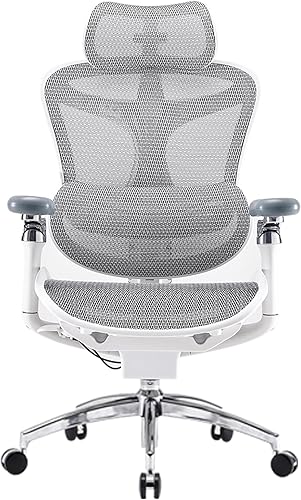
- Adaptive lumbar support
- 6D armrests
- Adjustable seat depth
- Three recline positions
The original C300 Pro pairs adaptive lumbar support with adjustable seat depth and 6D armrests. Consider it if you want several ways to position your arms and back.
Pros
- 6D armrests adjust in five directions
- Seat depth adjusts
- Three recline positions
- Adaptive lumbar support moves with the sitter
Cons
- Armrest adjustment may be more than you need
- Check the chair dimensions against your space
The headrest adjusts up and down, forward and back, and rotates. SIHOO also describes the 6D armrests as moving in five directions and aligning with the backrest when you recline.
What the review score reflects
The score weighs the chair’s stated adjustments and features against what you may want from an ergonomic office chair. The original C300 Pro scores highest here because its adjustable seat depth, backrest, headrest and 6D armrests give you several ways to shape the fit.
We compared the original model with two C300 Pro V2 configurations. The V2 versions describe full-body adaptive support and 8D armrests, but their feature and included-component details differ.
Which C300 Pro features matter most?
The most useful features are the ones that let you match the chair to your posture, desk and body proportions. Seat depth, backrest position, armrest placement and recline each affect a different part of your sitting setup.
The original model’s seat depth adjustment can help you set the seat for your leg length. Its backrest has four positions and moves vertically by 2.36 inches, while its three recline positions are 105°, 120° and 135°.
The adaptive lumbar support is designed to move with you rather than require manual repositioning. That may appeal if you shift between leaning forward to type and reclining to read, but individual fit and comfort vary.
The 6D armrests adjust up and down, forward and back, in and out, and rotate or flip upward. SIHOO says they coordinate with the backrest while reclining, which may help keep your arms supported as the chair tilts.
Does the C300 Pro fit your desk and body?
Check the chair’s dimensions, adjustment range and armrest clearance before buying. Even a highly adjustable chair can be a poor fit if its seat or arms don't work with your desk.
The original C300 Pro’s dimensions are 27.56 x 27.56 x 50.79 inches, and its product information also gives a seat depth of 17.1 inches and width of 20 inches. Measure your available floor area and compare the seat measurements with a chair that already feels comfortable.
Armrest height and width can affect whether you can pull close to the desk. Check the gap beneath your desk and whether you prefer arms to sit level with the desktop or clear it when you tuck the chair away.
SIHOO describes the original model as more suitable for taller users because of its wider seat and seat depth adjustment. That is a general fit description, so use your own leg and torso measurements to judge whether its ranges make sense.
For a wider look across the brand’s options, see our guide to the best SIHOO ergonomic office chair.
How does the C300 Pro V2 compare?
The C300 Pro V2 versions add DynaCore full-body support and 8D armrests, with three recline stops at 105°, 125° and 135°. One of the options includes a footrest, which can matter if you want a place to rest your legs while reclining.
Compare more reclining chairs with footrests.
SIHOO Doro C300 Pro V2 Ergonomic Office: Best for V2 support with a footrest

- DynaCore full-body support
- 8D armrests
- Adjustable seat depth
- Three recline positions
This V2 version includes a footrest and 8D armrests, with adjustable seat depth and recline. Check the seat and armrest fit for your desk setup.
Pros
- Footrest included
- 8D armrests
- Three recline positions
- 36-month warranty
Cons
- The feature set differs from the original C300 Pro
- Confirm the footrest suits your desk clearance
This V2 configuration is described as having a 3D superwide headrest, adjustable seat depth and smart adaptive recline resistance. Its stated warranty is 36 months.
SIHOO Doro C300 Pro V2 Ergonomic Office: Best for a V2 chair without a listed footrest

- DynaCore full-body support
- 8D armrests
- Adjustable seat depth
- Three recline positions
This C300 Pro V2 option describes full-body adaptive support and 8D armrests. Its included components differ from the footrest version, so compare the exact configuration before choosing.
Pros
- 8D armrests
- Adjustable seat depth
- Three recline positions
- Full-body adaptive support
Cons
- No footrest is named in the included components
- Confirm dimensions and configuration for your space
The second V2 configuration also describes 8D armrests and adaptive lumbar support. Its included components name an arm pad, caster, cushion, LED light and lumbar support, but do not name a footrest.
Compare the exact configuration when shopping, since the two V2 options have different listed included components. If you are deciding between generations, our SIHOO Doro C300 review covers the other Doro model.
What should you know about the armrests and recline?
The C300 Pro’s armrests offer more adjustment directions than a basic height-only design. That range can help if you often change between typing, gaming and reclining, though it may be unnecessary if you keep a fixed posture.
For desk work, set the armrests so your shoulders can relax and your elbows stay near your sides. Then check that the arms do not stop you from moving close enough to the keyboard and desk.
The original model reclines to 105°, 120° and 135°. For more models, see the best reclining office chairs.
Its intelligent weight-sensing device is described as adjusting to the user’s weight to make reclining easier and more balanced.
The V2 options use different recline stops: 105°, 125° and 135°. They also describe a smart adaptive mechanism that matches resistance to weight, so compare the range and mechanism names for the exact version you are considering.
What trade-offs should you consider?
The C300 Pro’s broad adjustment set is useful when you plan to fine-tune seat depth, arm placement and back support. The trade-off is that more adjustment choices can take time to set up, and the chair still needs to fit your desk and body.
Breathable mesh is a central feature of the original C300 Pro. If you prefer upholstered seating, compare fabric office chairs.
The seat has a foam fill, while the V2 configurations describe mesh padding and full-body adaptive support.
The V2 models have a different feature set, so don't assume every C300 Pro detail carries over unchanged. Confirm which armrest configuration, footrest and included components apply to the specific option you choose.
SIHOO says the original model has a three-year warranty and offers free product parts during that period. The V2 versions describe a 36-month warranty; review the warranty terms for the model you select.
Is the SIHOO Doro C300 Pro worth considering?
Consider the original C300 Pro if 6D armrests, adjustable seat depth and a vertically adjustable backrest are the features you value most. Choose a V2 option if its 8D armrests and full-body support fit your priorities, and decide whether the footrest configuration matters to you.
If you want to compare a different chair in the brand’s range, read our SIHOO M18 review or see the SIHOO M18 vs M57 comparison. Pick the C300 Pro for its particular mix of adjustment options, then verify the exact model configuration and fit for your workspace.
Frequently asked questions
What adjustments does the SIHOO Doro C300 Pro have?
The original C300 Pro has an adjustable headrest, seat depth, backrest and recline, plus adaptive lumbar support. Its backrest has four positions and moves up or down by 2.36 inches, while the chair reclines to 105°, 120° or 135°.
Its 6D armrests adjust in five directions.
What is the difference between the C300 Pro and C300 Pro V2?
The original C300 Pro lists 6D armrests and recline positions of 105°, 120° and 135°. The V2 versions describe 8D armrests, DynaCore full-body support and positions of 105°, 125° and 135°.
One V2 configuration includes a footrest, while the other does not name one among its included components.
Does the SIHOO Doro C300 Pro suit taller users?
The original C300 Pro has a wider seat and adjustable seat depth, and SIHOO describes it as more suitable for taller users. Fit still depends on your leg length, desk height and preferred sitting position, so compare the chair dimensions and adjustability with your own measurements before choosing.
How should I compare SIHOO chairs?
Start with the adjustments you need and whether the chair fits your body and desk. The C300 Pro emphasizes adaptive lumbar support, seat depth and adjustable armrests; the SIHOO M18 review and M18 versus M57 comparison cover alternatives with different feature sets.