Task Chair vs Office Chair: What Is the Difference? (November 2026)
A task chair is a type of office chair made for desk work, while office chair is a broader label. Compare each chair’s adjustments, back support and fit instead of relying on its name.
On this page (7 sections)
- Task chair vs office chair: what is the difference?
- Which adjustments matter for desk work?
- Does the back style change how the chairs feel?
- Which chair suits your work style?
- How do you match a chair to your desk?
- Are task chairs more ergonomic than office chairs?
- Which should you choose: a task chair or office chair?
A task chair is a type of office chair made for desk work, while office chair is a broader label. In a task chair vs office chair comparison, the name matters less than the chair’s adjustments, back style and fit at your desk.
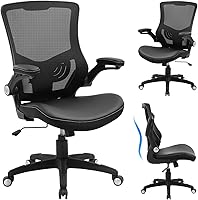
Some chairs use both labels in their names. The Amazon Basics Office Task Chair is one example, while the BestOffice model is called an ergonomic office chair and includes adjustable seat height and armrests.
That overlap is why it helps to compare features instead of assuming the labels define different designs.
Start with how you work and what you want to adjust.
 Best for reclining breaks
GABRYLLY Ergonomic High-Back Office Chair with Footrest

Task chair vs office chair: what is the difference?
“Task chair” usually points to a chair intended for focused desk work; “office chair” can refer to a wider range of workplace seating. Neither label guarantees a particular set of adjustments or level of support.
A task chair may have a swivel base, rolling casters and adjustable seat height for moving between desk tasks. An office chair may have those features too, or it may have a different shape and purpose, such as a high-back chair with a footrest.
These are common naming patterns, not strict categories with a universal feature checklist. A chair’s product name can help you understand its intended use, but the controls and dimensions tell you more about how it may fit your setup.
If you want a closer look at the category, see What is a Task Chair? Definition & Benefits.
For a shorter explanation of the chair type, read What Is a Task Chair?.
Is a task chair always smaller than an office chair?
No, the name alone doesn’t tell you a chair’s size. Compare its dimensions with your desk and the space around it.
For example, the Amazon Basics task chair is a mid-back model with a seat width of 20.1 in. The GABRYLLY chair has a wide mesh seat and high back, plus a pull-out footrest.
Those differences come from the individual designs, not from a reliable rule that all task chairs are compact or all office chairs are large. Check seat width, depth and height, then account for armrests and room to roll back.
Which adjustments matter for desk work?
Seat height and a stable way to sit at your desk matter first; other adjustments depend on your habits. Check which controls each chair actually offers instead of relying on an “ergonomic” or “task” label.
The BestOffice chair has adjustable seat height from 17.1 to 20.3 in and adjustable armrests. The Amazon Basics task chair offers adjustable seat height and seat angle, plus tilt control.
The GABRYLLY chair has adjustable seat height and a backrest that tilts from 90° to 135°. Its arms flip up and its headrest is adjustable, so it offers more ways to change the setup.
Think about which adjustments you’ll use every day. A tilt mechanism won’t help if you prefer to stay upright, and a headrest may not matter if you don’t want one.
What should you adjust first?
Set seat height so you can work at your desk without reaching up or hunching forward. Then check whether the armrests get in the way of your desk or help you rest your arms comfortably.
Desk height and chair height work together. If the chair can’t move high or low enough for your desk, a long list of other features won’t correct that basic mismatch.
Look at controls you can reach while seated and understand how they work. If you share a chair with someone else, easy-to-change settings may be more useful than a feature you rarely adjust.
Does the back style change how the chairs feel?
Back style can change how much of your upper body a chair covers, but it doesn’t tell you on its own which chair will feel better. Compare the back height, shape and included support features.
The BestOffice and Amazon Basics chairs are mid-back models. The GABRYLLY chair has a high back and adjustable 3D headrest, while the GTPLAYER gaming chair has a solid back, headrest and lumbar pillow.
A mesh back, such as the one on the BestOffice chair, allows airflow through the backrest. The Amazon Basics chair has padded upholstery in black faux leather.
These materials feel and behave differently, so choose based on your preferences and room conditions.
For help narrowing down desk-focused choices, see our Best Task Chair For Home Office guide. If gaming is part of your setup, compare the options in Best Task Chair For Gaming.
Which chair suits your work style?
Choose by the features you’ll use and the way you work, rather than by the category name. A basic desk setup may call for fewer controls than a chair you also use for gaming or reclining breaks.
Choose a simple desk chair for everyday tasks
The BestOffice chair suits a setup where a mid-back shape, mesh back, lumbar support and adjustable seat height cover your needs. Adjustable armrests give you another way to fit the chair to your desk.
The Amazon Basics task chair offers padded seat, backrest and armrests, plus tilt control and adjustable seat angle. Consider it if you prefer a padded faux leather chair and want those specific controls.
Before choosing either, compare the chair’s height range with your desk and check the space between its arms. If the base needs replacing, compare replacement office chair bases.
A chair that rolls and swivels still needs enough room to move without hitting drawers or walls.
Choose a chair with a headrest or footrest if you’ll use it
The GABRYLLY chair combines a high back, adjustable headrest and pull-out footrest. The backrest tilts up to 135°, which may suit someone who wants to recline during breaks as well as work at a desk.
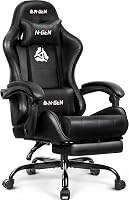
The GTPLAYER chair includes a headrest, lumbar pillow and footrest. Its title describes it for office or gaming use, so it may suit a desk setup where those added features matter.
Extra features take space and may be unnecessary for focused upright work. Measure the chair’s footprint and consider whether the footrest can extend without blocking a walkway.
When is a gaming chair a reasonable office choice?
A gaming chair can work at an office desk if its size, shape and adjustments fit your workspace. Compare the chair’s features with the way you sit, since a gaming label doesn’t tell you how it will fit every desk.
The GTPLAYER model has a height-adjustable seat, 360° swivel, headrest, lumbar pillow and footrest. Its solid back and Pearl White color give it a different look from the mesh-backed BestOffice chair.
Check your desk clearance and the room needed to recline or extend the footrest. If those features don’t fit your routine, a simpler task chair may be easier to place.
How do you match a chair to your desk?
Measure your desk, chair space and seated position before choosing. This helps you rule out a model that has useful features but doesn’t fit the room.
Check the space beneath the desk, including any drawers or crossbars that could meet the seat or armrests. Then compare the chair’s height range and dimensions with the clearances you measured.
Leave room for the chair to roll back and for you to enter or leave the seat. If you want a footrest, measure its extended reach too.
The GABRYLLY chair’s arms flip up, which can help you tuck it under a desk when it’s not in use. That still doesn’t replace measuring the seat and base against your available space.
Are task chairs more ergonomic than office chairs?
Not automatically: “task chair” and “office chair” don’t guarantee a specific ergonomic setup. Look at the controls and support features that matter for your workstation.
The BestOffice chair includes lumbar support and adjustable seat height and armrests. The Amazon Basics chair adjusts in height and seat angle, and it has tilt control and padded armrests.
The GABRYLLY chair adds an adjustable headrest and a reclining backrest. Those features may help you customize the chair, but you still need to check whether they work with your desk height and sitting habits.
A chair that fits you poorly can be awkward even when it has several adjustments. Use the chair’s measurements and control details to narrow your options, and follow the setup instructions for the model you choose.
Which should you choose: a task chair or office chair?
Choose based on the exact chair, not the broad label. Pick the BestOffice or Amazon Basics model if its mid-back shape and desk adjustments match your needs; consider GABRYLLY or GTPLAYER if you want a headrest, recline or footrest.
A task chair is an office chair intended for work, so the terms can overlap. Compare seat height, back style, arm position and room needs, then choose the model that fits your workday and space.
For another chair-category comparison, see Executive vs Task Chair: Key Differences or Drafting Chair vs Office Chair: Differences.
What to remember when comparing task chairs and office chairs
A task chair label suggests desk work, while office chair can describe a wider range of seating. The model’s actual controls, materials and dimensions are the useful details to compare.
Choose a simpler chair if you want the basic adjustments you’ll use each day. Choose added features only when they fit your desk, room and sitting routine.
Frequently asked questions
Is a task chair the same as an office chair?
A task chair is one kind of office chair, usually meant for desk work. Office chair is a broader label that can cover task, executive, conference and other desk seats.
Names vary, so compare the adjustments, back style and support features on the chair itself.
What is the difference between a task chair and an office chair?
The main difference is how broad the label is: task chair describes a work-focused chair type, while office chair can describe many chairs used in offices. There is no single feature that separates every task chair from every office chair, so check what each model adjusts.
Can a task chair be used as an office chair?
Yes. A task chair is designed for desk work, so it can serve as an office chair in a home or workplace.
Check that its seat height, arm position and back support suit your desk and body, and that its size fits the room.
Is an ergonomic chair different from a task chair?
Ergonomic describes features intended to support a usable sitting position, while task describes a chair's work-focused role. A task chair can have ergonomic adjustments, but the label alone doesn't guarantee them.
Check for specific details such as seat-height adjustment, armrests and lumbar support.
Which chair is better for working at a desk?
The better chair is the one that fits your desk and lets you sit comfortably with the adjustments you need. A simple task chair may be enough for a basic setup; a chair with a headrest, tilt or footrest may suit you if you want those features.
Compare the exact fit and controls.