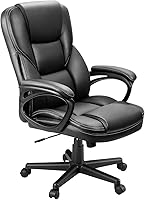
Use a Recliner as an Office Chair
You can use a recliner as an office chair if you can sit upright at your desk with your feet supported, your arms relaxed, and your screen at a comfortable height. Check the fit before committing to a full workday.
On this page (8 sections)
- Can you use a recliner as an office chair?
- How do you check whether your recliner fits the workstation?
- How should you set the recline and footrest for desk work?
- Which desk adjustments help a recliner work better?
- Which office chair alternatives suit desk work?
- Which adjustable desk chairs can you consider?
- What should you watch for during a work session?
- How do you decide whether to keep using the recliner?
You can use a recliner as an office chair if you can sit upright at your desk with your feet supported, your arms relaxed, and your screen at a comfortable height. Check the fit before committing to a full workday.
A household recliner may be comfortable for relaxing but awkward for desk work. Its seat height, armrests, footrest, and distance from the desk all affect whether you can work without leaning or reaching.
Can you use a recliner as an office chair?
Yes, if the recliner fits your desk and lets you work in a supported position. The chair should move close enough for you to reach your keyboard and mouse, while your back stays against the backrest and your feet have support.
Start with the recliner mostly upright. A deep recline can push you away from the desk and make you reach forward, so use it for short breaks or tasks that don't require typing.
An office chair with a reclining back may be easier to fit than a living-room recliner. Compare best reclining office chairs if you want a chair designed around desk use.
How do you check whether your recliner fits the workstation?
Sit in your normal working position and check the desk, chair, and screen together. A chair that feels fine on its own may still put your arms, legs, or eyes at an awkward height once you start working.
Use this quick fit check:
- Pull the chair up to the desk without forcing the arms underneath.
- Sit back and place your feet on the floor or a stable footrest.
- Relax your shoulders and bring your elbows near desk height.
- Move the keyboard and mouse close enough to reach without leaning.
- Set the screen so you can view it without bending your neck forward.
- Check that the recliner can move safely without hitting the wall or desk.
If the seat is too low, raising the screen alone won't fix the reach to your keyboard. Adjust the desk or input devices as needed, and make sure any change leaves your feet supported.
What if the recliner is too low or too deep?
Adjust the workstation around the chair only if you can keep a comfortable reach and stable foot support. A firm footrest can help when your feet don't reach the floor, while a separate keyboard and mouse can bring the work closer.
A deep seat can press behind your knees or make it hard to sit back. Try a cushion only if it doesn't push you forward or raise you so high that your arms no longer line up with the desk.
If the chair's arms prevent it from getting close enough, don't lean forward to compensate. You may need to change the desk arrangement or use a different chair.
How should you set the recline and footrest for desk work?
Keep the backrest mostly upright while typing, and lower the footrest if it blocks your approach to the desk. Reclining more can suit reading or a call, as long as the screen and controls remain easy to reach.
Use the chair's own controls and move gradually. The guide to how to recline an office chair explains how to adjust a desk chair's tilt while keeping its controls within reach.
A recliner's footrest can be useful during a break, but it may shift your hips or move you away from the keyboard. Put it away before typing if it changes your seated position.
Change positions during the day rather than trying to hold one posture for hours. Stand, stretch, or walk when practical, especially after a long stretch of screen work.
Which desk adjustments help a recliner work better?
Bring your work tools to a comfortable reach before changing the chair itself. A separate keyboard and mouse can help you position a laptop screen higher while keeping your hands near desk level.
Keep the mouse close to the keyboard, with your elbows near your sides. If the desk is too high for relaxed shoulders, a different work surface or chair may be a better fix than adding cushions.
The screen should sit far enough away to read without leaning forward. If you raise a laptop, use an external keyboard and mouse so you aren't reaching up to type.
Which office chair alternatives suit desk work?
Choose a desk chair if your recliner blocks the desk, leaves your feet unsupported, or makes you reach toward the screen. To compare another seating style, see kneeling chair vs office chair.
A mesh chair may also suit you if you prefer a more open back and adjustable support.
The SIHOO M18 has an adjustable seat height, headrest, lumbar support, and back support, plus a mesh back. SIHOO says it suits people from 5 ft 6 in to 6 ft 2 in.
Consider a mesh model if you want desk-focused adjustments rather than a large household recliner. See our guide to the best reclining mesh office chair for options with a reclining back.
A tall user should also check seat depth and backrest fit before choosing a desk chair. Our guide to the best reclining office chair for tall people focuses on that fit.
Which adjustable desk chairs can you consider?
A height-adjustable chair with tilt can be a practical alternative when a recliner won't fit the desk. For one ergonomic option, see the Branch Ergonomic Chair Pro review.
Check that the seat height works for your desk and that the chair's back and arms don't get in the way.
The Furmax Office Executive Chair High Back Adjustable has a pneumatic seat-height lever, a rocking function, and an adjustable tilt tension knob. Its contoured backrest provides lumbar support, and its backrest is 21.8 in wide.
The Amazon Basics Office Task Chair has adjustable seat height, seat angle, and tilt control. If its base needs replacing, see replacement office chair bases.
It also has padded armrests, a mid-back, and a 5-point base.
Neither chair's listed features guarantee a fit for every desk. If price is part of your choice, compare office chairs under 100 dollars.
Measure the seat height you need, check the available space under the desk, and consider whether the backrest gives you the support you want.
If you're weighing other chair styles, see can you use a gaming chair as an office chair? for another desk setup comparison. For additional fit guidance, read what is the best office chair for tall people?
What should you watch for during a work session?
Stop using the recliner for desk work if you keep leaning forward, shrugging your shoulders, or losing foot support. Those signs mean the chair and workstation aren't working well together in their current setup.
Check your position again after 20 to 30 minutes. A chair can feel comfortable at first but become awkward once you start typing or switching between the screen and desk.
Keep the floor clear around the recliner, especially if it has a moving footrest. Avoid rolling or sliding the chair over cords, and keep the footrest from blocking your path.
How do you decide whether to keep using the recliner?
For using a recliner as an office chair, keep it if you can sit upright, reach your work, and support your feet without constant adjustment. If it puts you too far from the desk or prevents a relaxed reach, choose a desk chair that fits the workstation.
A household recliner may suit occasional computer use, reading, or calls. For regular typing, prioritize seat height, easy access to the desk, and a backrest position that lets you see the screen comfortably.
Frequently asked questions
Can you use a recliner as an office chair?
Yes, if you can bring the recliner close enough to your desk and keep a workable upright posture. Check that your feet are supported, your elbows rest comfortably near desk height, and you can see the screen without leaning forward.
If the chair's arms or base block the desk, it may not fit.
How do you make a recliner work at a desk?
Start with the recliner mostly upright, then adjust the desk, screen, and foot support to fit your seated position. Keep the keyboard and mouse close enough to reach with relaxed shoulders, and check that the chair can move in and out without catching on the desk or floor.
Is a recliner better than an office chair for working?
A recliner can work for desk tasks if its height and shape let you sit upright and reach your equipment without strain. An office chair is often easier to fit because its height and tilt are designed around desk use.
Compare your actual workstation fit before choosing.
Should you recline while working at a desk?
A slight recline may feel comfortable for reading or calls, but keep your screen and input devices within easy reach. If reclining makes you reach forward, bend your neck, or lose foot support, return to a more upright position.
Change positions when you need a different task setup.