What Is a Thermal Label Maker?
A thermal label maker prints text and designs with heat instead of liquid ink. Direct thermal models use heat-sensitive labels, so you replace label rolls or sheets instead of ink cartridges.
On this page (8 sections)
- How does a thermal label maker work?
- What is the difference between direct thermal and other label printing?
- Do label makers use ink?
- Which compact thermal label maker fits home and office tasks?
- Can a thermal label maker print shipping labels?
- How do you choose the right thermal label maker?
- How should you set up and care for a thermal label maker?
- What is a thermal label maker best for?
A thermal label maker prints with heat instead of liquid ink. Direct thermal models use heat-sensitive labels, so your ongoing supply is label tape, sheets, or rolls rather than ink cartridges.
The right model depends on the labels you need. A compact Bluetooth machine can suit files, bins, school supplies, and small business tags, while a larger shipping printer is built around wider labels and package workflows.
How does a thermal label maker work?
A thermal label maker uses a print head that heats selected points on a heat-sensitive label surface. Those heated points turn dark and form letters, barcodes, borders, or other printed designs.
Direct thermal printing is usually monochrome. Colorful results may come from patterned or colored label material, while the printed text itself remains black on models such as the Phomemo D30 and Nelko P21.
The process needs no ink, toner, or ribbon. That keeps the printing path simple, but it also means you must choose compatible thermal labels and store them according to the label maker's instructions.
For a broader look at office printing equipment, see our guide to desktop printers.
What is the difference between direct thermal and other label printing?
Direct thermal printing creates marks directly on heat-sensitive material. Other label printers may use ink, toner, or thermal transfer ribbon, depending on the design.
Direct thermal models are useful when you want simple text, barcodes, or shipping information without managing ink cartridges. They are common in compact label makers and shipping-label printers.
Thermal transfer printing uses heat to move ink from a ribbon onto another surface. That is a different process, so don't assume every printer described as thermal uses the same supplies.
For a separate heat-based office tool, see how to use a thermal laminator.
Label material also changes the result. Fixed-length labels suit repeated sizes, while continuous tape lets you cut labels to different lengths.
Roll and fanfold labels are common in shipping workflows.
Do label makers use ink?
Most direct thermal label makers do not use ink. They use a heated print head and heat-sensitive label material instead.
Our guide to do label makers use ink explains the supply difference in more detail. The key trade-off is simple: you avoid ink refills, but you need the correct thermal tape or labels for the machine.
Thermal printing is not the same as color printing. The Phomemo D30 and Nelko P21 print black text, while patterned label tapes can add a colorful background or design.
Heat can affect some thermal labels over time. Keep labels away from conditions that may darken or fade them, and choose label stock that matches the surface and environment where you will use it.
Which compact thermal label maker fits home and office tasks?
A compact Bluetooth label maker fits small labels, light organization, and phone-based design. These models are easier to move between a desk, storage area, classroom, or small business workspace.
The Phomemo D30 Label Maker Machine with Tape supports continuous label tapes and fixed-length labels. It connects to smartphones and tablets through Bluetooth and uses the Print Master app on Android or iOS.
The app includes icons, borders, fonts, design assets, templates, barcode and QR code tools, image import, timestamp addition, Excel batch data import, document scanning, OCR recognition, and voice input. The D30 prints at 203 dpi in black and includes a rechargeable battery, charging cord, label maker, and user manual.
Its size is 1.14 in deep by 2.95 in wide by 5.17 in high, and it weighs 160 g. That makes it a strong match for readers who want a small machine that can handle both short labels and continuous tape.
Choose the D30 when app-based design tools matter and you want more label-format flexibility. For a focused room-by-room approach, compare our guide to the best label maker for home organization.
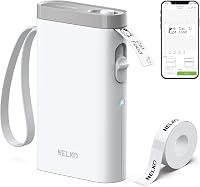
The Nelko P21 Label Maker Machine with Tape is another compact Bluetooth option for iOS and Android phones. It prints black text at 203 dpi, uses fixed-length labels, and does not support continuous label tape.
Its app includes icons, borders, materials, templates, 29 languages, images, time, QR codes, and barcodes. Supported fixed sizes include 14 x 40 mm, 14 x 50 mm, and 14 x 75 mm, with a maximum media size of 14 x 75 mm.
The P21 includes the label maker, 1 roll of white label paper, a Type C charging cord, a user manual, and a setup guide. It has a built-in rechargeable battery, but the charging adapter is not included.
It does not work with computers and is not compatible with Google Pixel phones running Android 14.
Choose the P21 if fixed label sizes suit your workflow and you want an app with multiple templates and languages. Check the paper size in the app before printing, and keep the green sticker on the back of the label strip intact.
For another brand comparison, see which Niimbot label maker is best. If you prefer typing on the machine itself, our guide to the best label maker with a keyboard covers a different style.
Can a thermal label maker print shipping labels?
A shipping-focused thermal printer is better for wider package labels than a pocket label maker. The JADENS Bluetooth Thermal Shipping Label Printer supports labels from 1.57 in to 4.1 in wide, including 4 x 6 in shipping labels.
The JADENS Bluetooth Thermal Shipping Label Printer uses a 203 dpi Japanese thermal print head and supports both fanfold labels and roll labels. It can connect by Bluetooth to Windows 8 or later and Mac, while Android and iOS phones use the Jadens printer app.
USB connection works with Windows 7 and newer and Mac OS 10.9 and newer. The printer works with shipping and marketplace platforms including Endicia, Dazzle, ShipStation, ShippingEasy, Shippo, ShipWorks, Ordoro, eBay, Amazon, and Shopify.
The package includes the printer, power cord, 50 test labels, USB cable, and user manual. It has a maximum media size of 4 x 6 in and a blue finish.
Choose JADENS when your main task is shipping, warehouse, or marketplace labels. Press and hold the feed button to identify and calibrate the label size whenever you change labels.
The JADENS printer has more setup requirements than a small app-based label maker because you need to select the right connection, label format, and computer or phone workflow. JADENS also includes a 1-year warranty and customer support by email, phone, and remote control.
How do you choose the right thermal label maker?
Start with label size and label type, then check device support. These choices affect whether the machine fits your daily work.
Choose a compact Bluetooth model if you need labels for folders, bins, cables, school items, cosmetics, plants, or small business tags. The D30 is the more flexible choice of the compact pair because it supports both continuous and fixed-length labels.
Choose the P21 if fixed-length labels are enough and you want a small phone-controlled machine for home, school, or office organization. It does not work with computers, so phone compatibility matters.
Choose JADENS if you need wider labels for packages. Its 4 x 6 in maximum media size and support for fanfold and roll labels fit shipping tasks better than the compact models.
Think about your input method too. App-controlled models make sense if you want icons, templates, QR codes, or image tools from a phone.
A computer-connected shipping printer may fit better when shipping platforms are central to your work.
How should you set up and care for a thermal label maker?
Load the correct label material, select its size, and calibrate when required. A mismatch between the app or printer setting and the physical label can cause offset or incomplete printing.
For the D30, select the correct paper size in the app. The included sample paper is 12 x 40 mm, so the template should match that size when you use it.
For the P21, connect through the Nelko app rather than the phone's general Bluetooth settings. Use genuine label paper, update the app when needed, and don't tear the green sticker from the label strip.
For JADENS, identify and calibrate the label size after changing labels. Keep the printer's connection method consistent with your device, whether that is Bluetooth, USB, or the phone app.
If printing becomes unclear, fully charge a compact model and clean the print head and platen roller with alcohol pads when the instructions allow it. Keep label rolls and sheets clean, dry, and free from adhesive buildup.
For step-by-step use with another common brand, see how to use a Brother label maker and how to use a Dymo label maker.
What is a thermal label maker best for?
A thermal label maker is best for repeated labels without ink cartridges, but the ideal model depends on the work.
Pick the Phomemo D30 if you want both continuous and fixed-length labels with a wide set of app design tools. Pick the Nelko P21 if fixed-length labels and phone-only printing match your routine.
Pick JADENS if you need 4 x 6 shipping labels, roll or fanfold media, and support for marketplace shipping workflows.
For office files, organize the label plan before printing. Our guide on how to label home office files for quick access can help you choose names and locations that stay easy to scan.
Thermal printing removes ink from the workflow, but it doesn't remove the need to match label material, device support, and label size. Start with those three requirements, then choose the smallest machine that handles your actual labels.
Frequently asked questions
What is a thermal label maker?
A thermal label maker prints labels by applying heat to heat-sensitive material. Direct thermal models do not use liquid ink, toner, or ribbons.
They are useful for file labels, storage bins, name tags, barcodes, and shipping labels, depending on the model and label size it supports.
Do thermal label makers use ink?
Most small thermal label makers use direct thermal printing, which creates black marks through heat-sensitive label material. You normally replace the label tape or roll rather than an ink cartridge.
Check whether the model accepts fixed-length labels, continuous tape, fanfold labels, or roll labels before buying.
Are thermal labels waterproof?
Water resistance depends on the label material, not only the printer. A thermal label maker can print on label stock designed for contact with moisture, but ordinary paper labels may not hold up the same way.
Check the label tape instructions before using labels on lunch boxes, bottles, or other damp items.
Can a thermal label maker print from a phone?
Many compact models connect to iOS or Android phones through Bluetooth and print from a brand app. Compatibility differs by model.
Some support smartphones and tablets, while others also support Windows or Mac through Bluetooth or USB.
Confirm the device and operating system requirements before choosing one.