What Is the Best Office Chair for Hip Pain?
On this page (3 sections)
The best office chair for hip pain offers excellent lumbar support and adjustable features that promote good posture. Look for chairs with a contoured seat and breathable materials. Proper ergonomic design can significantly reduce discomfort and pressure on your hips.
Finding the right chair can feel like a chore, especially when you’re already dealing with hip pain. Many chairs lack the necessary support, leading to prolonged discomfort throughout your workday. We’ve researched options that prioritize both ergonomics and comfort for hip sufferers.
- Key features include adjustable lumbar support and seat depth.
- A waterfall seat edge reduces pressure on your thighs and hips.
- Breathable materials prevent overheating and discomfort.
- Proper posture alignment is essential for hip pain relief.
Let’s break down what makes an office chair ideal for hip pain and how to find the perfect fit for your needs.
Choosing the Right Office Chair for Hip Pain Relief
If hip pain makes sitting at your desk a daily challenge, you’re not alone. Many people struggle with discomfort while working. The good news is that the right office chair can make a world of difference. We’ve looked into what makes a chair a true ally for your hips. We’ve looked into what makes a chair a true ally for your hips and found the right office chair can make a world of difference.
A supportive chair helps maintain good posture. This reduces pressure on your hip joints. Think of it as giving your hips a much-needed break. We found that certain features are key to finding relief.
Understanding Hip Pain and Office Chairs
Hip pain can stem from many sources. It might be arthritis, bursitis, or even just prolonged sitting. When you sit for long hours, the pressure on your hip joints increases. This can worsen existing pain or even create new discomfort. Your current chair might be part of the problem.
Many standard office chairs aren’t designed with specific pain points in mind. They often lack the necessary adjustments. This leads to slouching or awkward positions. These postures put undue stress on your hips and back. We’ve seen that a chair with proper ergonomic support is essential.
The Impact of Poor Posture
Slouching in your chair is a major culprit. When you slouch, your pelvis tilts backward. This flattens your lower back’s natural curve. It also compresses your hip flexors. For stretches to try after sitting, see our hip flexor stretches guide. Over time, this can lead to tightness and pain in your hips and lower back. Your body is trying to tell you something.
A chair that encourages you to sit upright is a big help. It supports your spine’s natural alignment. This means less strain on your hips and a more comfortable workday. We found that this alignment is key to preventing further issues.
What to Look for in a Hip-Pain-Friendly Chair
Several features stand out when searching for a chair to ease hip pain. These are the elements that actively work to support your body. They aim to distribute weight evenly and encourage healthy posture. We focused on these core aspects during our research.
We found that adjustable lumbar support is non-negotiable. This part of the chair supports the natural curve of your lower back. It prevents slouching and keeps your spine aligned. This alone can greatly reduce hip pressure. Think of it as a gentle, constant reminder to sit correctly.
Key Features for Hip Pain Relief
Adjustable Lumbar Support
This is perhaps the most critical feature. Look for a chair where you can adjust both the height and depth of the lumbar support. This allows you to customize it to your unique back curve. A well-adjusted lumbar support fills the gap between your lower back and the chair. This keeps your spine in a neutral position. We found this feature in many top-rated ergonomic chairs.
Seat Design: Waterfall Edge and Depth Adjustment
The seat itself plays a huge role. A waterfall seat edge is designed to curve downward at the front. This reduces pressure on the back of your thighs. It also improves circulation to your legs. Poor circulation can sometimes contribute to discomfort. We found this design to be very effective.
Additionally, seat depth adjustment is vital. You should be able to adjust how far forward or back the seat extends. Ideally, you want to sit with your back against the backrest. Your feet should be flat on the floor. There should be a few inches between the edge of the seat and the back of your knees. This ensures proper leg support and prevents pinching. We saw that this allows for a custom fit for different leg lengths.
Armrest Adjustability
While not directly under your hips, your armrests affect your overall posture. They should be adjustable in height and width. This allows you to rest your arms comfortably. Your shoulders should be relaxed, not hunched. When your arms are supported, your upper body posture improves. This indirectly benefits your lower back and hips. We found that adjustable armrests help prevent upper body tension.
Material and Cushioning
The type of material matters for comfort and temperature. Breathable mesh is a popular choice. It allows air circulation, keeping you cool. This is especially helpful if you tend to get warm. For cushioning, look for high-density foam. It provides firm support without being too hard. It should also contour to your body. We found that firm but comfortable cushioning is best for long periods. The type of material matters for comfort and temperature, and breathable materials are key for preventing overheating.
Swivel and Tilt Features
A chair that swivels allows for easy movement. You can reach different areas of your desk without straining. This reduces the need to twist your body awkwardly. Tilt mechanisms allow you to recline slightly. This can relieve pressure on your spine and hips. A good chair will have a stable base and smooth adjustments for these features.
Top Chair Features Summarized for Hip Pain Sufferers
Let’s recap the most important features to look for. Keeping this checklist handy can make your shopping easier.
- Adjustable Lumbar Support: For customized lower back alignment.
- Waterfall Seat Edge: To reduce thigh and hip pressure.
- Adjustable Seat Depth: To accommodate different leg lengths.
- Breathable Material: To keep you cool and comfortable.
- Sturdy Armrests: Adjustable for relaxed shoulder posture.
- Smooth Tilt Mechanism: For occasional posture changes.
Comparing Different Chair Types for Hip Discomfort
Not all chairs are created equal when it comes to hip pain. Let’s look at a few common types and how they stack up. This can help you decide what might be best for you.
| Chair Type | Pros for Hip Pain | Cons for Hip Pain |
|---|---|---|
| Ergonomic Office Chair | Highly adjustable, excellent lumbar support, customizable fit. Often has waterfall seats and depth adjustment. | Can be more expensive. Requires proper adjustment to be effective. |
| Executive Chair (Padded) | Often comfortable cushioning. May offer some back support. | Limited adjustability, often poor lumbar support. Can trap heat. Seat depth usually fixed. |
| Task Chair (Basic) | Affordable, generally functional. | Minimal adjustability, very basic support. Often lacks contoured seats or good lumbar support. |
| Kneeling Chair | Promotes upright posture, can reduce back strain for some. | Pressure shifts to knees and shins. Not suitable for everyone, especially with existing knee issues. May not be ideal for long-term hip pain relief. |
Based on our findings, a well-designed ergonomic office chair typically offers the most benefits for hip pain. Its adjustability allows you to tailor it precisely to your body’s needs. This is key for long-term comfort. We found that investing in an ergonomic chair can save you pain and potential future medical costs.
Making Adjustments for Optimal Hip Support
Once you have a chair with the right features, proper adjustment is key. Even the best chair won’t help if it’s not set up correctly for you. We found that many users don’t fully utilize their chair’s capabilities.
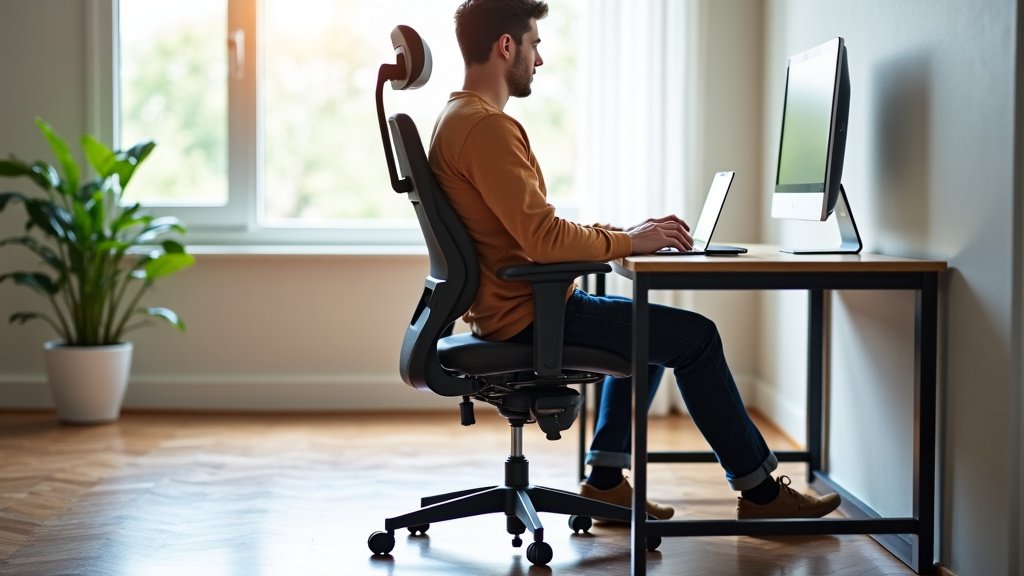
Start by adjusting the seat height. Your feet should be flat on the floor. Your knees should be at about a 90-degree angle. Then, adjust the lumbar support. Position it to fit the curve of your lower back comfortably. Next, adjust the seat depth. Ensure there’s a small gap between the seat edge and the back of your knees.
Finally, adjust the armrests. They should allow your shoulders to relax. Your forearms should rest comfortably. Take a few minutes to make these adjustments. It’s worth the effort for reduced hip pain. We found that regular checks can also help maintain optimal settings.
Conclusion
Finding the right office chair can truly transform your workday if you’re dealing with hip pain. We’ve learned that focusing on adjustable lumbar support and a waterfall seat edge are top priorities. These features, combined with proper seat depth and armrest adjustments, help maintain good posture and reduce pressure on your hips. Don’t underestimate the power of breathability and cushioning for extended comfort. Your next step is to actively look for these specific features when shopping. Investing in a chair designed for your well-being is a wise choice for long-term health and comfort.
Frequently Asked Questions
How much should I spend on an office chair for hip pain?
The cost can vary widely. We found that more affordable chairs might lack the necessary adjustability and support for hip pain. Investing in a good ergonomic chair, generally ranging from $300 to $1000, often provides the best long-term relief and durability. Look for chairs with a solid warranty.
Can a standing desk help with hip pain instead of a chair?
Yes, alternating between sitting and standing can significantly reduce pressure on your hips. While a standing desk is a great addition, it doesn’t replace the need for a supportive chair when you are sitting. The key is movement and variation throughout your day. We recommend using both a good chair and a standing desk if possible.
Is a memory foam seat topper a good solution for hip pain?
A memory foam seat topper can offer some temporary cushioning. However, we found that it doesn’t address the core issue of poor posture or lack of ergonomic support. For lasting relief, focus on a chair with built-in adjustability and proper lumbar support rather than just adding a cushion.
How often should I adjust my office chair settings?
We recommend checking and adjusting your chair settings periodically, especially when you first get it. Once you find your optimal position, you may only need minor adjustments. It’s beneficial to get up and move around every 30-60 minutes to further alleviate hip pressure, regardless of chair settings.
Can I use a regular dining chair for work if I have hip pain?
Dining chairs are typically not designed for long hours of sitting and often lack the ergonomic support needed for hip pain. They usually have fixed seats and minimal back support, which can worsen discomfort. We strongly advise against using a dining chair for extended work periods if you experience hip pain.