8 Best Large-Print Keyboards (November 2026)
The best large print computer keyboards include the BOOGIIO Large Print Computer Keyboard for strong contrast, the KOPJIPPOM Large Print Backlit Keyboard for white backlighting, and the KOPJIPPOM Large Print Keyboard for colorful lighting.
On this page (3 sections)
The best large print computer keyboard for most daily typing is the BOOGIIO Large Print Computer Keyboard.
Its yellow keys, black oversized letters, full-size 104-key layout and wired USB connection put readability first.
That combination suits people who look down at the keys often, including beginners, older users and anyone with low vision.
Large legends reduce the time spent searching for a letter, a number or a command key.
Strong contrast also helps when the keys are used under mixed light, such as daylight near a window or a warm lamp at a desk.
A familiar full-size layout matters in daily use because the main keys and number pad stay in the places many typists already expect.
You do not need to relearn a compact or split arrangement just to make the letters easier to see.
The wired connection keeps setup simple for a fixed desk, a desktop computer or a laptop that stays in one place.
It also removes batteries, charging cables and pairing steps from the routine.
Backlit models are better when the room changes from bright to dim across the day.
In that case, illumination can help the legends stay visible without relying only on key color.
If you also need a mouse, the CHONCHOW combo covers both devices in one wired set.
That option can make sense when both input devices are worn, mismatched or due for replacement at the same time.
This guide compares large print computer keyboards by legend size, contrast, lighting, layout, connection and practical setup.
Our score weighs specs, features and buyer feedback against what you are shopping for.
Readability comes first because a large print keyboard only helps if the letters are clear at your normal viewing distance.
Contrast comes next because black letters on a light keycap are easier to separate than small grey print on dark plastic.
Lighting matters when you type in a dim room, work late or sit away from the main light source.
Layout matters for comfort and habits, especially if you use the number pad for figures, passwords or forms.
Connection matters for placement, since a wired keyboard stays where the cable allows and does not need a battery kept charged.
For broader desktop input advice, see our guide to keyboards and mice.
If you want wireless use, compare these picks with our guide to the best large print wireless keyboard.
Use the links above when the question is about the wider desk setup rather than the print size alone.
Once you know whether contrast or backlighting matters more to you, the shortlist becomes much easier to judge.
Measure the free space in front of your monitor before choosing a full-size model.
Leave room for your hands, a mouse and the cable, not just the keyboard itself.
Our picks at a glance
-
1

-
2
 Best for white backlighting
KOPJIPPOM Large Print Backlit Keyboard
9.6/10 our score
See it on Amazon -
3

- 4
 Check it
X9 Large Print Backlit Computer Keyboard
Best for shortcut keys - 5
 Check it
CHONCHOW USB Wired Keyboard and Mouse Combo
Best for a complete desk set - 6
 Best for simple high-contrast typingCheck it
- 7
 Check it
QUASIO Large Print Backlit Keyboard with 7-Color
Best for a control knob - 8
 Check it
XDL-POWER Large Print Computer Keyboard
Best for yellow-key simplicity
Best large print computer keyboard picks
The BOOGIIO leads for strong contrast, while the KOPJIPPOM models add lighting for lower-light work.
The remaining choices focus on color control, shortcut keys, a complete keyboard and mouse set, or simple high-contrast typing.
That mix covers the main reasons people move from a standard keyboard to a large print model.
Some users mainly need bolder letters, while others need light behind those letters after dark.
Some also want a number pad, shortcut keys or a mouse included in the same purchase.
The picks below keep a full-size QWERTY layout in most cases, so typing habits do not need a major change.
Wired USB is common across the list because it keeps setup direct and avoids batteries.
Check the desk space, the computer port and the light in the room before you narrow the choice.
BOOGIIO Large Print Computer Keyboard: Best for strong contrast
- 104-key full-size QWERTY layout
- Yellow keys with black oversized letters
- Wired USB-A connection
- Spill-resistant design
Yellow keycaps and crisp black letters create a strong visual contrast for everyday typing. The full-size layout keeps the number pad and familiar key arrangement.
Pros
- Strong yellow-and-black contrast
- Full-size 104-key layout
- Works with Windows and MacOS
Cons
- Wired rather than wireless
- Some Mac hotkeys may not work
BOOGIIO is the best fit when the main goal is seeing the keys quickly. The yellow keycaps and crisp black letters create a strong contrast that remains easy to distinguish when the room is not brightly lit.
Its full-size 104-key QWERTY layout includes a numeric keypad, so you don't need to relearn the position of common keys. For an alternative keyboard layout, compare split mechanical keyboards.
The membrane switches are described as quieter and rated for a 5-million-keystroke life cycle.
The keyboard uses a wired USB-A connection and plug-and-play setup. It works with Windows and MacOS, although some system hotkeys outside Windows may not work.
The design includes fold-out feet at the back and a spill-resistant build. If a spill happens, air-dry the keyboard completely before using it again.
Choose BOOGIIO for the clearest yellow-and-black contrast. Choose a backlit model instead if adjustable illumination matters more than a fixed color scheme.
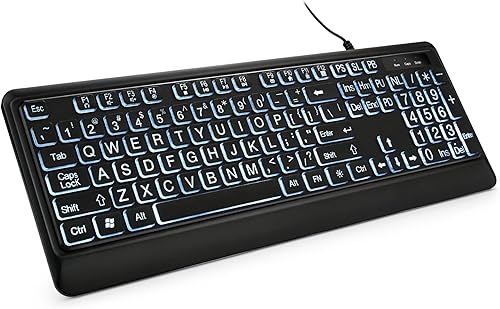
KOPJIPPOM Large Print Backlit Keyboard: Best for white backlighting
- Fonts 4X larger than standard
- Adjustable white LED backlight
- 104-key full-size layout
- Spill-resistant design
This KOPJIPPOM combines large print with an adjustable white backlight for lower-light typing. Its full-size layout suits desktop work and number-heavy tasks.
Pros
- Large print with white backlight
- Adjustable brightness
- Plug-and-play USB setup
Cons
- Multimedia keys may not fully work on Mac
- Wired connection
The KOPJIPPOM Large Print Backlit Keyboard is a strong choice for users who want large letters plus white illumination.
Its print is described as 4X larger than standard keyboard fonts.
That size makes the main letters, numbers and command keys easier to find at a glance.
It suits older users, students, office workers and anyone who types in a room that gets dim later in the day.
The 104-key full-size layout includes a number pad and multimedia or function keys.
The number pad helps with repeated figures, passwords, dates and spreadsheet entry.
Keeping the familiar QWERTY arrangement also means the keyboard feels normal from the first typing session.
The white LED backlight can be turned on or off and adjusted for brightness.
That control gives you more choice in a dim office or studio than a fixed off state.
You can raise the light when the room is dark and lower it when the screen is already bright.
This model connects through USB and does not need drivers.
It works with Windows, Mac OS and Raspberry Pi 3 or 4, although multimedia keys may not fully work on Mac.
The keyboard has a spill-resistant design and fold-out feet.
The feet change the typing angle, so try the raised position briefly and keep your wrists relaxed.
Its 4.9-ft wired connection gives a desktop setup some placement flexibility without batteries or charging.
Pick it when clean white backlighting is the priority.
For more color choices, the other KOPJIPPOM model offers 7 backlight colors.
KOPJIPPOM Large Print Keyboard: Best for colorful lighting
- Fonts 4X larger than standard
- 7 backlight colors
- 3 brightness levels
- 104-key full-size layout
Choose this model when you want large legends and more lighting choices. Seven colors and 3 brightness levels let you adjust the keyboard's appearance to your desk.
Pros
- 7 backlight colors
- 3 brightness levels
- Full-size number pad
Cons
- Wired connection
- Some multimedia keys may not fully work on Mac
This KOPJIPPOM model suits users who want large print and colorful lighting choices. The legends are described as 4X larger than standard fonts, and the backlight offers 7 colors with 3 brightness levels.
The color choices include blue, green, red, cyan, purple, yellow and white. That range lets you choose a more visible or less distracting look for your desk.
Its 104-key QWERTY layout includes a numeric keypad and foldable stands. The keyboard is USB powered, plug and play, and works with Windows and Mac OS, with a note that some multimedia keys may not fully work on Mac.
The cable is described as about 4 ft or 4.7 ft in the product information. Since the connection is wired, measure the distance from the computer before setting up a deep or shared desk.
Choose this model over the white-backlit KOPJIPPOM if color selection and 3 brightness levels are useful to you.
X9 Large Print Backlit Computer Keyboard: Best for shortcut keys
- 7 backlight colors
- 4 brightness levels
- 107-key full-size layout
- 12 shortcut keys
The X9 adds 12 shortcut keys to a full-size 107-key layout. Its 7 colors and 4 brightness levels give you more lighting control for dim rooms.
Pros
- 12 shortcut keys
- 4 brightness levels
- 7 backlight colors
Cons
- Windows compatibility is specified
- Wired rather than wireless
The X9 is the best large print keyboard here for users who want extra shortcuts with multicolor lighting. Its 107-key layout includes a number pad and 12 shortcut keys for common controls.
The backlight provides 7 colors and 4 brightness levels. That gives you one more brightness step than the KOPJIPPOM color model, which can help when the room gets darker.
This is a wired USB-A keyboard with plug-and-play setup. It is specified for Windows PC, Chromebook and laptop use, with Windows 10 listed as the minimum required operating system version.
The X9 uses a domed membrane switch and has a full-size QWERTY arrangement. Its 17.31 x 6.15 x 1.02 in dimensions make it a full desktop keyboard, so leave enough room for the number pad and shortcut row.
Pick it when shortcut keys and 4 brightness levels matter. If you need Mac support, choose a model whose data specifically includes MacOS instead.
CHONCHOW USB Wired Keyboard and Mouse Combo: Best for a complete desk set
- 3X larger key print
- Keyboard and mouse included
- Red, green and yellow keyboard backlight
- Mouse with 4 DPI levels
This combo makes sense when you need both input devices in one purchase. The keyboard has large print, a wrist rest and 3 backlight colors, while the mouse offers 4 DPI levels.
Pros
- Includes keyboard and mouse
- Integrated wrist rest
- 4 mouse DPI levels
Cons
- Wired set
- Multimedia shortcut keys are not supported on macOS
CHONCHOW makes the most sense when you need a large print keyboard and a mouse together.
The keyboard has print 3X larger than standard keys, a numeric keypad, multimedia hotkeys and an integrated wrist rest.
That mix suits a desk refresh where the keyboard and mouse both need replacing.
The wrist rest can support the base of the hands during longer typing sessions.
The number pad helps with figures, while the hotkeys give quick access to common controls.
The keyboard backlight uses red, green and yellow options.
Those colors keep the legends visible in low light without relying only on the key color.
Its low-profile keys are described as quiet, and the keyboard is rated for up to 10 million keystrokes.
Quiet keys can help in a shared room where typing noise is more noticeable.
The included mouse has 4 DPI levels: 1200, 1800, 2400 and 3600.
Higher DPI settings move the pointer faster for the same hand movement.
Lower settings give finer control for careful pointing on a small screen.
The mouse has a symmetrical design and RGB lighting.
That shape may suit either hand better than a strongly moulded mouse.
The combo is wired rather than wireless and uses USB.
It works with Windows, Mac and other systems, but multimedia shortcut keys are not supported on macOS.
Choose CHONCHOW if replacing both devices saves you setup time.
If you already have a mouse, one of the standalone keyboards may give you more focused value.
S erounder Elderly Keyboard: Best for simple high-contrast typing
- 104-key full-size QWERTY layout
- White keys with black large print
- 1.35 m USB cable
- ABS construction
The S erounder focuses on a familiar full-size layout with white keycaps and black large print. It is a straightforward choice for users who do not need backlighting.
Pros
- High-contrast white and black keys
- Full-size layout
- Simple wired setup
Cons
- No backlight listed
- Windows compatibility is specified
The S erounder is a straightforward pick for users who want high-contrast large print without backlighting.
It uses white keycaps with crisp black letters and a familiar 104-key QWERTY layout.
That fixed color scheme suits a bright or evenly lit desk where illumination is not the main problem.
The large black print is easier to separate from the white keycaps than small print on dark keys.
It can help elderly users, people with low vision and beginners who still look at the keys.
The full-size design includes a number pad, which helps if you enter figures regularly.
The layout also keeps function and command keys in familiar positions.
Its 1.35 m wired USB cable keeps the setup simple, with no charging or battery replacement.
You only need an open USB port and a cable path that does not pull the keyboard out of place.
The keyboard uses ABS material and membrane switches.
The switch life is described as 5 million keystrokes.
ABS construction is intended to handle regular daily typing and desk movement.
Compatibility is specified for Windows versions from Windows 98 through Windows 10 and OS X.
The product information also describes use with notebooks, desktops and laptops.
Pick S erounder when fixed black-and-white contrast is enough.
For yellow keys, compare it with the BOOGIIO or XDL-POWER.
QUASIO Large Print Backlit Keyboard with 7-Color: Best for a control knob
- 4X larger print
- 7 backlight colors
- 4 brightness levels
- Multimedia control knob
The QUASIO adds a multimedia control knob to large print and multicolor lighting. It suits desks where quick volume changes matter alongside readable keys.
Pros
- Multimedia control knob
- 7 colors and 4 brightness levels
- Full-size number pad
Cons
- Wired connection
- Windows compatibility is specified
The QUASIO suits desks where volume control matters as much as readable keys. Its multimedia control knob lets you adjust volume with a turn and press the control to play or pause music and video.
The keyboard has print 4X larger than traditional keyboards, 7 backlight colors and 4 brightness levels. Its full-size 104-key layout includes a numeric keypad and 12 multimedia shortcuts.
QUASIO describes the keys as using a tactile crater mechanism with almost silent typing. The keyboard is USB powered, plug and play and compatible with Windows, Mac and other operating systems in the product information.
The design also includes raised round keycaps and spill-resistant technology. It is a full desktop keyboard, so plan for its number pad and control area when arranging your desk.
Choose QUASIO if the knob would be useful every day. If visual contrast is your main concern and you do not need backlighting, a yellow-key model may be simpler.
XDL-POWER Large Print Computer Keyboard: Best for yellow-key simplicity
- 4X larger print
- Yellow keys with black letters
- 104-key layout
- Spill-resistant design
XDL-POWER uses yellow keys and black letters to make the keyboard easier to distinguish. Its 104-key wired layout keeps the setup familiar.
Pros
- High-contrast yellow keys
- Full-size 104-key layout
- No battery replacement
Cons
- No backlight listed
- Windows compatibility is specified
XDL-POWER is a simple yellow-key option for users who want large legends and a wired setup. Its yellow keys with black letters create a clear contrast, and the print is described as 4X larger than standard computer keyboard fonts.
The keyboard has 104 keys in a QWERTY layout and connects through USB. Plug-and-play setup means you don't need to charge batteries or install a driver.
Its membrane switches are rated for 5 million keystrokes, and the keyboard has a spill-resistant design. Dry it thoroughly after a spill before returning it to use.
The product information specifies Windows compatibility and also lists MacOS in the compatible operating system family. Check the computer's USB connection before arranging the keyboard on your desk.
Choose XDL-POWER when you want the yellow-key format without a backlight. BOOGIIO scores higher because it combines the same broad contrast idea with more detailed compatibility and design information.
How to choose a large print keyboard computer
The right large print keyboard computer depends on how you see the keys, how much desk space you have and whether you need lighting. Start with the visual treatment, then check the connection and layout.
Should you choose contrast or backlighting?
Choose high-contrast keys when the main problem is separating letters from their keycaps.
Yellow-and-black and white-and-black designs use fixed color contrast, while backlit keyboards add illumination that can be turned on or adjusted.
Fixed contrast is often enough in a bright office, a classroom or a desk near a window.
It also keeps the keyboard looking simple, with no light setting to change during the day.
Backlighting becomes more useful when the room changes from daylight to evening light.
It can help at night, in a dim hallway desk or in a room where the main light is behind you.
Backlighting does not replace readable legends, so look for both large print and a light setting that feels clear without being distracting.
A light that is too strong can make the legends harder to read or reflect in glasses.
Adjustable brightness therefore matters more than the number of colors for many users.
For more lighting-focused options, see our guide to the best backlit large print keyboard.
If you want to compare how wireless models change setup, read how to choose a Bluetooth large-print keyboard.
Think about who the keyboard is for before you compare the lighting features.
A beginner may benefit most from clear letters and a familiar layout.
A low-vision user may need both larger legends and stronger separation between letter and keycap.
A night worker may value a backlight that can be lowered rather than switched off completely.
A shared desk may need a keyboard that looks plain and stays readable under normal office light.
Check the size of the print in context, not only the headline claim.
Large print on the main letters is useful, but small secondary symbols can still be hard to find.
Look at whether command keys, numbers and punctuation are also printed clearly.
Consider the viewing distance as well, since a keyboard usually sits closer than a monitor.
A full-size layout takes more desk space than a compact one.
That extra space is often worth it for the number pad and familiar key positions.
Does the number of keys matter?
A 104-key full-size keyboard keeps the number pad and familiar QWERTY positions. That layout is useful for spreadsheets, forms and repeated number entry, but it needs more horizontal desk space than a compact keyboard.
The X9 has 107 keys because it adds shortcut keys. CHONCHOW also adds multimedia controls, while QUASIO adds a control knob and 12 shortcuts.
Measure the desk area from the monitor or laptop to the front edge. Leave room for your wrists and mouse instead of filling the entire surface with the keyboard.
Is wired USB a good choice?
Wired USB is a practical choice when the keyboard stays at one desk. It avoids battery charging and pairing, and every product in this roundup uses a wired connection.
The trade-off is cable placement. Check whether your computer has an open USB port and whether the cable reaches without crossing a walking path or pulling the keyboard out of position.
For a Mac-specific comparison, read our guide to the best large print keyboard for Mac. Mac compatibility can still differ for multimedia and system hotkeys.
How should you set the keyboard angle?
Use the fold-out feet only if the raised angle feels comfortable for your hands. A higher rear edge changes the angle of the keyboard, so test the position with short typing sessions and keep your wrists relaxed.
Our guide to Tenting Angles for Keyboards: A Complete Ergonomic Guide explains how angle changes affect hand position. You can also compare your desk with the advice on Standard Keyboard Tray Height for Ergonomics.
How do you care for a large print keyboard?
Keep drinks away from the keyboard even when the design is spill resistant. If a spill occurs, disconnect the keyboard, let it air dry completely and follow the product instructions before reconnecting it.
Use a soft, dry cloth for routine dust. Avoid pressing hard on the keycaps or using liquid directly on the keyboard, since moisture can move between the keys.
Keep the cable straight enough that the USB connector is not under tension. A stable keyboard position also makes the large legends easier to find because the layout stays consistent.
Verdict: which large print keyboard should you choose?
The BOOGIIO Large Print Computer Keyboard is the best overall choice for strong contrast, a familiar full-size layout and simple wired USB use.
Its yellow keys and black oversized letters make the main characters easier to distinguish in everyday light.
Choose the white-backlit KOPJIPPOM for dim rooms where a clean white light is enough.
That model is a good fit for offices, studios and desks that get darker in the evening.
Choose the color-backlit KOPJIPPOM for lighting control with 7 colors and 3 brightness levels.
The extra colors let you match the keyboard to the desk or choose a softer look.
Choose the X9 for extra shortcut keys and 4 brightness levels.
Its 107-key layout adds more control for users who rely on quick shortcuts.
Pick CHONCHOW if you need a mouse with the keyboard.
The combo saves separate shopping for both devices and keeps the setup wired and simple.
Choose S erounder or XDL-POWER for simpler high-contrast typing without a listed backlight.
Those models suit bright desks where fixed contrast is the main need.
Choose QUASIO if a multimedia knob belongs on your desk.
The knob makes volume and playback control quick without reaching for the mouse.
Match the final choice to the room, the desk space and the way you type each day.
Our top 3 picks at a glance
-
1
-
2
Best for white backlighting
KOPJIPPOM Large Print Backlit Keyboard
9.6/10 our score
See it on Amazon -
3
Frequently asked questions
What is the best large print computer keyboard for low vision?
The BOOGIIO Large Print Computer Keyboard is the strongest general pick here because it combines yellow keycaps, crisp black oversized letters, a full-size 104-key layout and a wired USB connection. The S erounder and XDL-POWER also use high-contrast key colors, while backlit models suit dim rooms.
Are large print keyboards for computers full size?
Many large print keyboards for computers use a full-size QWERTY layout with a numeric keypad. The BOOGIIO, both KOPJIPPOM models, CHONCHOW, S erounder, QUASIO and XDL-POWER all have 104 keys, while the X9 has 107 keys.
Are large print keyboards backlit?
Some large print keyboards are backlit, but not all. The KOPJIPPOM, X9, CHONCHOW and QUASIO models here include backlighting.
BOOGIIO, S erounder and XDL-POWER focus on contrast instead, so check whether you need illumination as well as larger legends.
Do large print keyboards work with Mac computers?
Several large print keyboard computer options list MacOS compatibility, including BOOGIIO and both KOPJIPPOM models. Compatibility can vary by shortcut or multimedia key, so a keyboard may work for typing while some special keys behave differently.