Is It Safe to Use a Treadmill Desk While Working?
On this page (3 sections)
Yes, it is generally safe to use a treadmill desk while working, provided you follow a few key guidelines. Many find it a great way to boost activity during their workday. You can burn more calories and improve your overall health without sacrificing productivity.
Standing desks and treadmill desks are becoming more popular. They help combat the negative effects of prolonged sitting. You might be wondering if walking and working is a good combination. Research suggests it can be quite beneficial for your physical well-being and even your mental focus.
- Treadmill desks are safe for most people.
- Start slowly and gradually increase your walking time.
- Listen to your body and take breaks when needed.
- Proper setup is key for comfort and safety.
We’ve looked into the research and found that incorporating movement can be a positive change. Let’s walk through how to make using a treadmill desk safe and effective for your work routine.
Is It Safe to Walk and Work? Understanding Treadmill Desks
Yes, using a treadmill desk while you work is generally safe for most people. It’s a fantastic way to integrate more physical activity into your day. You can achieve this without needing to set aside extra time for exercise. Many users find it helps them stay energized and focused throughout their workday. We’ve reviewed the available information and found that with proper setup and usage, it’s a very viable option.
Getting Started: Your First Steps to Treadmill Desk Safety
When you first start using a treadmill desk, the most important thing is to go slow. Think of it like dipping your toes into a pool. You wouldn’t jump straight into the deep end, right? The same applies here. Start with short walking intervals at a very slow pace.
Setting Your Pace and Time
We recommend beginning with 15-20 minute walking sessions. Keep the speed between 0.5 and 1.5 miles per hour. This is much slower than your typical walking speed. It allows you to comfortably type and focus on your tasks. As you get used to it, you can gradually increase the duration of your walking periods. Then, you can slowly increase the speed. Many experts suggest building up to 1-2 hours of walking per day, spread throughout your workday.
Listen to Your Body
Your body will tell you what it can handle. If you feel any discomfort or fatigue, it’s okay to slow down or stop walking. You can always switch back to sitting or standing. Pushing yourself too hard too soon is the quickest way to make it feel like a chore. It’s essential to prioritize comfort and avoid any strain. You want this to be a positive addition to your routine, not a source of pain.
The Importance of Proper Setup
A well-configured treadmill desk is key to your safety and comfort. Imagine trying to write a letter while balancing on a wobbly stool. It just wouldn’t work well. The same logic applies to your treadmill desk setup. A stable and correctly adjusted desk and treadmill are crucial.
Desk Height and Ergonomics
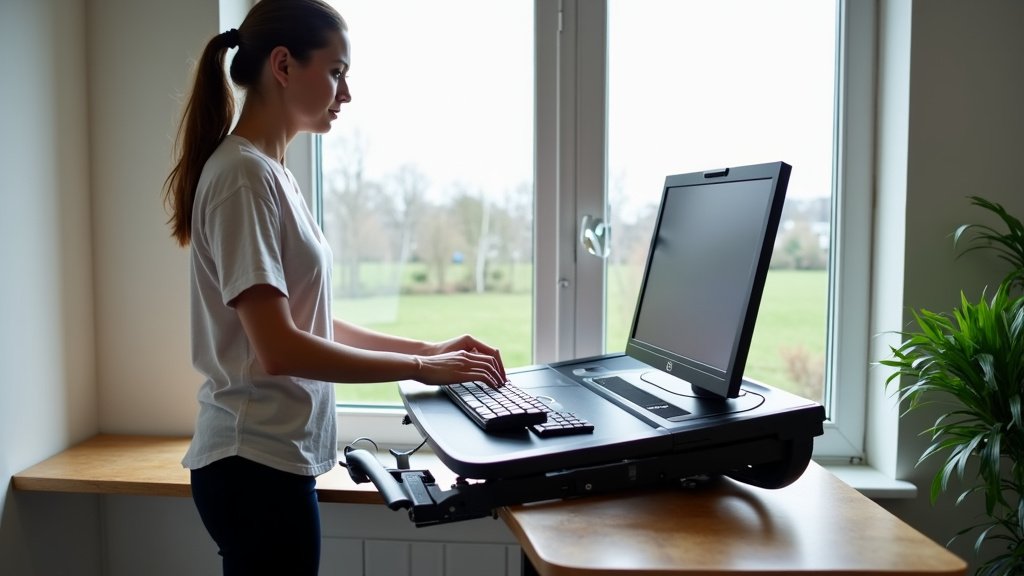
Your desk should be at a height that allows your elbows to be at roughly a 90-degree angle when typing. Your wrists should be straight and relaxed. If the desk is too high or too low, you can experience strain in your wrists, arms, or shoulders. Many treadmill desks are adjustable, so take the time to find that sweet spot. Good posture is just as important while walking as it is when sitting.
Monitor Placement
Your monitor should be positioned at eye level. This helps prevent neck strain. It should be about an arm’s length away from you. When you’re walking, your head might naturally move slightly. Ensure the monitor is stable and doesn’t cause you to constantly adjust your gaze or posture. A wobbly screen can be a real distraction and contribute to discomfort.
Keyboard and Mouse Stability
Ensure your keyboard and mouse are placed on a stable surface. They shouldn’t slide around while you’re walking. Some treadmill desks have a dedicated, non-slip keyboard tray. If yours doesn’t, consider using a thin mat underneath your keyboard and mouse. Accidental keystrokes or a sliding mouse can disrupt your workflow and your focus.
Potential Benefits of Using a Treadmill Desk
Beyond safety, there are many reasons why people are turning to treadmill desks. The most obvious benefit is increased physical activity. This can lead to a cascade of positive health outcomes.
Combating Sedentary Behavior
We all know that sitting for too long isn’t great for us. You can also try these desk leg exercises when you pause the treadmill. Guidelines from organizations like the Centers for Disease Control and Prevention (CDC) often highlight the risks of a sedentary lifestyle. These risks include obesity, heart disease, and diabetes. A treadmill desk directly counteracts this by encouraging movement throughout the day. It transforms passive sitting time into active walking time.
Boosting Energy and Mood
When you walk, your body releases endorphins, which are natural mood boosters. Many users report feeling more alert and less fatigued when they use a treadmill desk. Instead of hitting that afternoon slump, you might find yourself feeling refreshed. This gentle movement can help improve blood flow, which also contributes to better focus and reduced feelings of stress.
Burning More Calories
While it’s not a substitute for a dedicated workout, walking at a slow pace while working does burn more calories than sitting. Over time, this can contribute to weight management goals. It’s a simple way to add calorie expenditure to your daily routine without feeling like you’re exercising.
Safety Considerations for Different Work Tasks
Not all work tasks are created equal when it comes to treadmill desk use. Some activities are better suited for walking than others. Understanding this helps ensure you maintain safety and productivity.
Typing and Mouse Work
These are generally the easiest tasks to manage while walking. As long as your setup is stable and ergonomic, you should find this quite manageable. Aim for slower speeds to keep your typing accurate. Many people find their typing speed is only slightly affected, if at all, after a short adjustment period.
Video Calls and Meetings
This can be a bit trickier. For shorter, less formal calls, walking might be fine. However, for important client meetings or presentations, you might want to sit or stand. The slight movement from walking can be distracting on camera. Plus, you might worry about your appearance or ability to react quickly. Some users simply pause the treadmill during calls. Others find a stable standing position works best for this.
Detailed or Precision Work
Tasks requiring very fine motor skills or intense concentration, like detailed graphic design or intricate coding, might be better done when stationary. While some users adapt, others find the slight motion makes these tasks more challenging. It’s best to assess your own comfort and precision levels for these types of jobs.
Making the Transition: A Checklist for Success
Ready to give it a try? Here’s a quick checklist to help you make the transition smoothly and safely:
- Start Slow: Begin with very low speeds and short durations.
- Adjust Ergonomics: Ensure your desk, monitor, and keyboard are at the correct heights.
- Test Stability: Make sure your keyboard and mouse won’t slide.
- Listen to Your Body: Don’t push through discomfort or fatigue.
- Vary Your Position: Mix walking with sitting or standing throughout the day.
- Focus on Tasks: Choose appropriate work for walking and stationary periods.
Conclusion
Using a treadmill desk can be a safe and beneficial way to incorporate more movement into your workday. You’ve learned that starting slow, prioritizing proper setup, and listening to your body are key to a positive experience. By following these steps, you can combat sedentary behavior and boost your energy levels without sacrificing productivity. Ready to give it a try? Your next step is to assess your current workspace and plan how you’ll introduce walking intervals into your daily routine.
Frequently Asked Questions
How fast should I walk on a treadmill desk?
Start with a very slow pace, typically between 0.5 and 1.5 miles per hour. This speed allows you to comfortably type and focus on your work without feeling unsteady. As you get more accustomed to it, you can gradually increase your speed if it feels right.
Can using a treadmill desk replace my regular exercise routine?
While a treadmill desk increases your daily activity and calorie burn, it’s not a direct replacement for dedicated exercise. Think of it as a way to supplement your fitness, not substitute workouts like jogging, strength training, or sports.
What if I feel tired or uncomfortable while walking?
It’s important to listen to your body. For ways to balance positions at work, see sitting or standing while working. If you feel tired, fatigued, or experience any discomfort, slow down or stop walking. You can always switch to sitting or standing for a while. Pushing yourself too hard too soon can lead to injury or make you dislike using the treadmill desk.
Are there any specific types of work that are not suitable for a treadmill desk?
Tasks requiring very fine motor skills, intense concentration, or steady hands, such as detailed graphic design or complex coding, might be more challenging. Video calls and important presentations can also be tricky due to slight movement, so you might prefer to sit or stand for these.
How long should I aim to walk on my treadmill desk each day?
Many experts suggest building up to 1-2 hours of walking per day, spread out in intervals throughout your workday. It’s best to start with shorter sessions and gradually increase the duration as you feel more comfortable and your body adjusts.