What Is the Best Office Chair for Herniated Disc?
On this page (8 sections)
- Choosing the Right Office Chair for Your Herniated Disc
- Understanding Lumbar Support and Its Importance
- The Magic of Adjustable Features for Your Back
- Material Matters: Breathability and Cushioning
- What to Avoid When Buying a Chair for Back Pain
- Checklist: Key Features for Your Back-Friendly Chair
- Conclusion
- Frequently Asked Questions
Finding the best office chair for a herniated disc is about seeking support and comfort. Look for chairs with excellent lumbar support, adjustable features, and breathable materials to keep you comfortable all day. A good chair can make a huge difference in managing your pain. Our guide on whether you need an ergonomic chair if you have back pain explains their benefits.
When you have a herniated disc, sitting for extended periods can be tough. That’s why your office chair choice matters immensely. We’ve researched options focusing on ergonomic design and pressure relief. Your spine will thank you for choosing wisely.
TL;DR:
- Prioritize chairs with strong lumbar support.
- Look for chairs with adjustable height, armrests, and recline.
- Breathable fabrics help with comfort.
- Consider chairs designed for ergonomic needs.
We understand how challenging finding the right seating can be. Let’s walk through exactly what makes an office chair a good choice for managing a herniated disc.
Choosing the Right Office Chair for Your Herniated Disc
When you’re dealing with a herniated disc, finding the right office chair can feel like searching for a needle in a haystack. Your spine needs support, and sitting shouldn’t add to your pain. We’ve looked into what makes an office chair a good ally for your back.
The main goal is to reduce stress on your spine. A chair that cradles your back and promotes good posture is key. Think of it as giving your back a much-needed vacation while you work. Let’s break down the features that matter most.
Understanding Lumbar Support and Its Importance
Lumbar support is your new best friend when you have a herniated disc. It’s the curve in the lower part of your back. Many chairs have a slight curve, but you need something more substantial.
What Exactly is Lumbar Support?
Lumbar support is padding or a built-in curve designed to match the natural inward curve of your lower spine. It helps maintain this curve, preventing your back from slumping forward. This slumping can put extra pressure on your spinal discs.
Types of Lumbar Support to Look For
You’ll find a few different kinds. Some chairs have fixed lumbar support. This means the curve is built into the backrest. Others offer adjustable lumbar support, which is often better. You can move it up or down. You can also adjust how deep it pushes into your back.
Adjustable vs. Fixed Lumbar Support
For a herniated disc, adjustable is generally the way to go. Why? Because everyone’s body is different. What feels perfect for one person might not work for another. Being able to fine-tune the support means you can find that sweet spot for your pain relief.
Where Should Lumbar Support Hit?
The support should feel like it’s gently pushing into the small of your back. It shouldn’t feel like a hard stick poking you. You want it to fill that natural inward curve. Many experts recommend it sitting around your waistline. You can test this by sitting in a chair and feeling where the support is. Adjust it until it feels comfortable and supportive, not painful.
The Magic of Adjustable Features for Your Back
Beyond lumbar support, adjustability is vital. Your body isn’t static, and your chair shouldn’t be either. Being able to tailor the chair to your unique shape and needs can make a world of difference.
Height Adjustment: Finding Your Perfect Level
Chair height is crucial for ergonomics. Your feet should be flat on the floor. Your knees should be at about a 90-degree angle. When your feet are dangling or you’re hunched over, it puts strain on your back. Look for chairs with a good range of height adjustment. This ensures you can get your feet planted firmly on the ground.
Armrest Adjustability: Supporting Your Shoulders
Don’t forget your arms and shoulders! Adjustable armrests allow you to set them at a height that lets your arms rest comfortably. Your shoulders should feel relaxed, not hunched up. If armrests are too high or too low, it can lead to neck and shoulder pain. This pain can radiate down your back. Many chairs offer height, width, and even pivot adjustments for armrests. This level of customization can be a real back-saver.
Seat Depth and Tilt: More Ways to Customize
Some chairs allow you to adjust the seat depth. This means you can slide the seat forward or backward. You want to have a few fingers’ width between the edge of the seat and the back of your knees. This prevents pressure on the back of your thighs. Seat tilt is another feature. A slight forward tilt can sometimes help align your spine better. A gentle backward recline can offer a welcome break. Finding a chair that allows you to adjust these can greatly improve your comfort.
Material Matters: Breathability and Cushioning
What your chair is made of impacts how comfortable you are. For long hours at your desk, materials that breathe are a big plus. They help prevent overheating and keep you feeling fresh.
Fabric vs. Leather vs. Mesh
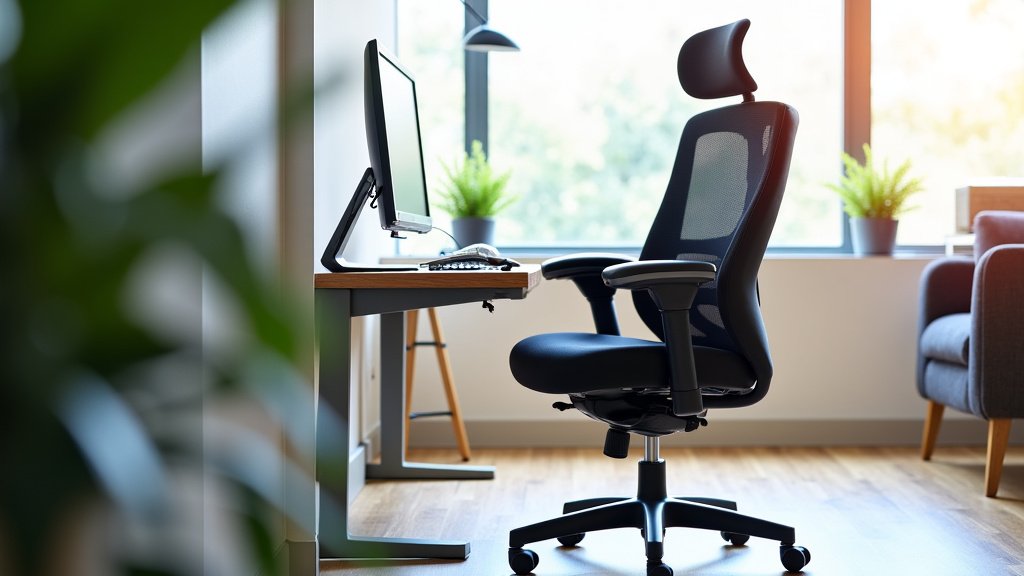
Mesh is often a top choice for breathability. It allows air to flow freely, keeping you cool. Fabric chairs can be soft and comfortable. However, some fabrics can trap heat. Leather can look premium, but it’s also known to get hot. For a herniated disc, you want materials that don’t make you fidget or sweat. We found that mesh and high-quality fabrics tend to perform best for long-term comfort.
Cushioning for Pressure Relief
The seat cushion needs to offer support without being too hard or too soft. Too hard, and it creates pressure points. Too soft, and you might sink in, losing good posture. Many ergonomic chairs use high-density foam. This foam provides a good balance of comfort and support. Some chairs even use gel or memory foam for extra pressure relief. Think of it as a supportive hug for your derrière.
What to Avoid When Buying a Chair for Back Pain
Not all chairs are created equal, especially when you have specific needs like a herniated disc. Steering clear of certain designs can save you a lot of discomfort and money.
Chairs Lacking Proper Support
Avoid chairs that are too low or have a flat back. Stools, traditional dining chairs, or very basic desk chairs often fall into this category. They simply don’t offer the spinal alignment and support your back needs. If a chair feels like you’re sinking into it or it forces you into an unnatural position, it’s probably not the one.
Overly Firm or Unsupportive Seats
A seat that’s rock hard offers no cushioning. This can create pressure points, which are painful. Conversely, a seat that’s too squishy doesn’t provide any stable support. You need something that conforms to your body while keeping it properly aligned. It’s a delicate balance.
Checklist: Key Features for Your Back-Friendly Chair
To help you make a smart choice, here’s a quick rundown of what to look for:
- Excellent, adjustable lumbar support that fits your lower back curve.
- Adjustable seat height so your feet are flat on the floor.
- Adjustable armrests to keep your shoulders relaxed.
- Breathable material like mesh or a comfortable fabric.
- Supportive, well-cushioned seat that isn’t too hard or too soft.
- Adjustable seat depth and tilt for personalized comfort.
Choosing the right office chair is an investment in your health and well-being. Taking the time to find one with the right features can significantly reduce your pain and improve your productivity. Your back will thank you for making a well-informed decision.
Conclusion
Choosing the best office chair for your herniated disc is about prioritizing your spine’s health. Remember, the goal is to find a chair that offers excellent lumbar support and a range of adjustability. Features like adjustable height, armrests, and seat depth allow you to customize your seating experience. Don’t overlook breathable materials and supportive cushioning for all-day comfort. Your next step is to actively look for chairs that tick these boxes. Start by visiting reputable office supply stores or trusted online retailers, and don’t be afraid to test chairs out before you buy.
Frequently Asked Questions
How do I know if a chair’s lumbar support is right for my herniated disc?
The lumbar support should gently hug the natural inward curve of your lower back without causing pain. You should feel it supporting your waistline. We found that adjustable lumbar support is often best because you can fine-tune its position and depth for your unique needs.
Can an office chair really help manage herniated disc pain?
Yes, a supportive ergonomic chair can make a significant difference. By promoting good posture and reducing pressure on your spine, it can help alleviate pain during long sitting periods. It’s not a cure, but it’s a vital tool for managing discomfort and preventing further strain.
What’s the difference between a chair for general ergonomics and one specifically for a herniated disc?
Chairs for general ergonomics focus on good posture and comfort for most people. However, chairs specifically recommended for herniated discs usually have more robust and adjustable lumbar support. They often offer more fine-tuning options for height, seat depth, and recline to target spinal relief more directly.
Are mesh chairs good for herniated discs?
Mesh chairs are often excellent choices because they offer superior breathability, which helps keep you cool and comfortable during long work sessions. For a focused comparison, see mesh chairs for herniated discs. We’ve seen that a good quality mesh backrest can provide firm yet flexible support that contours to your back. Just ensure the seat cushion is also supportive.
Should I look for a chair with a headrest if I have a herniated disc?
A headrest can be beneficial, especially if you tend to lean back or recline often. It can help support your neck and reduce strain on your upper spine. However, for active sitting and maintaining good posture, a well-adjusted chair without a headrest might be just as effective. Prioritize lumbar and seat support first.