How to Replace Logitech Ergo K860 Keys
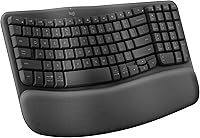
For Logitech Ergo K860 key replacement, confirm the replacement key is made for the K860 before attaching it. The keyboard has a curved, split keyframe, so a key from another model may not fit its shape or attachment.
On this page (7 sections)
- How do you replace a Logitech Ergo K860 key?
- How can you check whether a replacement key fits?
- What should you do before reattaching a loose key?
- When should you contact Logitech support?
- Which ergonomic keyboards are alternatives if a key can't be replaced?
- Can you prevent key damage during everyday use?
- What is the best next step for K860 key replacement?
For Logitech Ergo K860 key replacement, match the replacement to the exact K860 model and key position before trying to attach it. If a cap has simply come loose, inspect the cap and the mechanism underneath; if either part is broken or missing, check with Logitech support for a compatible replacement.
The K860 uses a curved, split keyframe and scooped keys shaped for fingertips. That design makes a key from another keyboard a poor guess, even if it looks similar.
How do you replace a Logitech Ergo K860 key?
First identify whether the cap is loose, missing, or broken. A loose cap with intact clips may be reattached carefully, while a broken cap or damaged mechanism needs a compatible part or repair guidance.
- Turn the keyboard off and disconnect it from your computer.
- Check the cap and the area beneath it for visible cracks or loose pieces.
- Confirm any replacement is made for the Ergo K860 and the correct key position.
- Align the cap in its original orientation and press gently and evenly.
- Stop if it doesn't sit level, click into place, or stay attached.
Don't force a cap into place or use glue. Either can make a later repair harder or damage the keyboard.
For an overview of keyboard styles and layouts, see our desktop keyboard buying guide. If you're comparing ergonomic models, our guide to the best ergonomic keyboard for office work covers other features to weigh.
How can you check whether a replacement key fits?
Check both the keyboard model and the key's position before ordering. A replacement described only as “Logitech” may not fit the K860's key shape or mounting point.
Look for compatibility that names the Logitech Ergo K860. Confirm the exact key, such as a letter, number, or modifier, because size and shape can vary across the keyboard.
Don't rely on appearance alone. The K860 has a curved frame and scooped keys, so a cap that looks close may still attach differently or sit at the wrong angle.
The Logitech Ergo K860 review explains the keyboard's split design, wrist rest, and adjustable palm lift. Those details can help you identify the model and decide whether a replacement or a different keyboard makes sense.
What should you do before reattaching a loose key?
Inspect the keycap and the mechanism beneath it before pressing anything. If the cap's clips are broken, or the part below it looks damaged, stop and ask Logitech support for the right next step.
Work on a clean, dry surface with the keyboard powered off. Keep small pieces away from children and pets, and don't pry at the mechanism with a knife or screwdriver.
If the cap appears intact, line it up in its original orientation. Apply light, even pressure; stop if it rocks, feels stuck, or needs force.
Should you remove the keycap first?
Only remove a keycap if Logitech's guidance for the K860 supports doing so. Pulling from one edge or twisting can stress the clips, and the correct removal method can depend on the key.
A keycap puller may help on keyboards designed for cap removal, but don't assume that applies here. If you can't find model-specific guidance, ask support rather than experimenting.
When should you contact Logitech support?
Contact Logitech support when a key is missing, cracked, or won't stay attached after careful alignment. Also ask for help if the underlying mechanism is damaged or you can't confirm a replacement's compatibility.
Share the exact keyboard model and the affected key when you contact support. Ask whether an individual key can be replaced and what repair options are available for your keyboard.
Avoid buying a generic keycap set until you have a clear compatibility answer. A full set may not solve damage to the mechanism beneath a key.
Which ergonomic keyboards are alternatives if a key can't be replaced?
If you can't get a compatible key or repair guidance, compare a replacement keyboard by its layout, connection, and wrist-support features. For more options, compare ergonomic mechanical keyboards.
These options have distinct designs, so choose based on how you type and what your desk setup needs.
The Perixx PERIBOARD-512B uses a one-piece split layout, curved key rows, and an integrated palm rest. It connects by wired USB.
The Logitech Ergo K860 has a curved, split keyframe, a memory foam wrist rest, and Bluetooth or USB receiver connectivity. Its palm lift adjusts to 0, -4, or -7 degrees.
The Cloud Nine C989M has a split mechanical layout, built-in tenting, palm support, and a USB connection. Its two keyboard halves can separate up to 8 inches.
Compare the best wireless ergonomic keyboards if wireless connection matters, or see best Perixx ergonomic keyboards for more options from that brand.
Can you prevent key damage during everyday use?
Keep debris away from the key gaps and avoid pressing keys at an angle. Gentle cleaning and careful handling can reduce avoidable stress on the keycaps.
Turn the keyboard off before cleaning and follow Logitech's cleaning guidance. Don't pour liquid onto the keys, and don't use sharp tools to remove debris.
If a key starts sticking or wobbling, stop pressing it repeatedly. Check for visible debris without prying, then ask support if the issue continues.
What is the best next step for K860 key replacement?
For a loose, intact cap, try careful realignment only if it sits back in place with light pressure. For a missing or damaged part, confirm K860 compatibility and contact Logitech support before buying a replacement.
Choose a replacement keyboard if repair parts aren't available or the keyboard has other problems. For a broader decision, compare how to replace office chair casters for another simple repair guide, or read 5 key humidifier benefits for your office for a different way to improve your workspace.
Frequently asked questions
Can you replace a key on a Logitech Ergo K860?
A loose keycap may be reattached if its clips and the keyboard’s key mechanism are intact. For a missing or broken key, first confirm that a replacement is specifically compatible with the Ergo K860.
If the switch or mounting parts are damaged, contact Logitech support before attempting a repair.
Do Logitech K860 keys fit other Logitech keyboards?
Don't assume K860 keycaps fit another Logitech keyboard, or that another model's keys fit the K860. Keycap shape and attachment can differ by model, especially on a curved split keyboard.
Match the replacement to the exact K860 model and key position, and ask Logitech support if compatibility is unclear.
How do you reattach a loose K860 key?
Turn the keyboard off, check that the keycap clips and the mechanism below it look intact, and align the cap with its original position. Press gently and evenly until it sits level.
Stop if it resists, rocks, or won't stay attached, since pressing harder could damage the mechanism.
Can you use a keycap puller on a Logitech Ergo K860?
Use a puller only if Logitech's instructions for the K860 allow it. A tool can catch or stress the keycap clips, and the curved frame makes it important to lift straight rather than twist.
If the cap is stuck or the correct method is unclear, ask Logitech support before removing it.