8 Best Wireless Ergonomic Keyboard (November 2026)
The best wireless ergonomic keyboards include the Logitech Ergo K860 Wireless Ergonomic Split Keyboard for split-key comfort, the Logitech Wave Keys Ergonomic Wireless Keyboard for compact wave typing, and the ULSOU Wireless Keyboard And Mouse Combo for a matched keyboard and mouse.
On this page (4 sections)
The best wireless ergonomic keyboard for most desk workers is the Logitech Ergo K860, with a curved split keyframe, pillowed wrist rest and adjustable palm lift. Wave Keys is easier to transition to from a standard keyboard, while ProtoArc adds backlighting and 3-device switching.
That opening choice depends on how you type and how much desk space you have. A full size split model can suit long typing sessions, while a compact wave model may leave more room for a mouse.
Wireless ergonomic keyboards use several approaches to comfort. Some separate the left and right key areas.
Others curve or wave the rows so the fingers follow a more natural path.
A wrist rest can support the palms between keystrokes. It should feel like a place to rest, not a ledge that pushes the wrists into a bent position.
If key visibility is a concern, compare large-print computer keyboards. Larger legends can help when lighting is poor or when you are learning a new layout.
Split keyframes separate the key areas, wave designs change the hand path without a sharp center break, and cushioned rests support the palms during typing. Each approach changes hand position in a different way.
For office desks, the key question is whether the shape fits your chair height and monitor distance. A keyboard that is too high or too far away can undo the benefit of the shape.
If you need a broader overview of layouts and connections, read our desktop keyboard buying guide. For a workplace-focused comparison, see the best ergonomic keyboard for office work.
Connection also matters at setup. Bluetooth can keep a USB port free, while a receiver can be a direct plug in option for a desktop computer.
Power is another practical difference. Some models use disposable batteries that you replace, while rechargeable models need a charging routine and a cable kept at the desk.
Our score weighs specs, features and buyer feedback against what you are shopping for. We compared the listed layouts, connection methods, power systems, wrist support and extra features, then ordered the picks from highest score to lowest.
That ordering helps you start with the strongest all around option. You can then trade that balance for a compact size, a mouse bundle, backlighting or a built in holder.
Our picks at a glance
-
1
 Best for split-key comfort
Logitech Ergo K860 Wireless Ergonomic Split Keyboard
9.7/10 our score
See it on Amazon -
2
 Best for compact wave typing
Logitech Wave Keys Ergonomic Wireless Keyboard
9.6/10 our score
See it on Amazon -
3
 Best for a matched keyboard and mouse
ULSOU Wireless Keyboard And Mouse Combo
9.6/10 our score
See it on Amazon
- 4
 Check it
Arteck Split Ergonomic Keyboard with Palm Rest
Best for a rechargeable split layout - 5
 Check it
Logitech Wave Keys MK670 Wireless Ergonomic Keyboard
Best for a keyboard and quiet mouse combo - 6
 Check it
EAYBLLY 2.4G Wireless Ergonomic Keyboard
Best for a built-in phone holder - 7
 Check it
COLIKES Wireless Ergonomic Keyboard
Best for colorful backlighting - 8
 Check it
ProtoArc EK01 Plus Backlit Bluetooth Ergonomic Keyboard
Best for backlighting and 3 devices
The best wireless ergonomic keyboards for different desks
The Logitech Ergo K860 is the strongest all-around pick because it combines split keys, wrist support and two connection methods. The other keyboards fit more specific needs, including compact wave typing, rechargeable power, backlighting and keyboard-and-mouse bundles.
Use this section to match the shape to your desk first. A split layout suits buyers who want the hands angled apart, while a wave layout suits buyers who want a gentler change from a standard keyboard.
Then check the setup details that affect daily use. Connection type, battery type, footprint and wrist rest depth matter as much as the headline layout.
If you already know you need a mouse, a bundle can be simpler than buying separate devices. If you only need a keyboard, a standalone model avoids paying for a mouse you may not use.
Logitech Ergo K860 Wireless Ergonomic Split Keyboard: Best for split-key comfort
- Curved split keyframe
- Pillowed wrist rest
- Bluetooth and USB connectivity
- 0, -4 and -7 degree palm lift
The K860 combines a curved split layout with a pillowed wrist rest and 3 palm-lift positions. It suits buyers who want a full-size wireless keyboard with familiar keys and several posture adjustments.
Pros
- Curved split keyframe
- Pillowed wrist rest
- Bluetooth and USB options
Cons
- Large 17.95 x 9.17 in footprint
- Graphite model uses 2 AAA batteries
The Logitech Ergo K860 Wireless Ergonomic Split Keyboard is the best choice when a clearly divided keyframe is your main reason for changing keyboards. Its curved, split design places the key areas at an angle, while the pillowed wrist rest supports the palms during typing.
The adjustable palm lift offers 0, -4 and -7 degree positions, so you can change the keyboard angle while seated or standing. Its scooped Perfect Stroke keys are shaped to match fingertips, and the full-size QWERTY layout includes a number pad.
You can connect with Bluetooth or the included USB receiver. It works with Windows, macOS, Linux and Chrome OS, and Logitech Options lets you customize Fn keys, create shortcuts and receive battery notifications.
The 17.95 x 9.17 in footprint is substantial, so measure your desk before choosing it. If you need to reposition your keyboard below the desktop, compare height-adjustable keyboard trays.
Pick the K860 if you want the most complete split-key setup here, especially with a built-in wrist rest and familiar full-size controls.
Logitech Wave Keys Ergonomic Wireless Keyboard: Best for compact wave typing
- Wavy ergonomic design
- Memory foam palm rest
- Easy-Switch for up to 3 devices
- Bluetooth and Logi Bolt receiver
Wave Keys gives your hands and forearms a wavy typing surface without the larger footprint of a full-size split keyboard. Easy-Switch helps when one keyboard serves a computer, tablet and phone.
Pros
- Compact wavy layout
- Memory foam palm rest
- Up to 3 device connections
Cons
- Graphite model uses a Logi Bolt receiver for receiver-based connection
- Windows and Mac functions differ
The Logitech Wave Keys Ergonomic Wireless Keyboard is the best fit for people who want ergonomic shaping without moving straight to a pronounced split layout. Its wavy keyframe keeps the transition familiar while placing the hands, wrists and forearms in a more natural position.
The cushioned palm rest uses memory foam, and the 14.8 x 8.62 in size is more compact than the K860. That smaller footprint can leave more room for a mouse, notebook or other desk items.
For daily typing, the wave shape guides each hand along a curved path. It suits people who type for long stretches but still want the keys to feel close to a familiar QWERTY board.
The palm rest gives the wrists a place to settle between reaches. It works best when the keyboard sits close to the body and the elbows remain relaxed at your sides.
Wave Keys can connect through Bluetooth or a Logi Bolt receiver. Easy-Switch lets you move between up to 3 devices, including a laptop, tablet and phone, with support for Windows, macOS, iPadOS and ChromeOS.
That multi device setup suits hybrid desks where the same keyboard serves a computer during the day and a tablet or phone later. You do not need to unplug a receiver to change devices.
Choose it when you want a softer change from a standard keyboard and multi-device flexibility. Read our best Bluetooth ergonomic keyboard guide for more options with Bluetooth connections.
The trade off is a less divided hand position than a split keyboard. Buyers who want the widest separation between the hands may prefer a split model instead.
ULSOU Wireless Keyboard And Mouse Combo: Best for a matched keyboard and mouse
- Wave keyboard with wrist rest
- Contoured optical mouse
- One 2.4 GHz receiver for both devices
- Automatic power saving
The ULSOU combo is a practical choice when you need both a wireless keyboard and mouse. The keyboard has a wave design and adjustable stand, while the mouse adds forward and back buttons.
Pros
- Keyboard and mouse in one set
- One receiver can connect both
- 33 ft wireless range
Cons
- Batteries are not included
- Receiver is stored on the back of the mouse
The ULSOU Wireless Keyboard And Mouse Combo is the best wireless ergonomic keyboard set when you also need a matching mouse. The keyboard uses a wave shape, wrist rest and adjustable stand, while the contoured optical mouse has forward and back buttons.
One 2.4 GHz USB receiver can connect both devices, or the keyboard and mouse can be used separately. The stated wireless range is up to 33 ft, which gives you more placement freedom than a short cable.
Both devices use 1 AA battery, and batteries aren't included. Automatic power saving puts the keyboard to sleep after 30 seconds of inactivity and the mouse after 15 minutes, then a button press wakes them.
The combo supports Windows XP through Windows 11, Mac and other operating systems. Choose it for a simple keyboard-and-mouse replacement, but confirm your preferred operating system and keep the receiver in mind because it is stored on the back of the mouse.
Arteck Split Ergonomic Keyboard with Palm Rest: Best for a rechargeable split layout
- Split keyset design
- Cushioned wrist and palm rest
- Rechargeable lithium battery
- Nano USB receiver and USB-C charging cable
Arteck pairs a 3-section split design with a cushioned palm rest and rechargeable battery. It fits Windows desktop and laptop users who want a receiver connection without disposable batteries.
Pros
- Rechargeable battery
- 102-key layout
- Foldable legs for typing angles
Cons
- Windows layout
- USB cable is for charging only
The Arteck Split Ergonomic Keyboard with Palm Rest is the best rechargeable option for buyers who want a 2.4G USB connection and a split layout. For more options, compare two-piece ergonomic keyboards.
Its 3-section design helps position the wrists and forearms, while the cushioned rest gives the palms a place to settle.
The keyboard has 102 keys, foldable legs and hotkeys for common functions and media controls. Its nano USB receiver stores at the back of the keyboard, and the USB-C cable is used for charging rather than keyboard connection.
Arteck states up to 6 months of battery life based on 2 hours of nonstop use per day. The keyboard works with Windows desktop, laptop and PC setups, and it has a 16.5 x 9.6 x 1.02 in footprint.
Choose Arteck if you prefer recharging over replacing batteries. Its Windows layout may feel less natural on a Mac, so Mac users should check the key functions before ordering.
Logitech Wave Keys MK670 Wireless Ergonomic Keyboard: Best for a keyboard and quiet mouse combo
- Wave Keys keyboard
- Signature M550 L mouse
- Memory foam palm rest
- Bluetooth or Logi Bolt keyboard connection
The MK670 adds a Signature M550 L mouse to the Wave Keys layout. Choose it when a matched keyboard and mouse set matters, especially if you prefer a compact keyboard that brings the mouse closer to your body.
Pros
- Keyboard and mouse together
- Compact wave keyboard
- SilentTouch mouse clicks
Cons
- The mouse is designed for medium to large hands
- Keyboard and mouse battery details differ
The Logitech Wave Keys MK670 Wireless Ergonomic Keyboard Mouse Combo is the best choice when you want Wave Keys comfort with a larger mouse for medium to large hands. The keyboard has a compact wave design and cushioned palm rest, while the Signature M550 L mouse has a contoured shape and rubber side grip.
The keyboard connects through Bluetooth or Logi Bolt, and Easy-Switch supports PC, tablet and phone changes. The compact keyboard can bring the mouse closer to your body than a full-size design, which may help keep the shoulder position more natural.
The mouse uses SilentTouch technology and SmartWheel scrolling. The keyboard has 99 keys, and the combo supports Windows, macOS, iPadOS and ChromeOS through the stated connection options.
Choose the MK670 when a matched set matters more than a split keyframe. If your hands are small, compare the mouse shape carefully because this mouse is designed for medium to large hands.
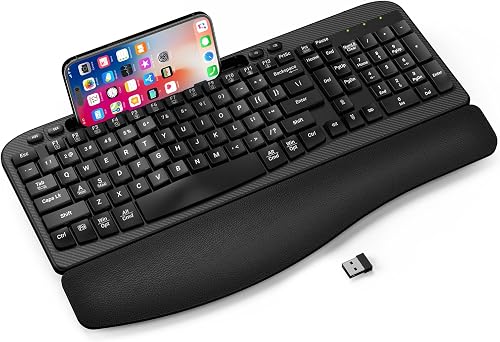
EAYBLLY 2.4G Wireless Ergonomic Keyboard: Best for a built-in phone holder
- Full-size wave keys
- 3-layer memory foam wrist rest
- 7.28 in device holder
- 8 and 12 degree tilt angles
EAYBLLY adds a 7.28 in holder to a full-size wave keyboard, giving your phone or small tablet a set place during desk work. Its 2.4G connection is plug and play on supported Windows, Mac OS and Chrome OS devices.
Pros
- Built-in device holder
- Memory foam wrist rest
- Two adjustable tilt angles
Cons
- AA battery is not included
- Large 16.57 x 9.01 in footprint
The EAYBLLY 2.4G Wireless Ergonomic Keyboard is the best wireless ergonomic keyboard here for a built-in phone or small-tablet holder. Its full-size wave keys and 3-layer memory foam wrist rest suit a home office, study desk or work surface where a second screen needs a fixed place.
The holder measures 7.28 in and supports vertical or horizontal placement. Dual tilt angles of 8 and 12 degrees let you choose between two typing positions, while the 2.4G connection reaches up to 33 ft and needs no driver installation on supported devices.
This keyboard has 104 keys and uses 1 AA battery, which is not included. An extra USB-C adapter supports Windows, Mac OS and Chrome OS, and the 16.57 x 9.01 in size gives you a full-size typing area.
Pick EAYBLLY if the device holder solves a real desk problem. Its larger footprint needs more room than compact wave keyboards, so measure your keyboard area before choosing it.
COLIKES Wireless Ergonomic Keyboard: Best for colorful backlighting
- 15 RGB lighting effects
- 2500mAh rechargeable battery
- Leather wrist rest
- Silent membrane keys
COLIKES suits buyers who want a quiet wave keyboard with colorful lighting. Its rechargeable battery, USB-C charging and receiver storage keep the setup simple, while the backlight adds visibility for dim desks.
Pros
- 15 RGB lighting effects
- 2500mAh rechargeable battery
- Windows, Mac, Chrome OS and Linux compatibility
Cons
- Backlight reduces stated battery runtime
- 2.4G connection uses a USB receiver
The COLIKES Wireless Ergonomic Keyboard is the best pick for quiet typing with colorful backlighting. It uses silent membrane keys, a soft leather wrist rest and 15 RGB lighting effects with 5 backlight modes and 3 brightness levels.
The built-in 2500mAh battery charges through USB-C. COLIKES states up to 277 days of use with the backlight off at 3 hours daily, or up to 10 days with the backlight on.
The backlight turns off after 90 seconds, and the keyboard enters sleep mode after 3 minutes.
A 2.4G USB receiver provides the wireless connection, and the receiver stores on top of the keyboard. The included USB-C to USB adapter supports Windows, MacOS, Linux and Chrome OS, while multimedia keys handle play, pause, volume and track controls.
Choose COLIKES when lighting is part of your desk setup rather than an occasional extra. For a quieter keyboard that also suits a styled desk, compare quiet ergonomic keyboard options.
Remember that using the RGB backlight changes the stated battery runtime.
ProtoArc EK01 Plus Backlit Bluetooth Ergonomic Keyboard: Best for backlighting and 3 devices
- Curved split frame
- Soft white backlight
- 2000mAh rechargeable battery
- Bluetooth and 2.4G connection for up to 3 devices
ProtoArc combines a curved split frame, cushioned wrist rest and soft white backlighting with 3-device switching. It is a good match for buyers who want lighting and multi-device pairing without a wired mode.
Pros
- 3-device switching
- Rechargeable 2000mAh battery
- Three adjustable tilt angles
Cons
- No wired mode
- Full-size design takes more desk space
The ProtoArc EK01 Plus Backlit Bluetooth Ergonomic Keyboard is the best wireless ergonomic keyboard for buyers who want a curved split frame, soft white lighting and 3-device switching. It combines a cushioned wrist rest with 3 adjustable tilt angles for seated or standing work.
The 117-key full-size layout connects to up to 3 devices through Bluetooth and 2.4G USB. It works with Windows, Mac OS X, Android and Microsoft systems, but it cannot connect through a wire.
Its 2000mAh rechargeable battery supports 3 backlight brightness levels. ProtoArc states up to 12 to 13 hours on high, 18 to 20 hours on medium, 34 to 36 hours on low and 90 to 100 days with the backlight off.
Choose ProtoArc if lighting and device switching matter more than wired fallback. The full-size design occupies more desk space, so compare your available area with the K860 before buying.
How should you choose a wireless ergonomic keyboard?
Choose the layout first, then compare the connection, power system, wrist support and desk footprint. For a different typing feel, compare low-profile mechanical keyboards.
A split layout changes hand position more than a wave design, while a compact keyboard may give your mouse more room.
Split layout or wave design?
A split layout is the better starting point if you want the key areas separated. The K860 and Arteck use split designs, while Wave Keys, ULSOU, EAYBLLY and COLIKES use wave-shaped designs.
Read our ergonomic split keyboard layout guide before choosing a large split keyboard. It explains the adjustment period and the desk space needed around the center break.
Is a wrist rest worth having?
A wrist rest can give your palms a stable place to rest between keystrokes, but it should not force your wrists upward. The K860, Wave Keys, Arteck, EAYBLLY, COLIKES and ProtoArc include wrist or palm rests, while ULSOU includes a keyboard wrist rest as part of its wave design.
The shape of the rest matters in daily use. A pillowed or memory foam surface spreads pressure across the heel of the hand, while a firmer edge can feel like support under the wrists.
Keep your shoulders relaxed and place the keyboard close enough that you do not reach forward. If a rest feels too high, try a lower tilt rather than raising the keyboard further.
Sit so your forearms are roughly level with the keys. A chair that is too low may make you bend the wrists down, while a desk that is too high may lift the shoulders.
Use the rest lightly, not as a surface to press into for the whole session. Your hands should still float enough to reach the top rows without stretching.
For standing desks, check the same points again. The tilt that feels right while seated may need a small change when you stand and your arm angle shifts.
If you use a keyboard tray, leave enough depth for the rest. A tray that holds only the keys may force the wrists to hover at the edge.
Small hands may feel the rest differently from large hands. Try a low tilt first, then adjust only if the typing position still feels strained after a short session.
Which keyboard connection is easiest?
A USB receiver is often the simplest choice for a desktop, while Bluetooth is useful when you want to preserve USB ports or switch among mobile devices. The K860, Wave Keys, MK670 and ProtoArc offer Bluetooth, while Arteck, ULSOU, EAYBLLY and COLIKES focus on USB receiver connections.
Receivers may be stored inside the packaging, at the back of the keyboard or under the mouse battery cover. Check that location before discarding packaging, especially with a combo.
Do tilt angles change comfort?
Tilt angles change the height and direction of the keys, so use the lowest comfortable position first. Arteck has foldable legs, the K860 has 0, -4 and -7 degree palm-lift positions, EAYBLLY has 8 and 12 degree angles, and ProtoArc has 3 adjustable tilt angles.
Our guide to tenting angles for keyboards covers how to adjust the keyboard without forcing your wrists into an awkward position.
Wireless ergonomic keyboard care and setup
Set up the keyboard with the receiver or Bluetooth connection before arranging your desk around it. Keep the receiver in a clear USB port, charge rechargeable models before a long workday and store spare batteries where you can reach them.
For a receiver model, plug it in and type a few lines before you move other items. That check confirms the computer sees the keyboard and that the position does not block the signal.
For Bluetooth, pair the keyboard while it is close to the device. Keep the pairing steps handy for the first few days, since a new layout can need a small adjustment after a restart.
Charge rechargeable models during a lunch break or overnight, depending on how you work. A regular routine is easier than waiting until the battery warning appears during a busy day.
Store spare batteries in the same drawer as the keyboard cable or receiver. That keeps the replacement step simple when the current set runs low.
Clean the keys with the keyboard powered off and avoid letting liquid enter the gaps. For splash-resistant or spill-resistant designs, follow the product instructions instead of assuming the keyboard can be washed or submerged.
A dry soft cloth can remove dust from the surface and the wrist rest. Shake crumbs out by turning the keyboard over only if the maker allows that step.
Avoid household sprays and excess moisture around the keys. Liquid can sit under keycaps and cause problems that a quick wipe cannot fix.
Measure the keyboard area before ordering. Full-size picks such as the K860, EAYBLLY and ProtoArc need more front-to-back space than compact Wave Keys, and a wrist rest adds to the usable depth.
Allow space for the mouse as well, not just the keyboard. A compact keyboard can bring the mouse closer to the body, which may change how much side room you need.
Check the height too. Tilt legs and adjustable stands raise the back of the keyboard, so a low desk clearance can become a problem.
If you share the desk with a notebook or phone holder, plan the whole row at once. The keyboard, rest, mouse and accessories should sit within an easy reach.
Keep the setup flexible for the first week. Small changes to chair height, monitor distance and tilt can improve comfort more than a perfect measured layout.
Final pick: which wireless ergonomic keyboard should you buy?
The Logitech Ergo K860 is the best wireless ergonomic keyboard overall if you want a curved split layout, cushioned wrist support, adjustable palm lift and Bluetooth or USB connection. Choose Logitech Wave Keys for a smaller wave design, Arteck for rechargeable split typing, or ProtoArc for backlighting and 3-device switching.
That final choice comes down to the trade off you value most. The K860 gives the most complete split setup, while the other picks trade some of that separation for size, power or lighting.
Wave Keys suits buyers who want a familiar feel with a curved typing path. Its compact footprint also helps when the desk already holds a mouse, notebook or monitor stand.
Arteck suits buyers who prefer a rechargeable battery over disposable batteries. Its split shape and receiver connection keep the setup simple for a Windows desktop or laptop.
ProtoArc suits buyers who type in low light or switch among several devices. Its backlight and 3-device connection are the main reasons to choose it over a plainer split model.
For a keyboard-and-mouse set, choose ULSOU when you want one receiver and choose MK670 when its larger mouse suits your hands. For more laptop-focused choices, continue with our best ergonomic keyboard for laptops.
Before you order, measure the desk area and check the battery type you prefer. A keyboard that fits your space and routine is more likely to stay in daily use.
Also check the operating system you use most. Key legends and shortcut behaviour can differ between Windows and Mac setups, even when the hardware supports both.
If you are unsure between split and wave, start with the layout that matches your current habits. You can always change later once you know which hand position feels natural.
Our top 3 picks at a glance
-
1
Best for split-key comfort
Logitech Ergo K860 Wireless Ergonomic Split Keyboard
9.7/10 our score
See it on Amazon -
2
Best for compact wave typing
Logitech Wave Keys Ergonomic Wireless Keyboard
9.6/10 our score
See it on Amazon -
3
Best for a matched keyboard and mouse
ULSOU Wireless Keyboard And Mouse Combo
9.6/10 our score
See it on Amazon
Frequently asked questions
What is the best wireless ergonomic keyboard for most people?
The Logitech Ergo K860 is the best wireless ergonomic keyboard for most people in this roundup because it combines a curved split keyframe, pillowed wrist rest, adjustable palm lift and Bluetooth or USB connectivity.
Choose a wave-style model if you want a more familiar transition from a standard keyboard.
Are split ergonomic keyboards better for typing comfort?
A split layout can place your hands and forearms in a more natural position, but comfort depends on the shape, width, wrist rest and your desk setup. The K860 and Arteck use split designs, while Wave Keys and similar models use a curved or wavy keyframe.
Give yourself time to adjust to a new layout.
Should you choose Bluetooth or a USB wireless receiver?
Bluetooth is useful when you want to connect devices without occupying a USB port. A USB receiver can be simpler for a desktop computer, especially when the keyboard is designed for plug-and-play use.
Check your computer's ports and the keyboard's supported operating systems before choosing.
Do wireless ergonomic keyboards need batteries?
Some use replaceable AA or AAA batteries, while others have rechargeable batteries. The Logitech Ergo K860 uses 2 AAA batteries, Arteck has a rechargeable battery, and ProtoArc uses a rechargeable 2000mAh battery.
Check the power type before buying so your charging routine matches the keyboard.
How should you set up a wireless ergonomic keyboard?
Place the keyboard so your elbows stay near your sides and your wrists remain relaxed rather than bent upward. Start with a low tilt, then adjust the palm lift or feet only as needed.
Keep the keyboard close enough that you do not reach forward, and leave space for the wrist rest.