Logitech Ergo K860 Review: Worth It? (November 2026)
The Logitech Ergo K860 suits desk users who want a full-size split keyboard with a cushioned wrist rest. Its curved layout and adjustable palm lift may take getting used to, while the Business version adds Logi Bolt wireless security for managed workplaces.
On this page (8 sections)
- Logitech Ergo K860 Review
- What does the Logitech Ergo K860 review find?
- How does the split layout affect typing?
- What do the tilt settings change?
- How do the standard and Business versions differ?
- Which K860 should you choose for your setup?
- What should you check before buying?
- Is the Logitech Ergo K860 worth choosing?
Logitech Ergo K860 Review
The Logitech Ergo K860 is a full-size split keyboard for people who want a curved typing layout and a cushioned wrist rest. Its shape changes the hand position from a flat keyboard, so allow time to adjust and check that the wide frame fits your desk.
The standard K860 connects through Bluetooth or a USB receiver and has three palm lift settings. The K860 for Business keeps the ergonomic layout and adds Logi Bolt wireless for workplaces that manage device security and deployment.
What does the Logitech Ergo K860 review find?
The Logitech Ergo K860 stands out for its joined split keyframe, pillowed wrist rest and adjustable palm lift. If you want a mouse with sideways scrolling beside it, see vertical mice with horizontal scroll.
It aims to support a more natural typing posture while keeping a familiar full-size layout with number pad.
Logitech Ergo K860 Wireless Ergonomic Split Keyboard: Best for everyday office typing

- Curved split keyframe
- Pillowed memory foam wrist rest
- Bluetooth and USB receiver
- Three tilt positions
A full-size ergonomic keyboard with a curved split layout, scooped keys, cushioned wrist rest and wireless options for everyday desk work.
Pros
- Three palm lift positions
- Bluetooth and USB receiver connectivity
- Full-size layout with numpad
- Compatible with Windows, macOS, Linux and Chrome OS
Cons
- The split shape may require an adjustment period
- Its wide footprint needs room on the desk
Logitech describes the K860's keys as scooped to match fingertip shape, with quiet key action. For a height comparison, see low-profile vs standard mechanical keyboards.
Its full-size arrangement and CAPS LOCK indicator may feel familiar if you're moving from a standard desktop board, though the curved center and split rows will feel different at first.
The desktop keyboard buying guide can help compare this style with traditional and compact layouts.
Who may like the K860 layout?
The layout may suit you if you type for long stretches and want your hands angled around a curved center. The wrist rest is built into the keyboard, so it stays in place as you type rather than moving as a separate pad might.
It may be a poor fit if you often switch between keyboards or need a compact board for a small desk. The K860 is about 18 in long and 9 in wide, so leave space for both the keyboard and mouse.
For a compact pointing device, see the Logitech Lift mouse review. For setup guidance, read how to use a Logitech Lift mouse.
How does the split layout affect typing?
The K860's curved split design separates the key areas while keeping them in one full-size frame. This can encourage a different hand position, but it does not guarantee comfort for every person or desk setup.
A split layout may take practice if you've spent years using a flat keyboard. Start with ordinary tasks and give yourself time to learn the key positions before judging speed or accuracy.
The ergonomic keyboard split layout guide explains what the center gap and curved rows change. For more office-focused choices, see our guide to the best ergonomic keyboard for office work.
Is the wrist rest removable?
The wrist rest is integrated into the K860, with a pillowed surface and memory foam layer on the standard model. The fixed design means it remains attached, which keeps the wrist support aligned but can make the keyboard bulkier to store or carry.
Logitech says the rest provides 54% more wrist support and 25% less wrist bending compared with a standard keyboard without a palm rest. These are manufacturer figures, not a promise that every user will feel the same change.
What do the tilt settings change?
The standard K860 has three palm lift positions: 0, -4 and -7 degrees. See whether a 7-degree keyboard tilt feels right for your setup.
Logitech presents the tilt legs as a way to set the keyboard for seated or standing work and support a natural wrist position.
Try each setting with your arms relaxed and wrists straight rather than choosing the steepest angle by default. The best position depends on your chair or standing desk height and how your forearms meet the keyboard.
For another way to adjust a keyboard angle, see negative tilt for a Corsair keyboard.
The keyboard tenting angles guide covers how angle affects hand position. Remember that the K860's adjustable palm lift is a tilt feature, not a pair of independently raised keyboard halves.
How do the standard and Business versions differ?
The main difference is wireless management and security: the standard K860 offers Bluetooth and a USB receiver, while the Business version includes Logi Bolt wireless with an encrypted Secure Connections Only mode. Both keep the curved split layout and full-size form.
| Feature | Ergo K860 | Ergo K860 for Business |
|---|---|---|
| Layout | Full-size QWERTY with numpad | Full-size QWERTY with numpad |
| Wireless options | Bluetooth and USB receiver | Bluetooth and Logi Bolt |
| Tilt adjustment | 0, -4 and -7 degrees | Three tilt positions |
| Workplace focus | Everyday desk use | IT deployment and managed devices |
| Compatibility | Windows, macOS, Linux and Chrome OS | Windows, macOS and Linux; check your setup |
Logitech Ergo K860 Split for Business Wireless: Best for managed business setups
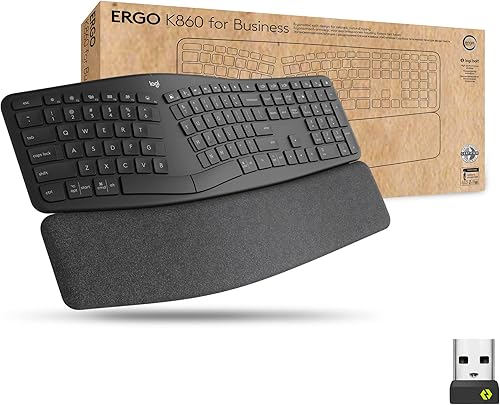
- Curved split keyframe
- Logi Bolt wireless
- Bluetooth
- Connects to up to three devices
A business-focused K860 with Logi Bolt encrypted wireless and features aimed at IT deployment, alongside the familiar split shape and wrist rest.
Pros
- Logi Bolt uses encrypted Secure Connections Only mode
- Bluetooth option
- Full-size layout with numpad
- Designed for remote deployment and management
Cons
- Business connectivity may be unnecessary for a personal desk
- Check device and operating system compatibility before choosing
Choose the Business version if your organization uses Logi Bolt or needs remote device deployment and management. For a personal workspace, compare the connection options your computer supports and avoid paying for workplace features you won't use.
Which K860 should you choose for your setup?
Choose the standard K860 for general office use if Bluetooth or a USB receiver covers your needs. For another ergonomic keyboard option, compare Perixx ergonomic keyboards.
Its adjustable palm lift, built-in rest and full-size arrangement suit a permanent desk where you have room for a wide keyboard.
Choose the Business model when Logi Bolt's encrypted connection and IT management features matter to your workplace. If you're connecting to a laptop on the go, also consider how often you'll carry a full-size board.
For other wireless layouts, compare our best wireless ergonomic keyboard picks. Laptop users can also review the best ergonomic keyboard for laptop setups.
What should you check before buying?
Check desk width, connection needs and the way you use the number pad before choosing the K860. Its dimensions are about 17.95 in long by 9.17 in wide, which leaves less room for a mouse than a compact keyboard.
The standard model works with Windows, macOS, Linux and Chrome OS. The Business version lists Windows, macOS and Linux compatibility; verify your work computer's requirements, especially if IT restricts wireless devices.
Consider the learning curve too. A split keyboard can feel unfamiliar, and the number row and central keys may take a little time to locate by touch.
If a key becomes damaged or stops working, our Logitech Ergo K860 key replacement guide covers what to check before replacing it.
Is the Logitech Ergo K860 worth choosing?
The Logitech Ergo K860 is a strong fit if you want a full-size curved split keyboard with an integrated wrist rest and adjustable tilt. Its wide frame and changed key positions are the main trade-offs to weigh against those features.
Pick the standard K860 for a personal desk with Bluetooth or USB receiver needs. Pick the Business version when Logi Bolt security and IT management are useful in your workplace.
Frequently asked questions
Is the Logitech Ergo K860 a split keyboard?
Yes. The Logitech Ergo K860 has a curved, split keyframe that separates the left and right typing areas while keeping them joined in one full-size keyboard.
The layout also includes a numpad, so check your desk width and mouse position before you buy.
What is different about the Logitech Ergo K860 for Business?
The Business version adds Logi Bolt wireless with encrypted Secure Connections Only mode and is designed for IT deployment and management. It keeps the curved split layout, wrist rest and three tilt positions.
Choose it when your workplace needs managed wireless devices; otherwise compare the standard model's USB receiver and Bluetooth options.
Can you connect the Ergo K860 with Bluetooth?
Both versions support Bluetooth. The standard K860 also connects with its USB receiver, while the Business version offers Logi Bolt wireless.
Confirm which connection method your computer supports and whether workplace security rules require a specific wireless option.
Does the Logitech Ergo K860 work while standing?
The K860 has adjustable tilt legs intended to help set palm lift while seated or standing. The standard model has 0, -4 and -7 degree positions, while the Business version describes three tilt positions.
Set the keyboard so your wrists feel relaxed and your shoulders stay loose.


