Logitech Lift Mouse Review: Worth It? (November 2026)
The Logitech Lift is a wireless vertical mouse for small to medium hands, with a 57-degree grip, quiet clicks and Bluetooth or Logi Bolt connectivity. Check your hand size and handedness before choosing a version.
On this page (8 sections)
- What stands out in this Logitech Lift mouse review?
- How does the Lift grip feel on paper?
- Are the Lift's controls practical for daily work?
- Which wireless connection should you use?
- Is there a left-handed Logitech Lift mouse?
- Which Logitech Lift color should you choose?
- What should you check before buying?
- Is the Logitech Lift worth considering?
The Logitech Lift is a wireless vertical mouse for small to medium hands, with a 57-degree grip, quiet clicks and Bluetooth or Logi Bolt connectivity. The main buying checks are whether its upright shape suits your hand, whether you need a left-handed version and how you want to connect it.
This review covers three color versions: Rose, Graphite and Sand. The supplied models are all right-hand configurations, so left-handed shoppers should verify the exact version before ordering.
What stands out in this Logitech Lift mouse review?
The Logitech Lift stands out for its upright 57-degree grip, thumb rest, quiet clicks and SmartWheel. It is aimed at small to medium hands, with customizable buttons and two wireless connection options.
Logitech Lift Vertical Ergonomic Wireless Mouse: Best for a rose finish

- 57-degree vertical shape
- Bluetooth Low Energy or Logi Bolt USB
- Whisper-quiet clicks
- SmartWheel
A rose-finish Lift for small to medium right hands, with a softly textured grip, thumb rest and quiet clicks.
Pros
- Softly textured grip and thumb rest
- Bluetooth Low Energy and Logi Bolt options
- SmartWheel scrolling
Cons
- Right-hand version
- Designed for small to medium hands
The Rose version has the same core design as the other colors. Logitech says the vertical shape promotes a more natural forearm posture, but an ergonomic shape is a fit preference, not a guarantee of comfort for every person.
The 9.7 score reflects how well the listed grip, controls and connection options match shoppers seeking a compact vertical mouse. Our score weighs specs, features and buyer feedback against what you're shopping for.
Who should consider the Logitech Lift?
Consider it if you want a vertical mouse with a thumb rest, reachable buttons and the choice of Bluetooth or a USB receiver. If you are choosing both devices, see ergonomic keyboard and vertical mouse combos.
For keyboard upkeep, read Logitech Ergo K860 key replacement instructions.
The design is intended for small to medium hands, which makes hand fit an important check. If you have larger hands, compare vertical mice for large hands.
A larger hand may find the mouse too compact, while someone who prefers a flat, standard mouse may need time to adjust to the upright grip. For a broader overview of vertical mouse versus standard mouse, compare how each shape changes your hand position.
How does the Lift grip feel on paper?
The Lift uses a 57-degree upright shape with a softly textured grip and snug thumb rest. That layout gives your hand a more upright position than a standard mouse, so consider your natural grip and desk space before choosing it.
The body measures 108 x 70 x 71 mm and weighs 125 g. Those dimensions can help you compare it with a mouse you already find comfortable, though they don't tell you how the shape will feel in your hand.
Logitech positions the Lift for small to medium hands. If your palm is larger or you use a fingertip grip, think through where your thumb and fingers would rest before making the switch.
A vertical design also changes how you move the mouse. If you are weighing that change, our guide to the best vertical mouse ergonomic options compares shapes for different desk needs.
Are the Lift's controls practical for daily work?
The Lift has easy-to-reach customizable buttons, quiet clicks and a SmartWheel. These features suit shared or quiet workspaces and people who want shortcuts close to the main buttons.
Logitech describes four customizable buttons that can be assigned through Logi Options+ software on Windows and macOS. Basic mouse functions work on other supported systems without extra drivers, but software customization may require a compatible computer.
The SmartWheel shifts between precision and speed scrolling. For a separate sideways control, compare vertical mice with horizontal scroll.
That gives you two scrolling behaviors, but it is not the same as an infinite-scroll wheel; see our explainer on vertical mice with infinite scroll if continuous scrolling is a must-have.
For setup help after you choose a version, follow our how to use a Logitech Lift mouse guide. It covers getting familiar with the grip and controls.
Which wireless connection should you use?
The Lift connects through Bluetooth Low Energy or a Logi Bolt USB receiver. Bluetooth avoids using a USB port, while the receiver is an option when you prefer a dedicated wireless connection.
The Lift can connect to up to three devices and switch between them, according to Logitech. Its basic compatibility spans Windows, macOS, iPadOS, Chrome OS and Linux, though advanced button customization depends on Logi Options+ support.
Check your computer's ports and operating system before choosing how to connect. If you plan to switch between a laptop and tablet, make sure the connection method and feature support fit both devices.
Logitech gives a battery life estimate of up to two years from one AA battery. Actual battery life can vary with use and computing conditions.
Is there a left-handed Logitech Lift mouse?
The Lift is available in left- and right-hand configurations, but the three models in this review are right-handed. Confirm that the exact version you choose is made for your dominant hand.
A right-hand shape can be awkward if you control the mouse with your left hand. For gaming controls designed around the left hand, compare left-handed MMO mice.
Look for a left-handed Lift configuration or a mouse designed for either hand, and check the orientation before ordering.
Our guide to a left-handed mouse setup and ergonomics can help you plan placement and compare suitable shapes. A comfortable mouse position also depends on where the keyboard sits, so our desktop keyboard guide covers how to choose a keyboard that fits the same workspace.
Which Logitech Lift color should you choose?
Choose Rose, Graphite or Sand based on the finish you want; the color versions here share the Lift's core vertical design. They are all right-hand models intended for small to medium hands.
Rose: Logitech Lift Vertical Ergonomic Wireless Mouse
Logitech Lift Vertical Ergonomic Wireless Mouse: Best for a rose finish
- 57-degree vertical shape
- Bluetooth Low Energy or Logi Bolt USB
- Whisper-quiet clicks
- SmartWheel
A rose-finish Lift for small to medium right hands, with a softly textured grip, thumb rest and quiet clicks.
Pros
- Softly textured grip and thumb rest
- Bluetooth Low Energy and Logi Bolt options
- SmartWheel scrolling
Cons
- Right-hand version
- Designed for small to medium hands
Rose is the color choice if you want a softer finish. It retains the textured grip, thumb rest, SmartWheel and Bluetooth or Logi Bolt connection options.
Graphite: Logitech Lift Vertical Ergonomic Wireless Mouse
Logitech Lift Vertical Ergonomic Wireless Mouse: Best for a graphite finish
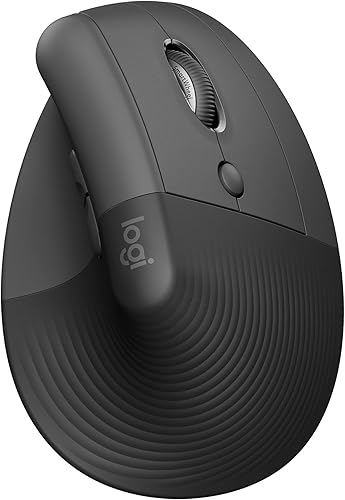
- 57-degree vertical shape
- Bluetooth Low Energy or Logi Bolt USB
- Whisper-quiet clicks
- SmartWheel
The graphite Lift has the same upright design and connection choices, suited to small to medium right hands.
Pros
- Softly textured grip and thumb rest
- Bluetooth Low Energy and Logi Bolt options
- SmartWheel scrolling
Cons
- Right-hand version
- Designed for small to medium hands
Graphite offers a darker finish while keeping the same core controls and upright shape. Its fit and handedness considerations are the same as the Rose version.
Sand: Logitech Lift Vertical Ergonomic Wireless Mouse
Logitech Lift Vertical Ergonomic Wireless Mouse: Best for a sand finish

- 57-degree vertical shape
- Bluetooth Low Energy or Logi Bolt USB
- Whisper-quiet clicks
- SmartWheel
A sand-finish Lift with the same upright grip and wireless options, for small to medium right hands.
Pros
- Softly textured grip and thumb rest
- Bluetooth Low Energy and Logi Bolt options
- SmartWheel scrolling
Cons
- Right-hand version
- Designed for small to medium hands
Sand gives you a lighter neutral finish. Choose it for the color preference, after checking the hand orientation and whether the vertical shape suits your grip.
What should you check before buying?
Check hand size, handedness, connection needs and the return policy before choosing a Lift. Those details matter more to the buying decision than the color alone.
Compare its dimensions with a mouse you already use comfortably. Consider whether the upright angle feels natural and whether the thumb rest and buttons fall within easy reach.
Confirm the exact hand orientation and included connection hardware for the version you plan to buy. If you rely on custom buttons, check that Logi Options+ supports your operating system.
Is the Logitech Lift worth considering?
The Logitech Lift is worth considering if you want a small to medium right-hand vertical mouse with quiet clicks, a thumb rest, SmartWheel scrolling and Bluetooth or Logi Bolt. Its main limits are its targeted hand size and the need to choose the correct hand configuration.
Pick the color that suits your desk after confirming fit and connection support. If wireless vertical options are still on your shortlist, compare the best vertical mouse wireless choices.
Frequently asked questions
Is the Logitech Lift good for small hands?
Logitech describes the Lift as a fit for small to medium hands. Its upright 57-degree shape has a softly textured grip and thumb rest, but comfort depends on your hand and how you hold a mouse.
Check whether your fingers reach the buttons naturally before choosing it.
Does the Logitech Lift come in a left-handed version?
Logitech describes the Lift as available in right- and left-hand configurations, but the three versions covered here are listed as right-hand models. If you need a left-handed mouse, confirm the exact hand orientation before buying and compare dedicated options in our left-handed mouse setup guide.
How does the Logitech Lift connect?
The Lift supports Bluetooth Low Energy or a Logi Bolt USB receiver. Choose based on the ports and pairing needs of your computer or tablet, and check operating system support for the features you plan to use.
Logitech says it can connect to up to 3 devices.
Does the Logitech Lift have infinite scrolling?
The Lift has a SmartWheel that Logitech describes as shifting between precision and speed scrolling. That does not mean it has an infinite-scroll wheel.
If that feature is essential, compare the controls carefully with other vertical mice before buying.


