9 Best Wireless Vertical Mice (November 2026)
The best wireless vertical mice include the Anker 2.4G Wireless Ergonomic Mouse for simple USB comfort, the Logitech M510 Full Size Ambidextrous 2.4 GHz for a familiar full-size shape, and the Logitech Lift Vertical Ergonomic Wireless Mouse for Bluetooth and small hands.
On this page (3 sections)
The best vertical mouse wireless pick for most right-handed users is the Anker 2.4G Wireless Ergonomic Mouse, with a neutral grip, 3 DPI levels and simple USB receiver setup.
Choose Logitech Lift for Bluetooth, ProtoArc for rechargeable multi-device use, or Logitech M510 for a familiar full-size shape.
That short answer is not a rule for every desk. The right pick depends on hand size, devices used, and whether you prefer replaceable or rechargeable power.
A vertical mouse changes the angle of your hand instead of making you rotate your wrist as much on a flat mouse.
That can help during long desk sessions, but the shape takes time to learn. Your fingers and forearm will need a few days to adjust.
If you prefer a stationary ball for pointer control, compare wireless trackball mice.
This guide compares upright wireless mice by hand fit, controls, battery type and connection options. It focuses on DPI steps, sleep modes, and whether side buttons work on your system.
Hand fit deserves special care because vertical shapes differ more than standard mice. A large model can feel unstable in a small hand, and a compact model may not support a large palm.
Battery style changes routine care. Some models use disposable AA or AAA batteries, while others use a built-in rechargeable battery and cable.
Connection also affects port use and setup. A USB receiver is often simple plug and play, while Bluetooth can keep a USB port free.
For a fuller desk setup, our desktop keyboard guide covers how a keyboard and mouse work together.
Good keyboard height and mouse position can also make the upright grip feel more natural.
Our picks at a glance
-
1

-
2
 Best for a familiar full-size shape
Logitech M510 Full Size Ambidextrous 2.4 GHz
9.6/10 our score
See it on Amazon -
3
 Best for Bluetooth and small hands
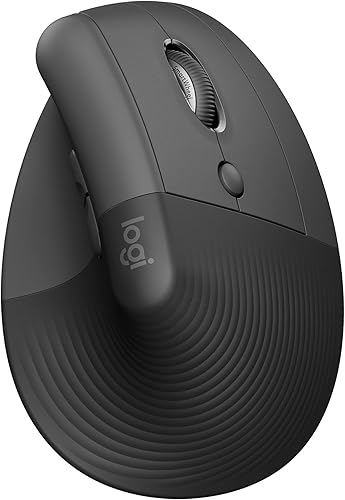
Logitech Lift Vertical Ergonomic Wireless Mouse
9.5/10 our score
See it on Amazon
- 4
 Best for 3-device switchingCheck it
- 5
 Check it
ProtoArc EM11 NL Wireless Ergonomic Vertical Mouse
Best for rechargeable multi-device use - 6
 Best for medium to large handsCheck it
- 7
 Check it
UGREEN Ergonomic Wireless Mouse
Best for quiet medium-size workspaces - 8
 Check it
TECKNET Ergonomic Mouse Vertical Wireless with 2.4GHz
Best for quiet USB-A value - 9
 Check it
Uineer Ergonomic Wireless Vertical Mouse
Best for RGB and rechargeable power
The best wireless vertical mice for different users
The Anker is the easiest starting point for most right-handed users because it keeps connection simple and controls familiar.
Left-handed shoppers can compare wireless mice for left-handed users.
That simplicity matters if you want an upright grip without learning a new pairing system. Plug in the receiver, choose a DPI level, and start with a light grip close to your keyboard.
Logitech Lift fits small to medium hands better, while ProtoArc and Uineer are stronger if rechargeable power matters.
Each also offers more connection options than a receiver-only mouse.
Hand size is the first filter. A mouse that is too large can force your fingers to reach, while one that is too small may leave your palm without support.
Connection type is the second filter. Bluetooth saves a USB port, while a 2.4 GHz receiver suits a desktop with a spare USB-A port.
Battery type is the third filter. Rechargeable models reduce replacements, while AA and AAA models can be easier to power when a cable is not handy.
Controls matter more than they seem. Back and Forward buttons speed up browsing, but some do not work on macOS, so check your system first.
DPI also shapes daily use. Lower settings suit careful document work, while higher settings help across wide monitors and long pages.
Adjustment is a real trade-off. Many designs suggest about 1 to 2 weeks to learn the grip, so start shorter and keep your wrist relaxed.
Use the notes below to narrow the list to two or three models. Then compare hand fit, connection, battery and buttons for your setup.
| Product | Best for | Connection | DPI | Power | Our score |
|---|---|---|---|---|---|
| Anker 2.4G Wireless Ergonomic Mouse | simple USB comfort | 2.4 GHz USB receiver | 800, 1200 or 1600 | 2 AAA batteries, not included | 9.7 |
| Logitech M510 Full Size Ambidextrous 2.4 GHz | a familiar full-size shape | 2.4 GHz Logitech Unifying receiver | 9.6 | ||
| Logitech Lift Vertical Ergonomic Wireless Mouse | Bluetooth and small hands | Bluetooth or Logi Bolt USB | 9.5 | ||
| TECKNET Ergonomic Mouse | 3-device switching | Bluetooth and 2.4 GHz USB-A | 800 to 4800 across 6 levels | 2 AAA batteries, not included | 9.4 |
| ProtoArc EM11 NL Wireless Ergonomic Vertical Mouse | rechargeable multi-device use | Dual Bluetooth or USB-A receiver | Built-in 500mAh battery and Type-C charging cable | 9.3 | |
| Lekvey Ergonomic Mouse | medium to large hands | 2.4G USB receiver | 9.1 | ||
| UGREEN Ergonomic Wireless Mouse | quiet medium-size workspaces | Bluetooth or 2.4G wireless | One AA battery | 8.6 | |
| TECKNET Ergonomic Mouse Vertical Wireless with 2.4GHz | quiet USB-A value | 2.4 GHz USB-A receiver | 8.5 | ||
| Uineer Ergonomic Wireless Vertical Mouse | RGB and rechargeable power | Bluetooth or USB-A receiver | 800, 1600, 2400 or 3200 | Rechargeable battery and Type-C cable | 8.3 |
Anker 2.4G Wireless Ergonomic Mouse: Best for simple USB comfort
- Right-hand vertical design
- 800/1200/1600 DPI
- 2.4 GHz USB receiver
- Next and previous buttons
Anker pairs a right-hand vertical shape with a USB receiver and 3 DPI levels. It suits buyers who want a straightforward wireless setup without Bluetooth pairing.
Pros
- Neutral handshake-style grip
- Receiver stores in the mouse
- Power-saving mode after 8 minutes
Cons
- Right-hand design only
- AAA batteries are not included
- Key click sounds are unavoidable
The Anker 2.4G Wireless Ergonomic Mouse is the strongest general pick for a right-handed desk. Its vertical shape encourages a neutral handshake-style grip, while the 800, 1200 and 1600 DPI settings let you choose slower or faster cursor movement.
If you want thumb joystick controls, compare vertical mice with a joystick.
The USB receiver stores in the bottom of the mouse, so setup is simple on a computer with a suitable USB port. It also has next and previous buttons for web browsing, which can reduce repeated trips to the browser toolbar.
The mouse uses 2 AAA batteries, which are not included. After 8 minutes of inactivity, it enters a power-saving mode and wakes when you press the left or right button.
Anker gives this model a 120 x 62.8 x 74.8 mm size and a stated weight of 3.4 oz. It is a good match for buyers who want an upright mouse without Bluetooth pairing, but key click sounds are unavoidable.
Logitech M510 Full Size Ambidextrous 2.4 GHz: Best for a familiar full-size shape
- Contoured shape
- Soft rubber grips
- 7 buttons
- Side-to-side scrolling and zoom
The M510 is not a steep vertical mouse, but its broad palm area and contoured body make it a useful alternative for shoppers who want wireless comfort with familiar controls.
Pros
- Long stated battery life
- Back and forward buttons
- Unifying receiver stays connected
Cons
- Not a true upright vertical design
- Maximum sensitivity is 1000 DPI
- Side controls need software for extra functions
The Logitech M510 is the right choice if you want wireless comfort without a strongly upright shape. Its contoured body, soft rubber grips and broad palm area feel more familiar than vertical designs here.
That shape suits right-handed users who want support without learning a handshake grip. Your palm rests on the broad area, and curved sides give fingers a place to settle.
It uses a 2.4 GHz Logitech Unifying receiver and includes 2 AA batteries. Logitech states up to 2 years of battery life, though actual life can vary.
Included batteries mean you can start without buying power first. Keep spare AA batteries in a drawer for long workdays.
The M510 has 7 buttons, including Back and Forward controls, side-to-side scrolling and zoom. Extra functions require Logitech SetPoint on Windows or Logitech Control Center on Mac OS X.
Side-to-side scrolling helps with wide spreadsheets, maps and music libraries. Zoom saves menu trips when checking photos or budget sheets.
This is not best if your main goal is the most upright wrist position. Choose it when full-size shape, macOS and Windows support, and long battery life matter more.
Care is simple with no rechargeable battery to top up. Wipe rubber grips with a dry cloth and keep the receiver in the laptop when you travel.
Logitech Lift Vertical Ergonomic Wireless Mouse: Best for Bluetooth and small hands
- 57-degree vertical angle
- Bluetooth Low Energy and Logi Bolt
- SmartWheel
- Up to 2 years from one AA battery
Logitech Lift gives small to medium right hands an upright 57-degree grip, quiet clicks and two connection choices. It is the strongest fit when Bluetooth and device switching matter.
Pros
- Designed for small to medium hands
- Bluetooth and Logi Bolt options
- Quiet clicks and SmartWheel
Cons
- Right-hand graphite model shown here
- Vertical shape takes adjustment
- One AA battery is included
The Logitech Lift Vertical Ergonomic Wireless Mouse is the best fit here for small to medium right hands. Its 57-degree shape, textured grip and thumb rest place the hand in a more upright position without the larger body used by some vertical mice.
That smaller body suits users whose fingers feel stretched on larger vertical models. The thumb rest gives your thumb a clear place to rest instead of dragging on the desk.
Lift connects through Bluetooth Low Energy or the included Logi Bolt USB receiver. It works with Windows, macOS, iPadOS, Chrome OS and Linux, so it suits moving between a laptop, desktop and tablet.
Bluetooth can save a USB port on a laptop, while the receiver gives a simple plug in option for a desktop. Keep the receiver stored safely when you carry the mouse in a bag.
The SmartWheel supports smooth scrolling, and the customizable buttons are easy to reach. Logitech also describes the clicks as whisper-quiet, which suits shared offices and quiet rooms.
One AA battery provides up to 2 years of stated battery life. The included battery means setup can start right away, and a spare AA is easy to find later.
If you want more detail before choosing this model, read our Logitech Lift mouse review. It can help you decide if the small to medium fit matches your hand.
TECKNET Ergonomic Mouse: Best for 3-device switching
- Bluetooth 5.0/3.0 and 2.4 GHz
- 6 DPI levels up to 4800
- Three-device connection
- Quiet left and right clicks
This right-handed TECKNET model switches among up to 3 devices and offers more DPI steps than most picks here. It suits medium to large hands and users who want Bluetooth plus USB-A.
Pros
- Three-device connection
- Six adjustable DPI levels
- Deep sleep mode for battery saving
Cons
- Right-hand use only
- Side buttons do not work with macOS
- Needs a 1 to 2 week adjustment period
The TECKNET Ergonomic Mouse is the best fit for users who switch among 3 devices. It offers Bluetooth 5.0 or 3.0 plus a 2.4 GHz USB-A mode, and Bluetooth can connect to 2 devices at the same time.
That setup suits a laptop plus a tablet or a work computer plus a home computer. You can move the cursor without unplugging a receiver each time you change machines.
Its 6 DPI levels range from 800 to 4800. That gives you more adjustment than the Anker or Lekvey, from slower pointer movement for detailed work to faster movement across a wide display.
Higher DPI can help on large monitors, but it can also feel jumpy at first. Start in the middle range and adjust one step at a time while you learn the vertical grip.
This right-handed model is aimed at medium to large hands. For a larger fit, compare vertical mice for large hands.
It uses 2 AAA batteries, enters deep sleep after about 10 to 30 minutes of inactivity, and has nearly silent left and right clicks.
Deep sleep helps the batteries last, and a simple click wakes the mouse. Keep spare AAA batteries nearby if you use it for full workdays.
The side buttons do not work with macOS. Pick this one when three-device switching and DPI choice matter more than universal side-button support.
ProtoArc EM11 NL Wireless Ergonomic Vertical Mouse: Best for rechargeable multi-device use
- 58-degree vertical design
- Dual Bluetooth and 2.4G USB-A
- 500mAh rechargeable battery
- 1000/1600/2400 DPI
ProtoArc combines a 58-degree grip, rechargeable power and connections for up to 3 devices. It fits small to medium right hands, but its forward and back buttons do not work with Mac OS.
Pros
- Rechargeable battery
- Up to 3 device connections
- Quiet left and right clicks
Cons
- Buttons are not programmable
- USB-C receiver is not included
- Forward and back buttons do not work with Mac OS
The ProtoArc EM11 NL is the best rechargeable choice for small to medium right hands. Its 58-degree vertical design, built-in 500mAh battery and Type-C charging cable remove the need for disposable batteries.
That design suits users with hands under 7.5 inches who want a clear size limit. Measure your hand before you order, because a vertical shape needs room for your palm and fingers.
ProtoArc supports up to 3 devices through dual Bluetooth and a 2.4G USB-A receiver. It works with Windows, Mac OS X and Android systems, but the forward and back buttons do not work with Mac OS.
Dual Bluetooth can keep a laptop and a tablet connected at once. The USB-A receiver adds a third option for a desktop that has a spare port.
The 1000, 1600 and 2400 DPI settings provide simple sensitivity choices. Left and right clicks are quiet, while the middle scroll wheel and forward and back buttons are not silent.
Quiet primary clicks help in shared rooms, but the other buttons may still be heard. That mix suits home offices where close colleagues sit nearby.
The mouse is designed for hands under 7.5 in and weighs 250 g. Expect a learning period of about 1 to 2 weeks, especially if you are moving from a flat standard mouse.
Rechargeable power means you should top up the battery before it runs low. Use the included Type-C cable and keep the mouse near your desk charger.
Lekvey Ergonomic Mouse: Best for medium to large hands
- Rechargeable 600mAh battery
- 800/1200/1600 DPI
- 2.4G USB receiver
- Back and forward buttons
Lekvey offers a large right-hand vertical shape with rechargeable power and plug-and-play USB connection. It is a practical choice when you want to avoid replacing batteries.
Pros
- 600mAh rechargeable battery
- USB-C charging cable included
- 36-month manufacturer's warranty
Cons
- USB receiver connection only
- All buttons are non-programmable
- Large shape may not suit small hands
The Lekvey Ergonomic Mouse suits medium or large right hands that prefer rechargeable power and a large vertical grip. Its 600mAh battery lasts about 3 to 4 weeks with 8 to 10 hours of daily use, or up to 2 to 3 months with lighter use.
That battery range suits people who dislike buying disposable batteries. Heavy daily use will need more frequent charging than light evening use.
It connects through a 2.4G USB receiver stored in the bottom and does not need Bluetooth pairing or drivers. The package includes a USB-A to USB-C charging cable and a manual.
A stored receiver helps when you carry the mouse between rooms. Check the bottom storage slot before you pack, so the receiver does not stay behind in a drawer.
Three DPI settings, at 800, 1200 and 1600, cover common office movement speeds. Back and Forward buttons support browsing, and the buttons are not programmable.
Standard DPI steps keep setup simple for documents and email. If you need custom button shortcuts, a model with programmable controls may suit you better.
At 5 x 3 in, this is one of the larger shapes in the group. Measure your hand before choosing it, especially if compact mice usually feel more controlled.
Auto sleep helps save power when you step away from the desk. Wipe the surface with a dry cloth and charge with the included cable when the battery runs low.
UGREEN Ergonomic Wireless Mouse: Best for quiet medium-size workspaces
- Bluetooth and 2.4G wireless
- Quiet clicks
- 1000/1600/2000/4000 DPI
- PTFE glide feet
UGREEN suits medium to large hands that need quiet clicks and dual wireless modes. Its 4 DPI levels cover document work, browsing and light gaming.
Pros
- Quiet click buttons
- Up to 3-device switching
- 10 m stated range
Cons
- Not suitable for small hands
- Right-hand design
- One AA battery is required
The UGREEN Ergonomic Wireless Mouse is a practical choice for medium to large hands that need quiet clicks. It connects through Bluetooth or 2.4G wireless, supports up to 3 devices and has a stated 10 m range.
That range gives flexibility in a home office where the computer may sit away from the desk. Bluetooth can save a port, while the wireless receiver suits a desktop setup.
Four DPI levels, from 1000 to 4000, let you adjust cursor speed for document work, browsing and light gaming. PTFE glide feet are intended to reduce surface friction while moving the mouse.
Lower DPI helps with careful edits, while higher DPI moves the cursor faster across wide screens. Glide feet matter most on desks where the mouse surface feels sticky.
UGREEN uses one AA battery and a smart sleep mode. It works with Windows, macOS, Linux, ChromeOS and Android, making it a flexible option for mixed-device workspaces.
One AA battery is easy to replace when power runs low. Smart sleep helps extend use, but a spare battery in a drawer is still a good habit.
This is a right-hand mouse and is not suited to small hands. For gaming-focused options, see our guide to the best vertical mouse for gaming.
Check the hand size guide before you order. A medium to large shape will feel more stable if your palm is large enough to fill it.
TECKNET Ergonomic Mouse Vertical Wireless with 2.4GHz: Best for quiet USB-A value
- 2.4 GHz USB-A receiver
- 5 DPI levels up to 4800
- 2 AAA batteries
- Over 3-million-click durability claim
This TECKNET model keeps setup simple with a USB-A receiver, quiet clicks and 5 DPI settings. It also has a green-purple finish and needs a 1 to 2 week adjustment period.
Pros
- Near-silent clicks
- 4800 DPI maximum
- 8-minute auto-sleep
Cons
- USB-A port required
- Side buttons do not support Mac systems
- 2 AAA batteries are not included
The TECKNET Ergonomic Mouse Vertical Wireless with 2.4GHz is a good match for a quiet USB-A setup. Its 2.4 GHz receiver offers a stated 49 ft range, and the mouse uses 2 AAA batteries with about 6 months of stated battery life.
That range suits a desk where the computer tower sits on the floor or at a distance. A stable receiver connection can keep cursor movement smooth without Bluetooth pairing.
Five DPI settings run from 800 to 4800. The mouse also has forward and backward buttons, an 8-minute auto-sleep mode and a low-battery light.
The wide DPI range covers slow detail work and fast movement across large displays. The low battery light gives a clear cue to replace the AAA batteries before they run out.
TECKNET describes the left and right clicks as over 90% quieter and the buttons as tested for more than 3 million clicks. It is a right-handed model with a green-purple finish.
Quiet clicks help in shared offices and quiet study spaces. The finish adds color, but it will not change how the mouse fits your hand.
The receiver needs a USB-A port, so a USB-C adapter may be needed on some Macs. The side buttons do not support Mac systems.
Auto sleep after 8 minutes helps save battery when you leave the desk. Allow about 1 to 2 weeks to adapt to the upright grip, and keep a light hold on the mouse.
Uineer Ergonomic Wireless Vertical Mouse: Best for RGB and rechargeable power
- Bluetooth 5.0, Bluetooth 4.0 and 2.4G
- 500mAh rechargeable battery
- 7-color LED lights
- Side scroll wheel
Uineer adds tri-mode wireless connection, RGB lighting and a side scroll wheel to a right-hand vertical design. It suits users who want desk style alongside rechargeable everyday use.
Pros
- Three connection modes
- Rechargeable battery
- Silent left and right buttons
Cons
- Right-hand design
- 1 to 2 week adjustment period
- The data lists different maximum DPI figures
The Uineer Ergonomic Wireless Vertical Mouse is the best fit for buyers who want a rechargeable mouse with RGB lighting and a side scroll wheel.
It supports Bluetooth 5.0, Bluetooth 4.0 and 2.4G USB connectivity for switching among up to 3 devices.
That mix suits a work laptop, a home desktop and a tablet in one setup. Bluetooth 5.0 and 4.0 options can help you match the device you use most often.
Its 800, 1600, 2400 and 3200 DPI settings cover basic office work, browsing and casual gaming.
Silent left and right buttons help in shared rooms, while the side buttons support page and app navigation.
A side scroll wheel can help with horizontal movement in spreadsheets and timelines. Silent primary clicks reduce noise, but side buttons may still make sound.
The built-in 500mAh battery recharges with the included Type-C cable. Uineer says a full charge can last for weeks with typical 8-hour daily use, and smart sleep starts after 10 to 30 minutes of inactivity.
Rechargeable power removes battery purchases, but you need to remember charging. A low battery indicator helps you plug in before work is interrupted.
This right-handed mouse weighs 105 g and includes 7-color LED lighting. The data gives different maximum DPI figures in different places, so treat the listed DPI settings as the safer guide.
Allow about 1 to 2 weeks to adapt if this is your first vertical mouse.
How to choose the best vertical mouse wireless model
The best vertical mouse wireless model depends first on hand size and hand orientation. A mouse that is too large can make your fingers reach, while one that is too small may leave your palm without enough support.
Match the mouse to your hand size
Logitech Lift and ProtoArc EM11 NL target small to medium hands. TECKNET's 3-device model, UGREEN and Lekvey are better starting points for medium to large hands.
Measure from the crease at your wrist to the tip of your middle finger. ProtoArc recommends hands under 7.5 in, while Lekvey gives a medium or large hand recommendation.
Pick the right wireless connection
A 2.4 GHz receiver is usually the simplest plug-and-play choice when your computer has USB-A. Anker, Lekvey and the USB-only TECKNET use this style.
That style suits desktops and laptops with a spare port. You plug in the receiver, and the mouse is ready without Bluetooth pairing.
Bluetooth helps save a USB port and works well with laptops and tablets. Logitech Lift, UGREEN, ProtoArc, Uineer and the 3-device TECKNET offer Bluetooth alongside a receiver.
Bluetooth also helps when moving between work and personal devices. Check how many devices each model can remember before relying on quick switching.
Read our Wireless vs Wired Setup: Which is Better? guide if deciding between cordless convenience and a cable.
A wired mouse avoids batteries and charging, but limits placement. Wireless models add freedom if you keep batteries or a cable nearby.
For a receiver desk, keep the receiver in the same port each day. That reduces lost receivers and pairing delays.
For a Bluetooth desk, keep the mouse charged or stocked. Sleep modes save power, but the first click may wake the mouse.
Match connection to your main device first. A laptop user may value Bluetooth, while a desktop user may value a USB-A receiver.
Check port type before you buy. Some Macs need a USB-C adapter, and some side buttons do not work on macOS.
Compare battery types and sleep modes
Rechargeable models reduce battery replacement. ProtoArc, Lekvey and Uineer use built-in rechargeable batteries, while Anker, TECKNET and Logitech M510 use replaceable batteries.
Sleep modes also affect daily use. Anker sleeps after 8 minutes, the USB TECKNET sleeps after 8 minutes, and Uineer and ProtoArc use longer inactivity windows.
Check the buttons you actually need
Back and Forward buttons are useful for browsing, but support differs by operating system. ProtoArc's forward and back buttons do not work with Mac OS, and both TECKNET models limit side-button support on Mac systems.
For extra button control, Logitech M510 supports software-based functions. Uineer adds a side scroll wheel, while Anker keeps the layout simpler.
Give the vertical shape time
A vertical mouse can feel awkward during the first several days because your hand moves differently. ProtoArc and TECKNET suggest about 1 to 2 weeks of adjustment.
Start with shorter sessions, keep your grip light and place the mouse close to your keyboard. If discomfort continues, stop using it and consider advice from a qualified health professional.
Which wireless vertical mouse should you buy?
The Anker 2.4G Wireless Ergonomic Mouse is the safest general choice for a right-hand vertical shape, clear DPI settings and simple USB receiver. Choose Logitech Lift for small to medium hands and Bluetooth, or ProtoArc EM11 NL for rechargeable multi-device use.
Those three cover common needs. Anker suits simple USB setup, Lift suits compact hands, and ProtoArc suits rechargeable multi-device work.
Choose TECKNET's 3-device model for more DPI levels and switching. Pick Lekvey or UGREEN for medium to large hands, and Uineer if rechargeable power, RGB lighting and a side scroll wheel are priorities.
Each pick trades a limit. TECKNET limits side buttons on macOS, Lekvey uses receiver only, and Uineer adds style features that may not matter to all.
For a receiver comparison, see our best USB vertical mouse guide. For a broader shortlist, see our best vertical mouse guide.
Before you order, measure your hand and check your ports. That prevents a poor fit or a receiver needing an adapter.
Also check battery style against your routine. Rechargeable models need charging, while AA and AAA models need replacements but run without a cable.
Give any vertical mouse a fair adjustment period. Start shorter, keep your grip light, and stop if discomfort continues.
The best choice fits your hand and devices without extra steps. Use the details above to pick the model for your desk today.
Our top 3 picks at a glance
-
1
-
2
Best for a familiar full-size shape
Logitech M510 Full Size Ambidextrous 2.4 GHz
9.6/10 our score
See it on Amazon -
3
Best for Bluetooth and small hands
Logitech Lift Vertical Ergonomic Wireless Mouse
9.5/10 our score
See it on Amazon
Frequently asked questions
What is the best vertical mouse wireless option for most people?
The Anker 2.4G Wireless Ergonomic Mouse is the best vertical mouse wireless choice for a simple right-hand setup. It uses a USB receiver, offers 800, 1200 and 1600 DPI, and includes next and previous buttons.
Choose Logitech Lift instead if Bluetooth or small-hand fit matters more.
Are wireless vertical mice better than standard mice?
A wireless vertical mouse changes how your hand rests by placing it in a more upright position. That may feel better for some users, but it also changes cursor control and needs an adjustment period.
Compare the Vertical Mouse vs Standard Mouse: Comparison before switching.
Should you choose Bluetooth or a USB receiver?
Choose Bluetooth when you want to save a USB port or connect to devices without USB-A. Choose a receiver when you want plug-and-play setup.
Some mice offer both, such as Logitech Lift, TECKNET's 3-device model and ProtoArc EM11 NL.
How long does it take to get used to a vertical mouse?
Many vertical mouse designs need an adjustment period because the grip and cursor movement differ from a standard mouse. ProtoArc and both TECKNET descriptions suggest about 1 to 2 weeks.
Start with shorter sessions and keep your wrist relaxed while learning the new angle.
What should you check before buying a wireless vertical mouse?
Check hand size, hand orientation, connection type, battery style and button support first. Small to medium hands may fit Logitech Lift or ProtoArc, while medium to large hands may prefer UGREEN or the larger Lekvey shape.
Also confirm whether your computer has USB-A, Bluetooth or both.


