Mechanical Keyboard vs Low Profile: Which to Choose? (November 2026)
Choose a low profile keyboard for a shorter reach and a standard mechanical keyboard for a taller key setup with more room to change switches. Compare height, travel, typing feel and replacement compatibility before choosing.
On this page (8 sections)
- Mechanical Keyboard vs Low Profile: Which Should You Choose?
- What does low profile mean on a keyboard?
- How do height and switch travel affect typing?
- Which typing feel should you expect?
- Can you replace switches in a low profile or standard board?
- Which keyboard layout and setup fit your desk?
- Does a low profile keyboard save desk space?
- Which one should you choose?
Mechanical Keyboard vs Low Profile: Which Should You Choose?
Choose a low profile keyboard for a shorter reach and a standard mechanical keyboard for a taller key setup with more room to change switches. In a mechanical keyboard vs low profile comparison, check the actual height, switch travel and replacement compatibility instead of relying on the label alone.
Standard mechanical keyboards can use different switch types and keycap designs. Low profile describes a shorter keyboard or switch design, and some low profile keyboards are mechanical too.
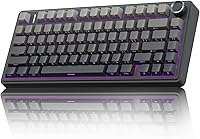
The AULA F75 Pro is a standard mechanical option with hot-swap support for compatible 3-pin or 5-pin switches. For a wider overview of layout and connection choices, start with our desktop keyboard buying guide.
What does low profile mean on a keyboard?
A low profile keyboard has a shorter key setup than a standard-height design. The term describes height and form, not one universal switch type or typing feel.
A lower keyboard may make the keys sit closer to the desk. That can change how far your fingers lift between presses, but the exact effect depends on the keyboard, switch and keycaps.
Look for measurements of total keyboard height and switch travel when the maker provides them. Don't assume that two low profile models have the same dimensions or key feel.
A low profile keyboard can be mechanical, while some keyboards described as having a mechanical feel use another design. Check the construction details for the model you want, and see our guide to mechanical keyboard switches for a closer look at switch choices.
How do height and switch travel affect typing?
Keyboard height tells you how high the keys sit; switch travel tells you how far a key moves. They're related to feel, but they're different measurements.
A taller keyboard may place your hands at a higher angle unless you adjust your setup. A wrist rest or a change in chair and desk position may help you find a comfortable position, but it doesn't change the keyboard's switch travel.
Shorter travel may suit someone who wants a more compact press. Others may prefer more movement under each finger.
Use published measurements for the exact keyboard rather than guessing from a photo.
The AULA F75 Pro includes pre-lubricated Reaper switches and supports compatible 3-pin or 5-pin replacements. Its product details don't give a switch-travel measurement, so don't infer one from its height or switch name.
Which typing feel should you expect?
Choose by the press and sound you prefer, since height alone doesn't predict how a keyboard feels. Switch type, keycaps, keyboard structure and your typing habits all play a part.
A standard mechanical keyboard can offer a distinct mechanical press, with feel varying by switch. The AULA F75 Pro has pre-lubricated Reaper switches, stabilizers and layers of sound-dampening material; those features describe its construction, not a guarantee that you'll like its sound.
The Redragon K521 is described as a mechanical-feeling keyboard. Its 104 keys, wired connection and multimedia combinations may suit someone who wants a full-size layout, but that phrase isn't enough to judge its press against a specific low profile mechanical switch.
If typing feel matters most, look for a way to try the exact switch or a sample before you decide. Our comparison of mechanical and membrane keyboards for typing explains how key construction changes the experience.
Can you replace switches in a low profile or standard board?
You can replace switches only when the keyboard supports replacement and the new switches match its sockets. A mechanical label alone doesn't confirm that switches are removable.
The AULA F75 Pro supports hot-swappable 3-pin or 5-pin switches, so you can replace compatible switches without soldering. Check the pin count and compatibility of any replacement before buying it.
The details for the Redragon K521 don't confirm hot-swap support. Treat its switches as non-replaceable unless the manufacturer confirms compatibility for the exact model.
Low profile boards can have their own switch shapes and sockets. Standard-height switches may not fit them, even if both keyboards use mechanical switches.
Check the keyboard maker's replacement guidance before ordering parts.
Which keyboard layout and setup fit your desk?
Choose the layout that gives you the keys you use without crowding your desk. A low profile design can change keyboard height, but layout determines how much desk width the board takes.
The AULA F75 Pro has an 81-key 75% layout with arrow keys. Its height is 1.7 inches, so it isn't especially low just because a separate desk accessory is described as low profile.
The Redragon K521 has 104 keys, including 12 multimedia combinations. A full-size layout keeps more keys in reach, while a compact board leaves more room for a mouse or other desk items.
If you're comparing compact low profile options, our best low profile keyboards guide covers that category. You can also narrow the choice by use case with our guides to low profile gaming keyboards, wireless low profile keyboards and white low profile keyboards.
Does a low profile keyboard save desk space?
A low profile keyboard can reduce height, but it doesn't always reduce the area it takes up. Check width and depth alongside height if your desk is tight.
The AULA F75 Pro measures 12.7 inches long by 5.64 inches wide by 1.7 inches high. Its 75% layout saves space compared with a full-size design by using fewer keys, while the Redragon K521's 104-key layout takes a different approach.
A low profile microphone arm can help with monitor clearance, but it doesn't make a keyboard lower. The FIFINE BM88 extends below the bottom of a monitor and includes cable management; the microphone is not included.
Which one should you choose?
Pick a low profile keyboard if a shorter key setup is your priority; pick a standard mechanical model if switch feel and replacement options matter more. Then match the layout and connections to your desk and devices.
Choose the AULA F75 Pro if you want hot-swap support for 3-pin or 5-pin switches, a compact 75% layout and Bluetooth, 2.4GHz or USB-C connections. Choose the Redragon K521 if you want 104 keys, a wired USB-A connection and a mechanical-feeling design.
For a low profile model, confirm its height, switch travel and supported replacement parts before buying. The right mechanical keyboard vs low profile choice is the one whose feel, fit and repair options match how you type.
For a specific repair, see Logitech Ergo K860 key replacement steps.
Frequently asked questions
Is a low profile keyboard a mechanical keyboard?
It can be. Low profile describes a shorter keyboard or switch design, while mechanical describes how a key registers a press.
Check the exact switch type and keyboard construction, since a low profile keyboard can use different key technologies.
Do low profile keyboards have less key travel?
Low profile models are designed around a shorter key setup, but the exact travel depends on the keyboard and switch. Compare published travel measurements for the specific models you are considering; height alone doesn't tell you the full press distance.
Can you replace switches on any mechanical keyboard?
No. Switch replacement depends on the keyboard's construction.
The AULA F75 Pro supports hot-swappable 3-pin or 5-pin switches, while the Redragon K521 information here does not specify hot-swap support, so don't assume its switches can be changed.
Which keyboard is better for typing?
Choose by the height, press feel and layout that suit your hands and habits. A standard mechanical board can offer a taller key setup and, on a hot-swap model, switch changes; a low profile board can reduce how high the keys sit.
Neither guarantees a better typing experience for everyone.
Can I use standard switches in a low profile keyboard?
Only if the keyboard is designed for those switches. Switch shape, height, pins and socket compatibility vary, so check the exact replacement type supported by the keyboard before buying.
Hot-swap support by itself doesn't mean every switch will fit.