5 Best Clamp-On Keyboard Trays (November 2026)
The best clamp-on keyboard trays include the VIVO Black Extra Large Clamp-on 34 x for wide keyboards and mice, the VIVO Black Clamp-on 27 x for standard-size desks, and the XINLEI Keyboard Tray Under Desk Large C-Clamp for thick desktops.
On this page (5 sections)
The best clamp on keyboard tray for most large workstations is the VIVO Black Extra Large Clamp-on 34 x 11 in tray. Its wide platform holds a keyboard, mouse and other small accessories, while the C-clamps add the tray without drilling into the desktop.
Choose the VIVO 27 x 11 in model when your desk has less horizontal space. The XINLEI gives you the highest platform depth and two mounting methods, while the suptek is the compact choice for a smaller keyboard.
If you're comparing the wider keyboard setup first, our guide to desktop keyboards covers keyboard size, layout and workspace fit. For wrist position, see typing angle keyboard 7 degrees before setting the tray height and angle.
Our picks at a glance
-
1
 Best for wide keyboards and mice
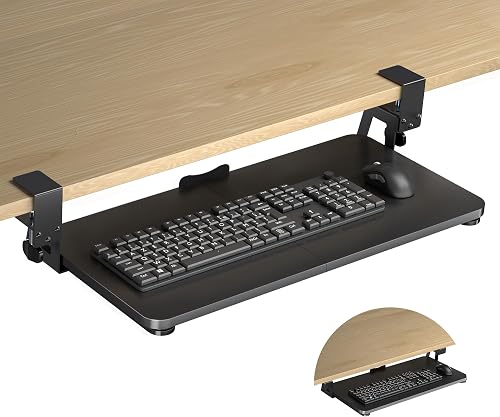
VIVO Black Extra Large Clamp-on 34 x
9.7/10 our score
See it on Amazon -
2

-
3
 Best for thick desktops
XINLEI Keyboard Tray Under Desk Large C-Clamp
9.4/10 our score
See it on Amazon
- 4
 Check it
AX WABER Keyboard Tray Under Desk Pull Out
Best for adjustable clamp fit - 5
 Check it
suptek Small Keyboard Tray Under Desk Pull
Best for compact keyboard setups
The best clamp on keyboard tray picks for different desks
The best clamp on keyboard tray depends on your available edge space, desktop thickness and desired platform size. The five picks below are ordered by score, with the largest VIVO tray first because it gives a wide keyboard and mouse setup the most usable room.
Our score weighs specs, features and buyer feedback against what you're shopping for. We compared the stated dimensions, clamp limits, mounting methods, slide ranges and platform sizes.
VIVO Black Extra Large Clamp-on 34 x: Best for wide keyboards and mice
- 33.9 x 11 in tray
- 39.4 in total clamp-to-clamp length
- 11 lb capacity
- 1.25 in maximum desk thickness
The extra-long platform gives a keyboard and mouse more room below a wide desk. Its C-clamps attach without drilling when the desktop has a level underside and square, smooth edges.
Pros
- Widest tray in this group
- 11 lb capacity
- Slides up to 8.5 in from the desk edge
Cons
- Needs 39.4 in of desk space
- Not for beveled edges
The VIVO Black Extra Large Clamp-on 34 x 11 in tray is the strongest fit for a wide workstation. Its 33.9 x 11 in platform gives a full-size keyboard and mouse more room than the smaller trays in this group.
The full clamp-to-clamp length is 39.4 in, so measure the front edge of your desk before choosing it. The desk surface must be no more than 1.25 in thick, and the tray is not compatible with beveled edges.
The sturdy C-clamps attach without drilling when the desktop has a level underside and a clean, square edge. Check for crossbars or other supports before mounting, because the clamp area needs to remain clear.
The tray holds up to 11 lb and extends up to 8.5 in from the desk edge. You can slide it under the desk when the keyboard is not in use, which helps keep the desktop open for other tasks.
This model is a good match if you want the most platform width and have at least 39.4 in of clear desk space. If that length is too much, the 27 in VIVO model keeps the same 11 in depth in a smaller frame.
VIVO Black Clamp-on 27 x: Best for standard-size desks
- 26.8 x 11 in tray
- 32.5 in total clamp-to-clamp length
- 11 lb capacity
- 1.25 in maximum desk thickness
This VIVO tray keeps the same 11 in depth and 11 lb capacity as the larger pick while using less horizontal space. It suits a regular keyboard and mouse on a desk with a square edge.
Pros
- Smaller footprint than the 34 in model
- 11 lb capacity
- Slides up to 8.5 in from the desk edge
Cons
- Less platform width than the extra-large model
- Not for beveled edges
The VIVO Black Clamp-on 27 x 11 in tray suits a standard desk that cannot fit the extra-large model. Its 26.8 x 11 in platform leaves room for a keyboard, mouse and other small accessories while reducing the total clamp-to-clamp length to 32.5 in.
Like the larger VIVO, it supports up to 11 lb and extends up to 8.5 in from the desk edge. The 1.25 in maximum desk thickness makes measuring the edge important before installation.
The C-clamps are designed for no-drill attachment, but they need a level underside and a clear mounting area. A beveled desktop edge is not suitable for this tray.
The 11 in depth gives you more front-to-back room than the AX WABER tray. That extra depth can help if your keyboard and mouse need to share the platform, but it also makes underside clearance worth checking.
Pick this model when your desk has about 32.5 in of clear edge space and you want a broad platform without the larger VIVO's 39.4 in footprint. For desks with unusual shapes, compare our guide to keyboard trays for corner desks and keyboard trays for curved desks.
XINLEI Keyboard Tray Under Desk Large C-Clamp: Best for thick desktops
- 25.6 x 11.8 in platform
- 30 in total length including clamps
- 1.63 in maximum desk thickness
- C-clamp or screw mounting
The XINLEI combines a broad platform with a higher stated desk-thickness limit than the VIVO trays. Its C-clamps or screw mounting give you two installation paths, depending on the desk.
Pros
- 1.63 in maximum desk thickness
- C-clamp and screw mounting options
- Back baffle helps stop the keyboard from falling
Cons
- Thicker desktops reduce keyboard clearance
- Total height is 4.45 in
The XINLEI Keyboard Tray Under Desk Large C-Clamp is the better fit when your desktop is thicker than the VIVO limit. Its 1.63 in maximum desk thickness gives the C-clamps a wider stated range, and the 25.6 x 11.8 in platform leaves room for a keyboard and mouse.
The full length is 30 in including the clamps, so it needs less front-edge space than either VIVO tray. The platform has a back baffle that helps stop the keyboard from sliding backward.
XINLEI offers two installation methods: C-clamps or screw mounting. The screw option can suit some thicker desktops, but it changes the installation process and requires a mounting surface that accepts screws.
The slide rail lets the tray move in and out, with a maximum slide-in distance of 12.24 in and a maximum pull-out distance of 7.75 in. The total height is 4.45 in, and thicker desktops reduce keyboard clearance.
Choose this tray if the 1.63 in clamp limit, 11.8 in platform depth or two mounting methods solve a problem on your desk. For more mounting ideas, compare keyboard tray mounting brackets before selecting a fixed installation.
AX WABER Keyboard Tray Under Desk Pull Out: Best for adjustable clamp fit
- 27.3 x 8.3 in tray
- 32.5 in total clamp-to-clamp length
- 11 lb capacity
- 1.9 in maximum desk thickness
The AX WABER suits a desk that needs a higher clamp-thickness limit and a narrower platform. Its stated slide range reaches 5.7 in from the desk edge.
Pros
- Highest stated maximum desk thickness
- 11 lb capacity
- No-drill clamp installation
Cons
- Narrower 8.3 in tray depth
- Not for beveled edges or edge obstructions
The AX WABER Keyboard Tray Under Desk Pull Out is the best fit when clamp thickness is your main concern. Its stated maximum desk thickness is 1.9 in, the highest limit among these picks.
The tray measures 27.3 x 8.3 in, with 32.5 in between the clamps. That narrower 8.3 in depth can work well when space below the desk is limited, but measure your keyboard and mouse together before choosing it.
The tray extends up to 5.7 in from the desk edge and holds up to 11 lb. Its adjustable C-clamp system lets you position the tray without drilling, and the clamps can be adjusted after installation.
The desktop should be between 0.3 and 1.75 in thick for the stated regular-board installation guidance. The edge must also be clear of reinforcing tubes or other obstructions, and a beveled bottom edge is not suitable.
Pick AX WABER when you need a no-drill tray for a relatively thick desktop and do not need an 11.8 in deep platform. If you want more room for a wide mouse area, compare extra-wide keyboard trays instead.
suptek Small Keyboard Tray Under Desk Pull: Best for compact keyboard setups
- 20 x 11.8 in tray
- 24.2 in total clamp-to-clamp length
- 11 lb capacity
- 1.57 in maximum desk thickness
The suptek takes up the least horizontal space here while leaving room for a small keyboard, mouse and other small accessories. Dual steel C-clamps and non-slip pads support a no-drill setup.
Pros
- Shortest total clamp-to-clamp length
- 11 lb capacity
- Edge stopper helps keep the keyboard from falling
Cons
- Smallest tray width in this group
- Does not fit desks thicker than 1.57 in
The suptek Small Keyboard Tray Under Desk Pull Out is the compact choice for a smaller desk or keyboard. Its 20 x 11.8 in tray uses 24.2 in of total clamp-to-clamp space, the shortest footprint in this roundup.
The platform holds a small keyboard, mouse and other small accessories, with an 11 lb capacity. Dual steel C-clamps attach without drilling, while non-slip pads help prevent scratches on the desk.
The tray does not fit a desk thicker than 1.57 in. Measure the front edge and check the underside before installation, especially if a drawer, crossbar or other support sits near the clamp area.
An updated slide system lets you pull and push the tray, and an edge stopper helps keep the keyboard from falling when you push it back. The smaller platform is useful for compact setups, but it leaves less width for larger keyboards.
Choose suptek when keeping the clamp footprint short matters more than fitting a large keyboard and mouse arrangement. If you need a different mounting position, read how to choose a chair-mounted keyboard tray before changing the desk setup.
How to choose a clamp on keyboard tray under desk
Choose a clamp on keyboard tray under desk by measuring the desk edge, checking the clamp thickness limit and confirming that the underside is clear. Then compare the platform size with the keyboard and mouse you plan to use.
If easier-to-read key legends matter, compare large-print computer keyboards.
A tray that fits the keyboard but leaves no room for the mouse can make the setup feel crowded. Compare ergonomic keyboard and mouse combos when choosing both devices together.
Measure both devices side by side, then allow room for the front edge and any safety ledge.
Measure the desk edge before buying
Measure the full distance required between the clamps, not only the tray platform. The VIVO extra-large model is 39.4 in including clamps, the VIVO 27 in model is 32.5 in, and the suptek is 24.2 in.
Also check for drawers, legs, crossbars and cable channels near the front edge. A wireless ergonomic keyboard and mouse combo can reduce cable clutter on the desktop.
A clear top edge does not always mean the underside has enough room for the clamp hardware.
Check desktop thickness and edge shape
A clamp on keyboard tray under desk needs a desktop thickness within its stated range. VIVO's two trays allow up to 1.25 in, XINLEI allows up to 1.63 in with C-clamps, AX WABER gives a stated maximum of 1.9 in, and suptek allows up to 1.57 in.
Edge shape matters too. VIVO and AX WABER state that beveled edges are not suitable, while the installation guidance for these trays favors a level underside and a clean, square edge.
Compare platform depth with your keyboard
The VIVO trays are 11 in deep, XINLEI is 11.8 in, AX WABER is 8.3 in and suptek is 11.8 in. A deeper platform can give your mouse more room, but it may need more clearance below the desktop.
If you use a large keyboard, check its front-to-back measurement against the tray depth. For a lower tray that leaves more room below the desk, compare low-profile under-desk keyboard trays.
Consider height, tilt and slide range
A slide-out tray lets you move the keyboard closer while typing and push it away when you need the desktop. The VIVO models extend up to 8.5 in from the desk edge, XINLEI pulls out up to 7.75 in, and AX WABER extends up to 5.7 in.
The tray position should let your elbows stay close to your body and your wrists remain comfortable. A low-profile mechanical keyboard can also change how your wrists sit at the desk.
If you want to compare height adjustment, see the best keyboard tray adjustable height options.
For negative tilt, our guide to the best ergonomic keyboard tray with negative tilt covers a different wrist-position goal.
How to install a clamp keyboard tray under desk
Install a clamp keyboard tray under desk by clearing the edge, checking the underside and tightening the clamps evenly. Keep the tray empty while you position it, then confirm that it slides without contacting nearby supports.
Place the tray where the keyboard will sit close enough for relaxed shoulders. Confirm that the clamps rest on a level underside and that the upper and lower surfaces are smooth where the hardware contacts the desk.
Tighten the clamps according to the instructions for the model. Do not force a clamp against a beveled edge, a crossbar or an edge obstruction, because the tray may not secure evenly.
After installation, slide the platform in and out slowly. Check that the keyboard stays on the tray and that the edge stopper or back baffle does not interfere with your normal typing position.
Use the supplied hardware and instructions for assembly. If the desk does not meet the tray's thickness or edge requirements, choose another mounting point or another tray rather than forcing the fit.
More guides on this topic
Which clamp-on keyboard tray should you choose?
Choose the VIVO Black Extra Large Clamp-on 34 x 11 in tray if you have at least 39.4 in of clear desk edge and want the widest platform. Pick the VIVO 27 x 11 in model for a standard desk with less horizontal space.
Choose XINLEI for a thicker desktop or when C-clamp and screw mounting options matter. Choose AX WABER for its higher stated desk-thickness limit and narrower platform, or suptek when a compact keyboard setup needs the shortest clamp footprint.
For a heavier setup, compare heavy-duty keyboard trays and keyboard trays with articulating arms. If your current tray moves or rattles, keyboard tray bumpers may help with fit and contact points.
Our top 3 picks at a glance
-
1
Best for wide keyboards and mice
VIVO Black Extra Large Clamp-on 34 x
9.7/10 our score
See it on Amazon -
2
-
3
Best for thick desktops
XINLEI Keyboard Tray Under Desk Large C-Clamp
9.4/10 our score
See it on Amazon
Frequently asked questions
What is the best clamp on keyboard tray?
The VIVO Black Extra Large Clamp-on 34 x 11 in tray is the best clamp on keyboard tray here for a wide workstation. It has a 33.9 x 11 in platform, an 11 lb capacity and a 39.4 in total clamp-to-clamp length.
Choose a smaller tray when your desk cannot spare that much horizontal space.
Can a clamp-on keyboard tray fit any desk?
No. Check the desktop thickness, edge shape, underside and clamp area first.
These trays need enough clear space for the clamps, and several are not compatible with beveled edges.
Crossbars, reinforcing tubes or other supports at the intended mounting point can also prevent a secure fit.
Are clamp-on keyboard trays better than screw-on trays?
Clamp-on keyboard trays avoid drilling and are easier to reposition, but they need a clear desk edge and suitable thickness. The XINLEI also offers screw mounting for some desk types.
Choose the mounting style that matches your desk structure and the clearance available below the desktop.
How much space does a clamp-on keyboard tray need?
Measure both the tray and the full clamp-to-clamp length. The VIVO extra-large model needs 39.4 in of horizontal space, while the suptek needs 24.2 in.
Also check clearance below the desk so the tray can slide in without hitting crossbars, drawers or other supports.
Can a keyboard tray improve typing posture?
A keyboard tray can let you bring the keyboard closer and adjust its position below the desktop. Several models here describe ergonomic typing angles, but the best position depends on your chair, desk height and arm position.
Use a comfortable neutral wrist position and keep the mouse within easy reach.


