How to Set Up a Treadmill Desk?
On this page (6 sections)
Setting up a treadmill desk is a great way to boost your daily activity and burn more calories while you work. You can get started by choosing the right treadmill and desk, then simply integrating them into your workspace. It’s easier than you might think to start moving more throughout your workday.
Many people find that a treadmill desk helps them feel more energized and less sluggish during long work hours. Research shows that incorporating movement can improve focus and productivity. You might be surprised at how much of a difference walking while working can make for your overall well-being and your ability to get things done.
- Choose a treadmill that fits your space and walking speed.
- Select a desk that is adjustable and stable.
- Ensure your setup allows for good posture.
- Start with short walking intervals.
- Listen to your body and adjust as needed.
Ready to transform your workday? Let’s walk through exactly how to set up your treadmill desk step by step, so you can start enjoying the benefits of moving more while you work.
Getting Your Treadmill Desk Setup Right
So, you’re ready to bring the benefits of movement right to your workstation. That’s fantastic! Setting up a treadmill desk might seem like a big project, but we’ve broken it down into simple, manageable steps. The goal is to create a comfortable and safe environment where you can work and walk without missing a beat. Let’s get started on building your new productive and active workspace!
Choosing the Right Equipment: The Foundation of Your Setup
Before you can even think about walking and working, you need the right tools. This means selecting a treadmill and a desk that work well together. Students planning a walking workspace can compare treadmill desks for students. Not all treadmills are created equal, and not all desks are suitable for this kind of setup. Doing a little research now will save you a lot of headaches later.
Selecting Your Treadmill
When picking a treadmill for desk use, think about a few key things. You’ll want something compact and quiet. Many under-desk treadmills are designed specifically for this purpose. They are usually lighter and have a lower profile. Look for models that have a low step-up height. This makes it easier to get on and off.
Speed is another important factor. Most people walk at a pace between 1 to 2 miles per hour while working. So, you don’t need a treadmill that goes super fast. Many under-desk models top out around 2 to 4 mph, which is perfect. Make sure it can handle consistent use throughout the day. Some cheaper models might overheat if used for hours on end.
Consider the controls. Can you easily adjust the speed without taking your attention away from your work? Many have remote controls, which are very handy. Also, check the weight capacity and the overall build quality. You want something that feels sturdy and reliable.
Choosing Your Desk
Your desk needs to be stable and the right height. If you’re using a standard desk, you’ll need to make sure it can accommodate the treadmill underneath. More often, people opt for a standing desk that they can adjust. This is ideal because you can switch between sitting, standing, and walking. More often, people opt for an adjustable standing desk that they can adjust.
An adjustable standing desk is your best friend here. Look for one that can go low enough for you to comfortably type while walking and high enough for you to stand or sit normally. Electric adjustable desks are the easiest to use, as they adjust with the push of a button. Manual ones can be a bit more work.
Make sure the desk has enough surface area for your monitor, keyboard, mouse, and any other essentials. You don’t want to feel cramped. Stability is key. When you’re walking, the desk shouldn’t wobble. A wobbly desk can be distracting and even unsafe for your equipment.
Setting Up Your Treadmill Desk: The Practical Steps
Now that you have your equipment, let’s put it all together. This is where your vision starts to become a reality. We’ll focus on placement, ergonomics, and initial adjustments to make sure your setup is comfortable and functional from day one.
Desk and Treadmill Placement
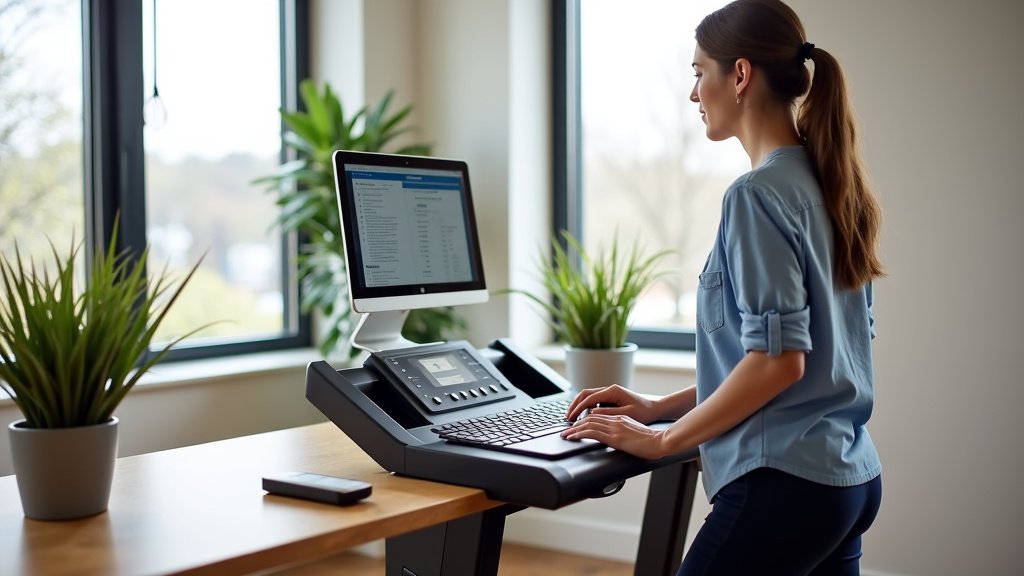
The first step is to position your desk. Ideally, place it near a power outlet for the treadmill and your computer. If you have a standing desk, you’ll want to adjust its height first to a comfortable standing level. Then, slide the treadmill underneath.
Ensure there’s enough space for the treadmill’s length and width. You don’t want it bumping into anything. The front edge of the treadmill should be close enough to your desk so you can easily step onto it. You should have a little room to move your feet naturally without hitting the desk.
Ergonomics: The Key to Comfort and Health
This is perhaps the most critical part of setting up your treadmill desk. Proper ergonomics prevent strain and injury, making your experience enjoyable. We’re aiming for a setup that supports good posture whether you’re walking, standing, or sitting.
Monitor Height: Your monitor should be at eye level. This means the top of your screen should be about level with your eyes. If your monitor is too low, you’ll hunch over. If it’s too high, you’ll strain your neck. You might need a monitor stand or an adjustable arm to get this just right. Many experts recommend keeping your head, neck, and torso aligned.
Keyboard and Mouse Position: When walking, your arms should be relaxed, with your elbows bent at about a 90-degree angle. Your wrists should be straight, not bent up or down. The keyboard tray or the desk surface should be at a height that allows for this. You might need to adjust your desk height or use a keyboard tray. This alignment is important for preventing carpal tunnel syndrome and other repetitive strain injuries.
Your Body Posture: When you’re walking, try to maintain an upright posture. Your shoulders should be relaxed, not hunched. Your core should be slightly engaged. Avoid leaning heavily on the desk or leaning too far forward. Think of it as a gentle, easy walk. The Centers for Disease Control and Prevention (CDC) recommends avoiding prolonged sitting, and a treadmill desk helps with that.
Testing and Adjusting Your Setup
Once everything is in place, take it for a test drive. Start with the treadmill off and standing. Adjust the desk height so you can comfortably type and use your mouse. Then, turn on the treadmill at its lowest speed, say 1 mph. Step onto it carefully.
Walk for a few minutes and see how it feels. Are your arms in a good position? Is the monitor at the right height? Is the desk stable? Make small adjustments as needed. You might find that you need to raise or lower the desk a bit, or perhaps adjust your monitor’s position. Don’t be afraid to tweak things until they feel just right. It often takes a few tries to dial in the perfect setup.
Your First Week with a Treadmill Desk: Getting Started
You’ve done the hard work of setting everything up. Now comes the fun part: using it! The key to success with a treadmill desk is to start slowly and build up gradually; review these treadmill desk safety tips as you begin. Don’t try to walk for eight hours straight on day one. Your body needs time to adjust to this new way of working.
Pacing Yourself: Start Slow and Steady
When you first begin, aim for short walking intervals. Try walking for 15-30 minutes at a time, a few times a day. You can alternate between walking and standing or sitting. For example, walk for 30 minutes, then stand for 30 minutes, then sit for 30 minutes.
Keep your walking speed slow. A pace of 1 to 2 mph is usually sufficient. The goal is to increase your activity level, not to get a strenuous workout. You should be able to hold a conversation or participate in a video call comfortably. Many users find that walking at a casual pace is perfect for focused work.
Listen to Your Body
Your body will tell you what it needs. If you feel fatigued, dizzy, or uncomfortable, take a break. Slow down the treadmill or step off and sit or stand. Pay attention to any aches or pains. They might be a sign that your ergonomics need further adjustment or that you’re pushing yourself too hard, too soon.
As you get more accustomed to walking while working, you can gradually increase the duration and frequency of your walking intervals. You might also find your comfortable walking speed increases slightly. The most important thing is to find a rhythm that works for you and allows you to stay productive and energized.
What to Expect and How to Optimize
You might find that certain tasks are easier to do while walking than others. For example, answering emails or doing research might be fine, but tasks requiring intense concentration or fine motor skills might be better done while standing or sitting. Experiment to see what feels best for different types of work.
Staying hydrated is also important. Keep a water bottle nearby. Consider comfortable, supportive shoes. You don’t need a full athletic shoe, but something with good cushioning and support will make a big difference. Many people wear comfortable sneakers or even supportive slippers. The goal is to make your experience as comfortable and sustainable as possible.
A Quick Checklist for Your Treadmill Desk Setup
Here’s a quick rundown to ensure you’ve got everything covered:
- Treadmill Selection: Is it compact, quiet, and low-profile?
- Desk Choice: Is it stable and adjustable to multiple heights?
- Ergonomics Checked: Is your monitor at eye level and keyboard/mouse at elbow height?
- Clearance: Do you have enough legroom and space to move safely?
- Power Access: Are your treadmill and computer within reach of outlets?
- Comfortable Footwear: Are you wearing shoes that support your feet for walking?
Conclusion
You’ve successfully learned how to set up a treadmill desk, transforming your workspace into a more active and energizing environment. By carefully selecting your equipment and prioritizing proper ergonomics, you’ve created a foundation for a healthier workday. Remember to start slow, listen to your body, and gradually build your walking intervals. You’re now ready to embrace the benefits of moving more while you work. Take that first step today by setting a goal for your first walking session this week!
Frequently Asked Questions
Do I really need a special under-desk treadmill?
Not always. While under-desk treadmills are designed to be compact and quiet, you might be able to use a smaller, lighter traditional treadmill if space and noise aren’t major concerns. Just ensure it fits comfortably and doesn’t create a tripping hazard.
How fast should I walk on my treadmill desk?
Most people find a walking speed of 1 to 2 miles per hour is ideal for working. The goal is to increase your daily activity without becoming too breathless or fatigued to concentrate on your tasks. You should easily be able to hold a conversation.
What if my desk wobbles when I walk?
A wobbly desk can be distracting and even unsafe. Check that all desk legs are even on the floor, and consider using desk leg stabilizers or caster cups. For standing desks, ensure the locking mechanisms are fully engaged. Investing in a sturdier desk might be necessary.
Can I wear any shoes while using a treadmill desk?
While you don’t necessarily need athletic shoes, comfortable footwear with good support and cushioning is highly recommended. Avoid going barefoot or wearing unsupportive shoes like flip-flops, as this can lead to foot fatigue or discomfort.
How long should I walk each day when I first start?
Begin with short intervals of 15-30 minutes, a few times a day. You can alternate walking with standing or sitting. Listen to your body and gradually increase the duration and frequency as you feel more comfortable and less fatigued.