9 Best Extra-Wide Keyboard Trays (November 2026)
The best extra wide keyboard trays include the HUANUO Under Desk Keyboard Tray for adjustable positioning, the VIVO Black Extra Large Clamp-on 34 x for the longest black tray, and the VIVO White Extra Large Clamp-on 34 x for a white extra-wide setup.
On this page (7 sections)
- The best extra wide keyboard tray options
- How we chose the best extra wide keyboard trays
- How wide does a keyboard tray extra wide need to be?
- What desk checks matter before installing an extra large keyboard tray?
- Is a clamp-on keyboard tray better than an under-desk slide-out model?
- How should you set up and care for an extra wide keyboard tray?
- Which extra wide keyboard tray should you choose?
The best extra wide keyboard tray for most desks is the HUANUO Under Desk Keyboard Tray, because it combines a 25 in slide-out platform with swivel, tilt and height adjustment. That mix suits people who change seats, screens or posture during the day.
Choose VIVO for the longest 34 in surface, or UPGRAVITY for a 31.5 in platform with extra depth. Each choice trades width for adjustment, finish or clamp limits, so the best pick depends on your desk as much as your keyboard.
An extra wide keyboard tray gives you room to keep the keyboard and mouse below the desktop instead of crowding the main work surface. Monitors, notebooks and desk accessories can stay on top while typing gear tucks away when it is not needed.
The right choice depends on more than width, since clamp span, desk thickness and under-desk obstacles can decide whether the tray fits. A broad platform is only useful if the clamps have a level edge and the slide path stays clear of legs or supports.
For a full-size keyboard, width helps the mouse sit beside the keys without squeezing your arm. For typing comfort, depth matters too, because it affects wrist position and how far the tray reaches from the desk edge.
Measure your keyboard and mouse together before you compare models. Leave space for the way you actually work, not just the widest point of the keyboard.
Check the desk thickness at the clamp points and note any crossbar, stretcher or support tube below. Those details often rule out a tray that looks right on width alone.
If you are also choosing a desktop keyboard, our desktop keyboard buying guide covers keyboard sizes, layouts and mouse pairing. For a different mounting style, compare these picks with the best clamp on keyboard tray options.
Think about storage as well, since a slide-out tray should disappear when the desktop needs to be clear. The best setup is one you will use daily without fighting the slide or reaching around it.
Our picks at a glance
-
1

-
2
 Best for the longest black tray
VIVO Black Extra Large Clamp-on 34 x
9.7/10 our score
See it on Amazon -
3
 Best for a white extra-wide setup
VIVO White Extra Large Clamp-on 34 x
9.6/10 our score
See it on Amazon
- 4
 Check it
BONTEC Under Desk Keyboard Tray
Best for thick desktops - 5
 Check it
AX WABER Keyboard Tray Under Desk Pull Out
Best for a compact clamp footprint - 6
 Check it
UPGRAVITY Extra Large Keyboard Tray Under Desk
Best for the widest black platform - 7
 Check it
Klearlook Keyboard Tray Under Desk
Best for built-in desk organization - 8
 Check it
UPGRAVITY Extra Large Keyboard Tray Under Desk
Best for rustic desk styling - 9
 Check it
Zontera Ergonomic Keyboard Tray Under Desk
Best for a high-clearance clamp
The best extra wide keyboard tray options
The HUANUO is the strongest adjustable choice, while the VIVO and UPGRAVITY models give you the most usable width and depth. The remaining trays are better when you need a specific desk thickness limit, finish or storage feature.
HUANUO Under Desk Keyboard Tray: Best for adjustable positioning
- 25 x 9.84 in slide-out tray
- 180-degree swivel
- 6.3 in height adjustment
- Included wrist rest
The HUANUO combines a wide slide-out surface with swivel, tilt and height adjustment. It suits buyers who want an extra wide keyboard tray that can move between seated and standing work.
Pros
- Height adjusts for sitting or standing
- Swivels left and right
- Wrist rest included
Cons
- Needs specific crossbar and side-clearance measurements
- Desk top must be over 0.6 in thick
The HUANUO Under Desk Keyboard Tray is the best fit for buyers who want an extra wide keyboard tray that can change position during the day. Its 25 x 9.84 in slide-out surface fits keyboards up to 17.3 x 5.5 in plus mouse space, and the included wrist rest adds a place to support your hands.
The tray swivels 180 degrees left and right, so you can turn it toward a different screen or work position. It also tilts 6 degrees up and 22 degrees down, giving you more control over the keyboard angle.
The 6.3 in height adjustment makes this the most flexible choice for moving between sitting and standing. The lowest connector height is 7.48 in, so measure the space beneath your desktop before ordering.
HUANUO requires careful fit checks. The desk should be over 0.6 in thick, with no crossbar in the way, or enough clearance for the crossbar and full slide-under movement.
The sides also need clear space for the tray and any rotation.
Choose HUANO for adjustability and corner-desk flexibility. Tighten the knob before typing, and confirm the tray's clearance rather than assuming every desk can accept it.
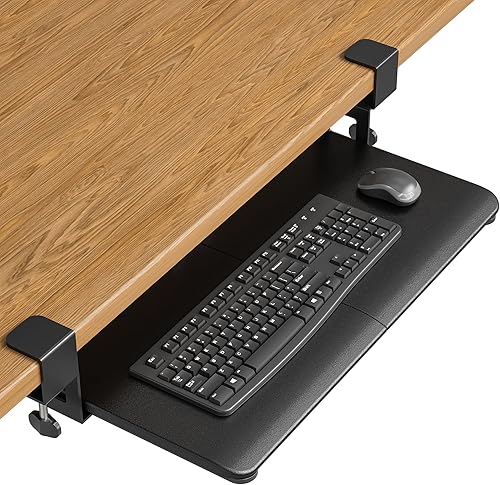
VIVO Black Extra Large Clamp-on 34 x: Best for the longest black tray
- 33.9 x 11 in tray
- 39.4 in total clamp-to-clamp length
- 11 lb capacity
- Adjustable C-clamps
This black VIVO tray gives large keyboards, a mouse and small accessories a broad platform below the desk. Its clamp-on design avoids drilling, but your desk needs a square, level edge and enough total width.
Pros
- Longest tray surface here
- Holds up to 11 lb
- Slides out up to 8.5 in
Cons
- Not for beveled edges
- Needs 39.4 in of total desk space
The black VIVO Extra Large Clamp-on tray is the best choice when maximum platform width matters. The tray measures 33.9 x 11 in, while the total length from clamp to clamp is 39.4 in.
That broad surface can hold a keyboard, mouse and other small accessories below the desktop. The tray extends up to 8.5 in from the desk edge and slides under 12.5 in when you want the work area out of the way.
The adjustable C-clamps attach without drilling and support up to 11 lb. Your desk surface must be no more than 1.25 in thick, and the underside must be level where the clamps sit.
This tray is not compatible with beveled edges. Check for crossbars and other supports before choosing it, then measure the full 39.4 in span rather than only the tray surface.
Pick the black VIVO when you need the longest extra large keyboard tray and your desk has a square, level edge.
VIVO White Extra Large Clamp-on 34 x: Best for a white extra-wide setup
- 33.9 x 11 in tray
- 39.4 in total clamp-to-clamp length
- 11 lb capacity
- Adjustable C-clamps
The white VIVO uses the same extra-wide 34 in layout as the black version. It is a good fit when you want space for a keyboard, mouse and small accessories with a lighter desk setup.
Pros
- Wide 11 in depth
- Clamp-on installation
- Slides out up to 8.5 in
Cons
- Not for beveled edges
- Requires a level underside and 39.4 in of space
The white VIVO uses the same 33.9 x 11 in extra-wide tray as the black version, with a 39.4 in total clamp-to-clamp length. It is the better match when you want a white keyboard tray to blend with a lighter workstation.
Its surface leaves room for a keyboard, mouse and small accessories. The slide extends up to 8.5 in from the desk edge and can move beneath the desktop when the tray is not needed.
The C-clamps support desks up to 1.25 in thick and hold up to 11 lb. A level underside, square edge and clear clamp area are required for the mounting system to secure properly.
Like the black VIVO, this model does not fit beveled desktops. It also needs enough open width for the full 39.4 in clamp span, so measure the desk before you compare finishes.
Choose the white VIVO when the VIVO width and clamp design fit your desk, but the black finish does not suit your setup.
BONTEC Under Desk Keyboard Tray: Best for thick desktops
- 25.6 x 11.8 in platform
- C-clamps for desks up to 1.97 in thick
- 11 lb capacity
- Protective anti-skid padding
BONTEC offers a deep 11.8 in platform for a keyboard and mouse while supporting thicker desktops than several other clamp-on picks. It needs a flat edge and an unobstructed underside.
Pros
- Supports desks up to 1.97 in thick
- Deep platform for mouse space
- No drilling required
Cons
- Not for curved, rounded or beveled edges
- May not suit vertical mice or split ergonomic keyboards
The BONTEC Under Desk Keyboard Tray is a strong match for a thick desktop and a deep mouse area. Its 25.6 x 11.8 in platform gives standard keyboards and mice more front-to-back room than the 8.3 in AX WABER tray.
Its C-clamps fit desktops up to 1.97 in thick and support up to 11 lb. Protective pads help prevent scratches and improve grip, while the pull-out platform slides beneath the desk after use.
BONTEC needs at least 31.3 in of width and 11.8 in of depth underneath the desk. The underside must be flat and unobstructed, and the tray is not suited to curved, rounded or beveled edges.
The platform is designed for standard keyboards and mice. Check carefully if you use a vertical mouse, oversized gaming keyboard or split ergonomic keyboard, since the stated surface does not guarantee every arrangement will fit comfortably.
Choose BONTEC when desk thickness and a deep 11.8 in platform matter more than a 30 in-plus tray width.
AX WABER Keyboard Tray Under Desk Pull Out: Best for a compact clamp footprint
- 27.3 x 8.3 in tray
- 32.5 in total clamp-to-clamp length
- 11 lb capacity
- 5.7 in extension
AX WABER keeps the total clamp span shorter than the 34 in VIVO options while still leaving room for a keyboard, mouse and small accessories. Its 8.3 in depth is less generous than the deepest trays here.
Pros
- Shorter total clamp span
- Holds up to 11 lb
- No drilling required
Cons
- Not for beveled edges or reinforcing tubes
- Requires at least 33 in of desk size
The AX WABER keyboard tray is the best extra large keyboard tray for a shorter clamp footprint. Its tray measures 27.3 x 8.3 in, and the total length including clamps is 32.5 in.
That surface holds a keyboard, mouse and small accessories, while the slide extends up to 5.7 in from the desk edge. The 8.3 in depth keeps the tray more compact than the 11.8 in platforms in this roundup.
The adjustable C-clamps support desks up to 1.9 in thick, and the tray holds up to 11 lb. The product information also calls for a desktop size of at least 33 in and says structures with reinforcing tubes or other clamp obstacles are unsuitable.
The tray is not compatible with beveled edges. Check the desk edge, underside and full clamp span before assembly, even though no drilling is required.
Pick AX WABER when your desk cannot spare the 35.8 to 39.4 in span needed by the widest trays.
UPGRAVITY Extra Large Keyboard Tray Under Desk: Best for the widest black platform
- 31.5 x 11.8 in platform
- 35.8 in total clamp-to-clamp length
- 11 lb capacity
- Ball slide-way system
The black UPGRAVITY gives you one of the widest platforms in this roundup and a deep surface for a keyboard, mouse, phone and small accessories. Measure the center stretcher clearance before ordering.
Pros
- 31.5 in wide platform
- Supports desks up to 2.17 in thick
- Non-slip EVA pads
Cons
- Needs at least 11.8 in of center-stretcher clearance
- Heavier than several picks
The black UPGRAVITY is the best choice when you want a 31.5 x 11.8 in extra wide keyboard tray with a deep surface. It leaves room for a full-size keyboard, mouse, phone and other small accessories below the desktop.
Its total clamp-to-clamp length is 35.8 in, and the tray extends up to 9.8 in from the desk edge. The ball slide-way system supports smooth movement in and out, while the design keeps the tray under the desk when it is not in use.
The C-clamps fit desks up to 2.17 in thick and include non-slip EVA pads. The tray holds up to 11 lb and weighs 11.93 lb, so check the desk and clamp area before installation.
UPGRAVITY requires at least 11.8 in from the center stretcher to the desk edge. It is also not compatible with beveled edges, and the full 35.8 in span must fit on the desk.
Choose this model when width and depth are more important than a compact clamp footprint.
Klearlook Keyboard Tray Under Desk: Best for built-in desk organization
- 24.4 x 10 in tray
- 360-degree rotation
- Drawer and phone slot
- Built-in headphone hanger
Klearlook adds storage features that the simpler trays do not have, including a drawer, phone slot and headphone hanger. Its 24.4 in width is better for a large keyboard and mouse than for the very widest setups.
Pros
- 360-degree rotation
- Built-in organization features
- Supports desks up to 2.68 in thick
Cons
- Height cannot be adjusted
- Needs 35 in table width for double-sided rotation
Klearlook is the best keyboard tray extra wide option when you want organization built into the tray. Its 24.4 x 10 in platform includes a drawer, phone slot, built-in headphone hanger and mouse pad.
The tray rotates 360 degrees, which helps move it out of the way when it is not in use. Its adjustable tilt angle gives you a way to set the typing position, but the height cannot be adjusted.
Klearlook supports desktops up to 2.68 in thick. Double-sided rotation needs at least 35 in of table width, while single-sided rotation needs at least 27.5 in.
This is not the widest platform in the group, so it suits a keyboard and mouse setup that benefits from organization more than maximum surface width. The plastic construction and built-in storage make it a different choice from the larger metal clamp-on trays.
Pick Klearlook when the drawer, phone slot and headphone hanger solve more of your desk problem than another 7 or 9 in of tray width.
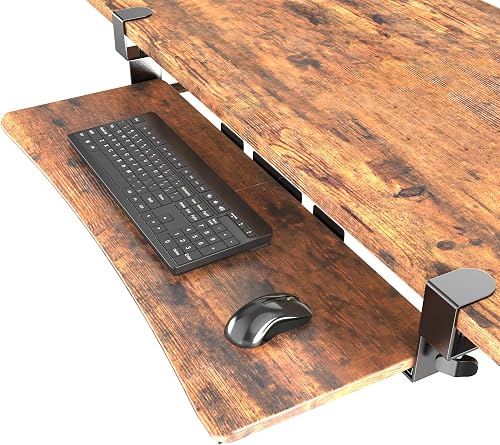
UPGRAVITY Extra Large Keyboard Tray Under Desk: Best for rustic desk styling
- 31.5 x 11.8 in platform
- Rustic Vintage Brown finish
- 35.8 in total clamp-to-clamp length
- 11 lb capacity
This rustic brown UPGRAVITY has the same broad platform layout as the black version, making it a practical choice when finish matters as much as keyboard and mouse space.
Pros
- Wide and deep platform
- Rustic Vintage Brown finish
- Non-slip EVA pads
Cons
- Needs 35.8 in of total desk space
- Not compatible with beveled edges
The rustic brown UPGRAVITY is the best extra large keyboard tray for a vintage-style desk. Its 31.5 x 11.8 in platform matches the broad layout of the black UPGRAVITY, but the finish is Rustic Vintage Brown.
The surface fits a full-size keyboard and mouse, with additional room for a phone and small accessories. It extends up to 9.8 in from the desk edge and slides under 11.8 in when stored.
The adjustable C-clamps support desks up to 2.17 in thick and include non-slip EVA pads. The tray holds up to 11 lb and uses a ball slide-way system for movement below the desk.
Measure the 35.8 in total clamp span and the 11.8 in center-stretcher clearance before choosing it. The tray is not compatible with beveled edges.
Pick this version when you want the UPGRAVITY surface and clamp limits with a warmer desk finish.
Zontera Ergonomic Keyboard Tray Under Desk: Best for a high-clearance clamp
- 25.6 x 11.8 in board
- 31.5 in total clamp-to-clamp length
- C-clamps for desks up to 2.76 in thick
- Back baffle
Zontera suits desks with thicker tops because its adjustable clamps support up to 2.76 in. The 25.6 x 11.8 in board leaves room for a keyboard, mouse and small accessories.
Pros
- Highest stated desk-thickness limit here
- Back baffle helps keep the keyboard in place
- 31.5 in total clamp span
Cons
- Less wide than the 31.5 and 33.9 in trays
- Requires 31.5 in of desk space
Zontera is the best keyboard tray extra large option for a thick desktop. Its adjustable C-clamps support desks up to 2.76 in thick, the highest stated limit in this roundup.
The 25.6 x 11.8 in board gives a keyboard, mouse and small accessories a deep work area. The total clamp-to-clamp length is 31.5 in, and the tray extends up to 7.8 in from the desk edge.
A built-in back baffle helps keep the keyboard from sliding, while the upgraded slide mechanism moves the tray in and out. Thick non-slip pads help improve stability and prevent scratches on the desk surface.
Zontera needs at least 31.5 in of clear desk space between the clamps. It is not as wide as the 31.5 in and 33.9 in tray surfaces, but its clamp limit may solve a fit problem that rules out other models.
Choose Zontera when desk thickness is the main constraint and a 25.6 in platform is enough for your keyboard and mouse.
How we chose the best extra wide keyboard trays
We compared tray width, depth, clamp span, desk-thickness limits, adjustment range and storage features against the needs of buyers searching for an extra wide keyboard tray. Width was weighed with the space needed for the clamps, because total span is what the desk must provide.
Our score weighs specs, features and buyer feedback against what you are shopping for. A tray with strong adjustment may suit a sit-stand user, while a simpler slide-out may suit a fixed desk.
A tray can be wide but still fail to fit because the clamps need more total desk width. Measure the surface, the complete clamp span and the space below the desk before choosing a model.
Desk thickness sets a hard limit for several clamp-on designs. Some trays in this group support thicker tops than others, so a model that wins on width can still be the wrong fit for your desktop.
Edge shape matters in the same way, since beveled, curved or rounded edges can stop clamps from seating properly. Check the front edge and the underside where each clamp will sit.
We also looked at how each tray handles mouse space. An 11.8 in deep platform gives more room than an 8.3 in surface, but depth is useful only if your knees, desk frame and chair still have enough clearance.
Adjustment range helps when the tray must serve more than one user or one posture. Swivel, tilt and height control can change how natural the typing position feels over a long session.
Storage features were treated as a trade-off, not a bonus for every buyer. A drawer or phone slot helps some desks, while a plain platform may leave more room for the keyboard and mouse.
Weight capacity also shaped the comparison, since the tray should hold the keyboard, mouse and small accessories without extra stretching. Keep the load within the stated limit and check stability after setup.
The final balance is practical fit over headline size. The strongest tray is the one your desk can mount, your chair can clear and your arms can use without strain.
How wide does a keyboard tray extra wide need to be?
A keyboard tray extra wide should be wide enough for your keyboard, mouse and the way you work. The widest options here have 31.5 or 33.9 in surfaces, while the 24.4 to 27.3 in trays suit buyers who want more room than a basic keyboard platform without using the full desk width.
Measure the keyboard at its widest point, including any side controls or attached wrist rest. Then mark the space needed for the mouse beside it, since a wide keyboard can leave little usable mouse room on a shallow tray.
Depth also changes the feel of the setup. The 11.8 in trays from BONTEC, UPGRAVITY and Zontera leave more front-to-back room, while the AX WABER's 8.3 in depth creates a smaller footprint.
If the keyboard will sit near a corner, check rotation and nearby furniture. Our guide to the best keyboard tray for corner desk covers the clearance issues that matter in that layout.
What desk checks matter before installing an extra large keyboard tray?
The most important checks are desk thickness, edge shape, total clamp span and obstacles beneath the desktop. A wide keyboard tray cannot compensate for a clamp that has no level surface or a slide blocked by a crossbar.
Use a tape measure to record:
- The desktop thickness where each clamp will sit.
- The clear width needed from clamp to clamp.
- The depth below the desk edge.
- The location of legs, crossbars, stretchers and support tubes.
- The keyboard, mouse and accessory space you want on the tray.
Several models require a square edge and reject beveled edges. BONTEC also rules out curved and rounded edges, while HUANUO requires specific clearance around crossbars and desk sides.
After installation, tighten the clamps or adjustment knob before typing. Keep the tray within its stated weight limit, and do not use the platform as a support for leaning or pulling yourself up.
Is a clamp-on keyboard tray better than an under-desk slide-out model?
A clamp-on keyboard tray is easier to add to a desk because it does not require drilling, while a mounted under-desk model can offer more controlled positioning. The best choice depends on whether you can provide a clear clamp area and whether you need height or swivel adjustment.
HUANUO stands out for its 180-degree swivel, tilt and 6.3 in height range. The VIVO models and most other picks use clamp-on mounting with a simpler slide-out layout.
Clamp-on designs can work well for renters or desks you do not want to modify. They still need a level underside, suitable thickness and enough total width for the clamps.
If the tray needs to attach to your chair instead of the desk, read our guide to a keyboard tray on chair. That setup changes the clearance and movement questions.
How should you set up and care for an extra wide keyboard tray?
Set up the tray so your keyboard and mouse stay close enough for relaxed shoulders, then slide it away when you need the desktop. A low, close position usually helps more than reaching forward to a tray that is pulled too far out.
Keep the surface clear of loads beyond its stated capacity and check the clamps after the first few typing sessions. Early tightening matters, because clamps can settle once the tray is loaded and used.
Start by measuring again before tightening the hardware. Confirm that the tray slides without hitting legs, crossbars or supports, then place the keyboard where your wrists stay as straight and neutral as your desk position allows.
Test the full slide with the keyboard and mouse in place. If the tray catches or sits too low, adjust before you settle into daily use.
Wipe the tray with a soft, lightly damp cloth suitable for its surface. Avoid harsh cleaners that could dull the finish or leave residue where your hands rest.
Avoid adding accessories that block the slide path, and check the hardware if the platform begins to wobble. Clear the path before each slide so cables and small items do not get pinched.
Small replacement parts can also affect daily comfort. Our guide to best keyboard tray bumpers explains what to look for when you need to reduce movement or protect contact points.
Which extra wide keyboard tray should you choose?
Choose the HUANUO if you want the most adjustment, including swivel, tilt and height movement. Choose the black or white VIVO if a 33.9 in tray is your priority and your desk has 39.4 in of clear clamp space.
Choose BONTEC for a deep platform and a desk up to 1.97 in thick, or choose UPGRAVITY for a 31.5 x 11.8 in surface and a higher 2.17 in desk-thickness limit. AX WABER is easier to fit when total desk width is tighter.
Klearlook makes the most sense when its drawer, phone slot and headphone hanger matter more than maximum width. The rustic UPGRAVITY adds the same broad layout in a brown finish, while Zontera suits thick desktops up to 2.76 in.
For a gaming station, compare these choices with the best keyboard tray for gaming. For general home use, our best keyboard tray for home office guide can help you weigh width against daily desk space.
Our top 3 picks at a glance
-
1
-
2
Best for the longest black tray
VIVO Black Extra Large Clamp-on 34 x
9.7/10 our score
See it on Amazon -
3
Best for a white extra-wide setup
VIVO White Extra Large Clamp-on 34 x
9.6/10 our score
See it on Amazon
Frequently asked questions
What is the best extra wide keyboard tray?
The HUANUO Under Desk Keyboard Tray is the best extra wide keyboard tray for most buyers because it combines a 25 in slide-out surface with swivel, tilt and 6.3 in height adjustment. Choose VIVO if you need a 33.9 in tray, or UPGRAVITY if you want a 31.5 in platform with 11.8 in depth.
How wide should an extra large keyboard tray be?
Choose the tray width by measuring your keyboard first, then leave room for the mouse and any small accessories you want beside it. The options here range from 24.4 in to 33.9 in.
A wider platform also needs more clear desk width, especially with clamp-on hardware.
Are clamp-on keyboard trays safe for every desk?
No. Clamp-on trays need a clear, level underside and a suitable desk edge.
Several picks here cannot fit curved or beveled edges, crossbars, reinforcing tubes or other supports.
Measure desk thickness, total clamp span and under-desk clearance before installing.
Can an extra wide keyboard tray hold a mouse?
Yes, the trays in this roundup are designed around keyboard and mouse use, but usable mouse space depends on the keyboard size and tray depth. The 11.8 in deep BONTEC, UPGRAVITY and Zontera platforms leave more front-to-back room than the 8.3 in AX WABER tray.
What should I check before buying a keyboard tray extra wide?
Measure the keyboard, mouse area, desk thickness, desk width and the clear space below the desktop. Also check for crossbars, legs, beveled edges and supports where the clamps or sliding parts will sit.
For a corner desk, confirm the tray can move without striking nearby furniture.


