8 Best Vertical Mouse for Large Hands (November 2026)
The best vertical mice for large hands include the Evoluent for large-hand comfort, the Logitech MX Vertical Wireless Mouse Ergonomic Design for premium wireless work, and the TECKNET Ergonomic Mouse for 3-device switching.
On this page (8 sections)
- The best vertical mice for large hands
- How we chose the best vertical mouse for large hands
- Which vertical mouse shape works for big hands?
- Wired or wireless vertical mouse for large hands?
- How should you set up a vertical mouse?
- Are vertical mice suitable for gaming?
- What should you check before buying a large-hand vertical mouse?
- Best vertical mouse for large hands: final picks
The best vertical mouse for large hands is Evoluent, with a medium-to-large sculpted grip, finger support, 6 customizable buttons and 4 pointer speeds. Choose Logitech for wireless use, or TECKNET if you need to switch between several devices.
Large hands need more than a steep angle. The palm should rest on the shell, the thumb should reach its support without stretching and the fingers should sit naturally over the buttons.
If you're also choosing a desktop keyboard, match the mouse height and reach to the rest of your desk. A keyboard that sits too far away can force you to reach even when the mouse itself fits well.
Our picks at a glance
-
1

-
2
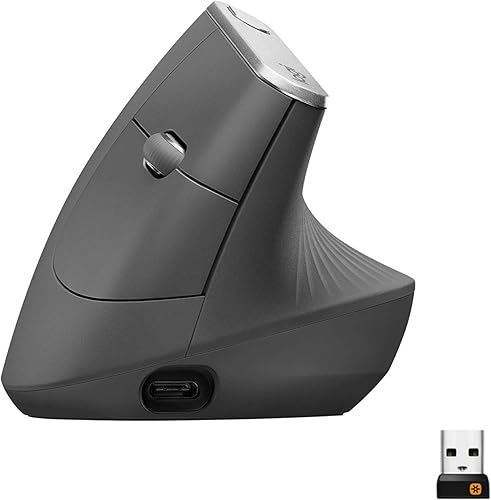 Best for premium wireless work
Logitech MX Vertical Wireless Mouse Ergonomic Design
9.6/10 our score
See it on Amazon -
3

- 4
 Check it
ProtoArc EM11 NL Wireless Ergonomic Vertical Mouse
Best for rechargeable multi-device use - 5
 Best for a roomy rechargeable gripCheck it
- 6
 Check it
Amazon Basics 6-Button Vertical Wireless Mouse
Best for simple large-palm value - 7
 Best for a rechargeable USB-A setupCheck it
- 8
 Check it
SABLUTE MAM4 Ergonomic Wireless Vertical Mouse
Best for programmable controls
The best vertical mice for large hands
The best fit depends on your hand measurements, connection needs and tolerance for a new grip. Evoluent leads for its stated medium-to-large shape, while Logitech and TECKNET offer stronger wireless flexibility.
Evoluent: Best for large-hand comfort
- Medium-to-large hand fit
- Wired handshake grip
- 6 customizable buttons
- 4 pointer speeds
Evoluent has the clearest large-hand focus in this group, with a sculpted grip, finger support and adjustable pointer speeds. Its wired design suits a fixed desk.
Pros
- Designed for medium to large hands
- Finger support helps keep the pinkie off the desk
- 4 pointer speeds
Cons
- Wired rather than wireless
- Right-handed design
Evoluent is the clearest choice for large-hand comfort because its shape is specifically sculpted for medium to large hands. The handshake grip places the hand upright, while the wide lower lip gives the last finger a supported edge instead of leaving it against the desk.
Its 6 customizable buttons suit work that uses repeated shortcuts. Four pointer speeds, shown by indicator lights, let you change cursor movement without releasing your grip.
This is a wired right-handed mouse, so it works best at a fixed workstation where the cable is not a problem. Optional Mouse Manager software for Windows allows extensive button and wheel customization, while basic functionality works on newer OS X and Linux without a driver.
Choose Evoluent when the shell and finger support matter more than wireless freedom. Its 7 oz weight and 5.4 x 3.6 x 3.6 in dimensions also make desk space part of the fit check.
Logitech MX Vertical Wireless Mouse Ergonomic Design: Best for premium wireless work
- 57° vertical angle
- 4000 DPI sensor
- Bluetooth or USB receiver
- Up to 4 months per charge
Logitech combines a 57° handshake angle with wireless connections and a 4000 DPI sensor. Its shape fits a variety of hand sizes, making it a strong larger-hand option when desk cable freedom matters.
Pros
- Wireless connectivity
- 57° vertical angle
- Rechargeable battery
Cons
- Only 4 buttons
- Right-handed design
Logitech MX Vertical is the strongest wireless choice for a larger hand that wants a more polished work setup. Its 57° vertical angle supports a handshake position, and the textured rubber surface gives the palm a defined grip.
The 4000 DPI sensor suits detailed cursor work across documents and larger displays. A cursor speed switch gives you a quick way to change sensitivity without opening software.
It connects through Bluetooth or the included USB receiver and works with Windows, macOS and iPadOS. The rechargeable battery lasts up to 4 months under the stated conditions, and a 1-minute quick charge provides 3 hours of use.
The shape fits a variety of hand sizes rather than naming only large hands. Measure your palm and compare the 7.5 x 6 in stated item dimensions before choosing it for a very broad grip.
Read our best vertical mouse ergonomic guide if you want to compare this shape with other ergonomic designs.
TECKNET Ergonomic Mouse: Best for 3-device switching
- Medium-to-large hand fit
- Bluetooth and 2.4GHz
- 6 DPI levels up to 4800
- 6 buttons
TECKNET suits larger hands that move between devices. It supports Bluetooth connections and a 2.4GHz receiver, with 6 DPI levels and quiet left and right clicks.
Pros
- Supports up to 3 devices
- Medium-to-large hand fit
- 6 adjustable DPI levels
Cons
- Requires 2 AAA batteries
- Side buttons are not compatible with macOS
TECKNET is a strong fit for larger hands that move between a work computer and other devices. It supports Bluetooth and 2.4GHz wireless, with Bluetooth able to connect to 2 devices and the receiver providing another connection mode.
Switching with the bottom button saves re-pairing each time you change machines. This suits people who use a desktop during the day and a laptop or tablet later.
Six DPI levels run from 800 to 4800, so you can choose slower movement for detailed work or faster movement for a wide screen. Lower settings help in menus, while higher settings reduce hand travel.
The 6-button layout adds side controls, and the left and right clicks are nearly silent. That quiet action suits shared rooms, libraries and late evening work.
The mouse is right-handed and best for medium-to-large hands. It uses 2 AAA batteries and enters deep sleep after about 10 to 30 minutes of inactivity, then wakes when you press a main button.
Keep spare AAA batteries in a drawer, because there is no charging cable to fall back on. The low battery light blinks, so you can plan a change before the mouse stops.
Side buttons do not work with macOS, so Mac users should check whether those controls matter. Windows, Mac, Chrome and Linux support is listed, but that limitation remains important.
ProtoArc EM11 NL Wireless Ergonomic Vertical Mouse: Best for rechargeable multi-device use
- 58° vertical angle
- Rechargeable 500mAh battery
- Up to 3 devices
- 1000, 1600 and 2400 DPI
ProtoArc is a rechargeable, multi-device choice with a 58° angle, but its stated fit is small to medium hands under 7.5 inches. Larger-hand shoppers should measure carefully before choosing it.
Pros
- Rechargeable battery
- Connects to up to 3 devices
- Quiet left and right clicks
Cons
- Designed for small to medium hands
- Forward and back buttons are not compatible with Mac OS
ProtoArc EM11 NL is not a natural first pick for very large hands because it is designed for hand lengths under 7.5 inches. It belongs in this roundup as a reminder that a vertical shape alone does not guarantee a large-hand fit.
Its 58° angle supports a relaxed upright grip, and the mouse connects to up to 3 devices through dual Bluetooth and a 2.4G USB-A receiver. That choice helps if you share one mouse between a laptop, a tablet and a phone.
A built-in 500mAh battery recharges through the included Type-C cable. Recharging removes the need to buy disposable cells, but you will need to keep the cable within reach of your desk.
The 1000, 1600 and 2400 DPI settings cover common office work. Start on the middle setting for documents, then move up if your screen is large or you often cross the full desktop.
Left and right clicks are quiet, but the scroll wheel and forward and back buttons are not. That mix suits a quiet office, though the louder buttons may be noticed in a very silent room.
Choose ProtoArc only after measuring your hand against its stated range. Its rechargeable design and multi-device switching are useful, but the small-to-medium fit makes it less suitable for broad palms.
Allow 1 to 2 weeks to adapt, according to the product guidance. Keep your palm relaxed during that period rather than forcing the grip to match your old mouse.
Lekvey Ergonomic Mouse: Best for a roomy rechargeable grip
- 5 x 3 in body
- Medium or large hand fit
- 600mAh rechargeable battery
- 800, 1200 and 1600 DPI
Lekvey gives medium and large hands a roomy 5 x 3 in body, rechargeable power and a simple USB receiver. Its 3 DPI levels keep the controls straightforward.
Pros
- Designed for medium or large hands
- Rechargeable battery
- Forward and back buttons work with Mac OS
Cons
- No Bluetooth
- Buttons are not programmable
Lekvey offers a roomy shape for medium or large hands, with a 5 x 3 x 2.5 in body. Its neutral handshake position and thumb controls make it a straightforward option for browsing, documents and regular office work.
The taller shell gives the palm a place to rest instead of hovering over the desk. That support matters during long reading and spreadsheet sessions when a flat mouse can leave the wrist more exposed.
The built-in 600mAh battery recharges through the included USB-C cable. Lekvey states about 3 to 4 weeks with 8 to 10 hours of daily use, or up to 2 to 3 months with light use.
Auto sleep helps stretch that charge when you step away from the desk. Plug the cable in during a break and the mouse will be ready again without hunting for batteries.
Three DPI levels, 800, 1200 and 1600, keep sensitivity changes simple. The middle setting suits most office work, while the lowest helps when you need fine control in a small area.
The forward and back buttons work with Mac OS, and the mouse connects through a 2.4G USB receiver without Bluetooth pairing. That plug and play approach suits desktops with a free USB port.
Choose Lekvey if you want a larger body and rechargeable power without extra connection modes. Its buttons are not programmable, so it is less suited to shortcut-heavy workflows.
Amazon Basics 6-Button Vertical Wireless Mouse: Best for simple large-palm value
- Medium-to-large palm fit
- 2.4GHz wireless
- 4 adjustable DPI levels
- 2 AAA batteries included
Amazon Basics targets medium to large palms with a right-handed vertical shape and 6 buttons. It suits shoppers who want wireless plug-and-play use without rechargeable charging.
Pros
- Clear large-palm measurements
- 6 buttons
- Batteries included
Cons
- Uses 2 AAA batteries
- Windows compatibility is specified
Amazon Basics gives large-palm shoppers a clear measurement target. It is designed for right-handed users with a palm longer than 6.7 in and wider than 3.2 in, which makes it easier to compare with your own hand.
That stated range helps you rule the mouse in or out before you order. Measure from your wrist crease to your middle fingertip, then check your palm width across the widest part.
The vertical body provides natural finger placement and uses optical tracking. Your hand sits more upright, which can feel calmer than twisting a flat mouse across the desk for hours.
Four DPI settings, 1000, 1200, 1600 and 2400, let you adjust pointer response for documents, browsing or a larger screen. Try the lower settings for careful pointing and raise them when you move between windows.
It uses 2.4GHz wireless through a USB-A connection and is designed for plug-and-play use with Windows 7, 8, 10, 11 or later. The receiver stores away when you travel, so it is less likely to be lost in a bag.
Two AAA batteries are included, with an approximate 4-month lifespan. That included pair gets you started, though you may want branded spares for a busy desk.
Choose this model for a simple wireless setup and a defined large-palm range. It is less flexible than the Bluetooth options if you regularly switch between computers or tablets.
Acer Ergonomic Mouse Wireless: Best for a rechargeable USB-A setup
- Medium-to-large hand fit
- 57° vertical angle
- 300mAh rechargeable battery
- 1000, 1200 and 1600 DPI
Acer offers a 57° angle, rechargeable battery and USB-A wireless connection for medium to large hands. It does not use Bluetooth, and the side button does not work on Mac.
Pros
- Rechargeable battery
- Medium-to-large hand fit
- 32 ft stated range
Cons
- No Bluetooth
- Not compatible with Mac according to the product details
Acer is a practical rechargeable option for medium-to-large hands using a USB-A port. Its 57° vertical design and 4.3 x 3.1 in dimensions give the palm more height and width than a compact office mouse.
The upright shape encourages a handshake grip, with the palm resting against the shell. Let your hand settle into the contour instead of perching on top, because that contact is part of how the design is meant to work.
Three DPI levels, 1000, 1200 and 1600, cover basic office control. The middle level suits mixed browsing and document work, while the highest setting helps on wider monitors.
The 300mAh battery lasts up to a month on a full charge, and the mouse sleeps after 10 minutes of inactivity. A double click wakes it, so keep the cable nearby for a monthly top up.
Wireless connection uses only the included 2.4GHz USB-A receiver, with a stated range of up to 32 ft. There is no Bluetooth, and the product details say it is not compatible with Mac.
The side button also does not work on Mac. That limits navigation shortcuts if you expected them to work across every system you use.
Acer suits a Windows, Linux or Chrome OS desk that has USB-A available. Pick another model if Bluetooth pairing or full Mac support is important.
Expect 1 to 2 weeks of adjustment, according to the product notice. Shorter sessions at first can make the new angle easier to learn.
SABLUTE MAM4 Ergonomic Wireless Vertical Mouse: Best for programmable controls
- Medium-to-large hand fit
- 3-device Bluetooth and 2.4G
- 6 programmable buttons
- 8000 DPI maximum with Windows software
SABLUTE is the control-heavy pick, with 6 programmable buttons, tri-mode connections and an 800mAh rechargeable battery. Windows software is needed for button customization and extra DPI settings.
Pros
- 6 programmable buttons
- Connects to up to 3 devices
- Rechargeable battery
Cons
- Software customization is Windows only
- Lower score for buyers who want a simpler mouse
SABLUTE MAM4 is the best fit for a large-hand user who wants programmable controls rather than a basic pointer. Its taller full-palm profile, 57° angle and 4.66 x 3.1 in dimensions target medium and large hands.
That full-palm contact helps larger hands avoid gripping the sides tightly. Your thumb can reach the side buttons while your fingers stay over the main clicks, which suits repeated shortcut use.
The mouse connects to up to 3 devices through BT1, BT2 and a 2.4GHz USB receiver. One button switches between them, so you can move from a laptop to a desktop without setting up a new pairing each time.
Six physical buttons can be customized through Windows software, while the standard DPI range runs from 800 to 4000 and the software supports settings up to 8000 DPI. Higher settings suit large or multi-monitor displays, but test them slowly so cursor movement stays controlled.
An 800mAh battery provides about 30 days per charge. Quiet click technology lowers the sound, and the fast-scrolling wheel suits long documents and spreadsheets.
Choose SABLUTE when shortcut control and multi-device use justify a more involved setup. The extra software options are available on Windows only, so Mac users should plan around the default controls.
Set up the buttons for tasks you repeat every day, such as back, forward or copy. That focus keeps the customization useful instead of adding controls you rarely touch.
How we chose the best vertical mouse for large hands
The best vertical mouse for large hands needs a shell that supports the palm without forcing the fingers into a cramped position. We compared stated hand ranges, body dimensions, angle, finger support, button layout, connection type and power method.
Hand size is the first filter, because a steep angle will not help if your palm cannot rest on the body. A mouse for medium to large hands should leave room for the thumb and keep the pinkie clear of the desk.
We also looked at daily desk work, including adjustable DPI to match pointer movement to your screen and task. Wireless or rechargeable designs reduce cable clutter but add battery decisions.
Button layout matters for people who repeat the same actions all day. Programmable buttons can save hand movement, while simpler fixed buttons suit users who want a mouse that works at once.
Our score weighs specs, features and buyer feedback. It does not replace measuring your hand, checking port availability or confirming operating-system support.
Connection limits can change a good fit into a poor one. Some models use only a USB receiver, some add Bluetooth, and a few side buttons do not work on macOS.
Power is another trade-off, from wired models that avoid charging to AAA models that need spares. Finally, we matched each mouse to a fixed desk, a shared office or a multi-device laptop setup.
Which vertical mouse shape works for big hands?
A taller, wider shell usually gives a big hand more room, but dimensions matter more than the word ergonomic. Evoluent, Lekvey, Amazon Basics, Acer and SABLUTE state medium-to-large or large-palm fit.
Hand length and palm width shape the fit in different ways. Length affects how far your fingers reach, while width affects whether the shell supports the side of your hand.
Body dimensions in the specs help you compare models before you hold one. A taller profile can support the palm, but a narrow shell may still leave a broad hand feeling crowded.
The angle also changes how your fingers reach the buttons. A 57° or 58° shape can support an upright grip, but your thumb and pinkie should still rest without pressure.
That upright grip suits long office sessions because the forearm stays in a more natural position. It also changes muscle use, so it can feel unfamiliar even when the size is correct.
Use our best vertical mouse for small hands guide to see why the same angle can feel too large or too small depending on the shell. Hand length and palm width both affect comfort.
If you are moving from a standard mouse, give the shape time to feel normal. Keep your grip light and let your palm rest on the shell during the first week.
Measure before you order, especially when a model gives a clear range. That small step can save you from a mouse that looks ergonomic but feels too small.
Wired or wireless vertical mouse for large hands?
A wired mouse avoids battery changes and charging, making Evoluent a strong fixed-desk choice. Wireless models give you a cleaner desk, but check whether they use Bluetooth, a USB receiver, or both.
Logitech and TECKNET offer the most flexible connection choices here. Lekvey, Acer and Amazon Basics rely on a USB receiver, while SABLUTE combines Bluetooth with 2.4GHz wireless.
If you use a laptop with limited USB-A ports, Bluetooth can reduce the need for an adapter. If you work on a desktop with an open USB-A port, a receiver may be simpler.
For cable-free options, compare this guide with best vertical mouse wireless.
How should you set up a vertical mouse?
Place the mouse close enough that your elbow stays near your side. Rest your palm on the shell, keep your grip light and use the pointer-speed control before changing your desk position.
A close position reduces reaching across the desk during long sessions. If your shoulder lifts or your wrist bends for each click, move the mouse or keyboard a little closer.
Keep your fingers relaxed over the buttons instead of hooking them down. A light grip lets the shell support your hand, which is the point of the vertical shape.
Expect an adjustment period when moving from a standard mouse. ProtoArc recommends 1 to 2 weeks, and TECKNET notes that its shape may take about 1 week to adapt to.
Short work sessions can make that period easier to manage. Use it for browsing and documents first, then add longer tasks once the movement feels steadier.
Keep the mouse on a clear surface and avoid gripping it tightly during long sessions. A tight grip can undo the relaxed posture the design is meant to encourage.
Adjust DPI or pointer speed in small steps. Slower settings help with careful pointing, while faster settings reduce hand travel on a large screen.
If discomfort continues, stop using it and consider advice from a qualified health professional. A vertical mouse should support comfort, not replace care for ongoing pain.
Are vertical mice suitable for gaming?
Vertical mice can work for everyday games, but button layout, sensor settings and hand fit still matter. Logitech offers a 4000 DPI sensor, TECKNET reaches 4800 DPI, and SABLUTE supports up to 8000 DPI through Windows software.
A taller ergonomic shape may feel slower to control until you adapt. Players who need specialized controls should compare button placement and software support with their game requirements.
Our guide to best vertical mouse for gaming covers gaming-focused trade-offs. It may also help to compare a vertical option with a standard shape in Vertical Mouse vs Standard Mouse: Comparison.
What should you check before buying a large-hand vertical mouse?
Measure your hand length and palm width first, then compare those numbers with the model's stated fit. Also check whether the mouse is right-handed, because every pick here is designed for right-handed use.
Hand length runs from the wrist crease to the middle fingertip, and palm width is measured across the widest part. Those two numbers tell you more than a general large label.
Body dimensions add useful context when a hand range is not stated. A taller or wider shell may suit a broad palm, but it can also feel bulky on a smaller hand.
Next, confirm connection and operating-system needs. Acer has no Bluetooth, TECKNET side buttons do not work with macOS, and ProtoArc forward and back buttons are not compatible with Mac OS.
Check your ports before you choose a receiver model. A laptop with few USB-A ports may need Bluetooth, while a desktop with USB-A free can use a simple plug and play receiver.
Power deserves a quick check as well. Rechargeable models need a cable and regular charging, while AAA models need spare batteries on hand.
Finally, leave room for the grip to move. A large mouse may fit your hand but still feel awkward if the desk, keyboard or monitor forces your arm into a tight angle.
Keep the mouse close to your body and at the same height as your keyboard. That spacing helps your elbow stay near your side during long work sessions.
Best vertical mouse for large hands: final picks
Choose Evoluent when the main goal is a medium-to-large sculpted grip with finger support and customizable controls. Pick Logitech MX Vertical when you want a wireless 57° design with a 4000 DPI sensor.
Choose TECKNET for 3-device switching and 6 DPI levels, or Lekvey for a roomy rechargeable body with simple USB receiver setup. Amazon Basics is the clearest budget-style choice when your palm matches its stated measurements.
If you need a taller shell with programmable buttons, choose SABLUTE. For more office ergonomics, compare your mouse position with the Best Big And Tall Office Chair For Tall People guide.
Our top 3 picks at a glance
-
1
-
2
Best for premium wireless work
Logitech MX Vertical Wireless Mouse Ergonomic Design
9.6/10 our score
See it on Amazon -
3
Frequently asked questions
What is the best vertical mouse for large hands?
Evoluent is the strongest fit when hand size is the main concern because it is sculpted for medium to large hands and includes finger support. Logitech MX Vertical is a better match if you want wireless use, while TECKNET adds 3-device switching and 6 adjustable DPI levels.
Measure your hand before ordering if the product gives a specific range.
How do you measure your hand for a vertical mouse?
Measure from the crease at your wrist to the tip of your middle finger, then compare that length with the mouse's stated hand range. Also check palm width and the body dimensions when those details are available.
A taller shell can still feel narrow if your palm needs more side support.
Are vertical mice good for big hands?
A vertical mouse can suit big hands when the shell supports your palm and lets your fingers rest without crowding. Larger-hand models in this guide include Evoluent, TECKNET, Lekvey, Amazon Basics, Acer and SABLUTE.
A vertical shape changes your grip, so allow time to adjust.
How long does it take to get used to a vertical mouse?
The adjustment period varies by model and user. ProtoArc recommends 1 to 2 weeks, while TECKNET says its shape may take 1 week to adapt to.
Start with short work sessions, keep your palm relaxed and adjust pointer speed until the movement feels controlled.


