Vertical Mouse vs Trackball: Which Should You Choose? (November 2026)
Choose a vertical mouse if you want an upright grip with familiar mouse movement; choose a trackball if you want to control the cursor without moving the mouse. Your hand comfort, desk space and adjustment preference matter more than the shape alone.
On this page (8 sections)
- Vertical mouse vs trackball: how does cursor control differ?
- Which mouse needs less desk space?
- Which grip feels more natural?
- How quickly can you adjust to each style?
- Which is better for long desk sessions?
- Can you get both an upright grip and trackball control?
- What should you check before choosing a model?
- Which should you choose for your desk?
Choose a vertical mouse if you want an upright grip with familiar mouse movement; choose a trackball if you want to control the cursor without moving the mouse. In a vertical mouse vs trackball comparison, the main difference is how you steer the cursor, followed by the way each shape supports your hand.
A vertical mouse travels across your desk, much like a standard mouse, but holds your hand at an angle. A trackball stays in one place while your thumb or fingers roll a ball to move the pointer.
There isn't one right choice for every desk or hand. Consider how much space you have, how you prefer to move your hand, and whether you want a more upright grip.

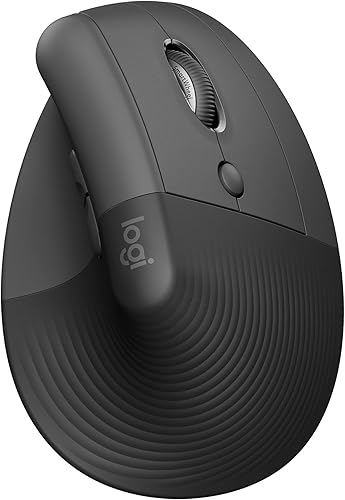 Best for small to medium hands
Logitech Lift Vertical Ergonomic Wireless Mouse
Vertical mouse vs trackball: how does cursor control differ?
A vertical mouse moves as a unit, while a trackball moves the cursor through a rolling ball. That change in control is the clearest difference between the two types.
With a vertical mouse, you guide the whole device over the desk. Its shape changes your grip, but the movement is still familiar if you've used a regular mouse.
With a trackball, the body stays still and your thumb or fingers rotate the ball. You can point without sliding the mouse across the surface.
The Logitech Lift is a vertical option with a 57-degree shape, thumb rest and SmartWheel. The Logitech Ergo M575S is a trackball with thumb control and a sculpted shape.
What does a trackball vs vertical mouse feel like in daily work?
A vertical mouse feels closer to a conventional mouse in use, even though your hand rests differently. You still need room to move the body from side to side.
A trackball shifts the motion to your thumb or fingers. It can be convenient when you want to keep your hand and mouse body in one place, but the ball's movement may take some practice.
People who switch from a standard mouse can start with a vertical model if they prefer a familiar cursor motion. People who want minimal mouse travel may prefer a trackball after they get used to it.
Which mouse needs less desk space?
A trackball needs less travel space because its body stays in place. A vertical mouse needs a clear path for the device to move, even if the mouse itself is compact.
A small work surface, a crowded desk or a setup close to a wall can make the trackball's fixed position useful. You still need room for your hand, keyboard and anything else you use while working.
A vertical mouse may fit well on a larger desk or one with an open area beside the keyboard. If you often reach across clutter or hit the edge of your surface, measure the available space before choosing.
Does a trackball mouse work on any surface?
The Logitech Ergo M575S is designed to work on any surface, according to its product information. Because it does not need to slide around, your desk material matters less to cursor control.
A vertical mouse relies on movement across the desk, so the surface can affect how easily you reposition it. If your current mouse catches or skips, consider a suitable mouse pad.
Our guide to best ergonomic mouse pads can help you compare options.
Which grip feels more natural?
A vertical mouse changes your hand angle; a trackball can keep your hand still while you steer with your thumb or fingers. Comfort depends on how those positions feel to you over time.
Vertical models are shaped to hold the hand at an angle, often described as a handshake position. The Anker vertical mouse promotes a neutral handshake-style position, while Logitech says the Lift's 57-degree shape supports a more natural forearm posture.
Trackballs trade repeated arm movement for thumb or finger control. The M575S is sculpted for hand support, and Logitech says it supports the hand and realigns the forearm into a better posture.
These descriptions aren't a promise that either mouse will resolve pain or suit every person. If using a mouse causes discomfort, consider changing your setup and getting professional advice for pain that continues.
Is a vertical mouse easier on the wrist?
A vertical mouse may feel better if you prefer holding your hand at an angle rather than palm-down. It still requires moving the device, so it may not be your preference if that motion feels uncomfortable.
A vertical mouse vs standard mouse comparison explains how the grip changes from a conventional mouse. For a broader look at movement and posture, read our Trackball vs Mouse: Which is Best for Ergonomics?.
How quickly can you adjust to each style?
A vertical mouse keeps familiar cursor movement, while a trackball asks you to learn a different way to steer. Your adjustment may depend on how comfortable you already are with thumb or finger control.
With a vertical mouse, you continue sliding the device to point. The main adjustment is the angle of your hand and how the buttons fall under your fingers.
With a trackball, the first challenge is coordinating ball movement with cursor speed. Start with small movements and adjust pointer speed if your operating system allows it.
Give either style several work sessions before deciding whether the fit is right. Short breaks and a sensible mouse position can also help you avoid overworking one hand.
Which is better for long desk sessions?
Neither type guarantees all-day comfort; choose the control style that lets you work with less effort and strain. For another wrist-position adjustment, see Corsair keyboard negative tilt.
Keep your wrist relaxed, place the mouse close to your body and avoid reaching far to use it.
A vertical mouse may suit you if you want to maintain the movement pattern of a regular mouse while changing your grip. The best ergonomic mouse guide compares additional shapes and features for desk work.
A trackball may suit you if you want to reduce repeated arm movement or work in a tight space. The M575S has customizable buttons, and its cursor speed can be adjusted through the Logi Options+ app.
If arm comfort is your main concern, compare the grip and controls with our best mouse for arm pain guide. Your desk height, keyboard position and how you hold the mouse can matter alongside the model.
Can you get both an upright grip and trackball control?
Yes, a vertical trackball combines an angled hand position with a stationary ball. The Nulea model has a 65-degree shape and thumb control, so the body stays put while your thumb steers the cursor.
That combination can fit a desk where you want less mouse travel and prefer an upright grip. Nulea also describes its model as supporting Bluetooth or an included USB receiver and pairing with up to 3 devices.
A hybrid doesn't remove the learning curve of trackball control. Think about whether you want to learn both a new grip and a new cursor motion at once.
What should you check before choosing a model?
Check hand orientation, connection type and control layout before you buy. For a gaming-focused left-handed option, compare left-handed MMO mice.
These details can matter more than whether a mouse is vertical or trackball.
The Anker 2.4G Wireless Ergonomic Mouse is right-handed and connects through a 2.4 GHz USB receiver. Its tracking offers 800, 1200 and 1600 DPI settings, and it needs 2 AAA batteries that are not included.
The Logitech Lift shown here is a right-handed vertical mouse for small to medium hands. It connects using Bluetooth Low Energy or a Logi Bolt USB receiver and has customizable buttons.
The Logitech Ergo M575S is a right-handed trackball that connects through Bluetooth or Logi Bolt USB. Its AA battery is included, and Logitech gives a battery life of up to 18 months.
The Nulea is also right-handed, with Bluetooth or an included USB receiver. It uses a Type-C charging cable, and Nulea says to charge it with a standard 5V charger or computer USB port, not a fast charger.
If you also need a keyboard, our desktop keyboard buying guide covers layout and desk setup choices that work alongside your mouse. For an ergonomic model, see our Logitech Ergo K860 review.
Which should you choose for your desk?
Choose a vertical mouse for a changed grip with familiar movement, or a trackball for stationary control and less need for clear travel space. If you want both, consider a vertical trackball and allow time to learn its controls.
Pick the Anker or Logitech Lift if you want a vertical mouse. Pick the Logitech Ergo M575S if you want a stationary trackball, or the Nulea if an upright shape and thumb control appeal to you.
Before deciding, consider your hand orientation, desk space and connection needs. The best fit is the one you can control comfortably through your normal workday.
Frequently asked questions
Is a vertical mouse better than a trackball?
Neither style is better for everyone. A vertical mouse keeps familiar movement across the desk while changing the grip, and a trackball stays in place while your thumb or fingers move the cursor.
Choose based on which motion feels easier to manage during your usual tasks.
Does a trackball take less desk space?
A trackball needs less clear surface for cursor movement because its body stays put. Leave room for your hand and keyboard, and check the mouse's own footprint before buying.
A vertical mouse still needs open space to travel across the desk.
Is a vertical trackball a good middle ground?
A vertical trackball combines an angled grip with stationary cursor control, as in the Nulea 65-degree thumb model here. It may suit you if you want both features, but it also combines two movements that can take adjustment.
Which mouse is easier to learn?
A vertical mouse may feel more familiar if you've used a standard mouse, since you still move its body to steer. A trackball changes cursor control to a ball, so allow practice time and adjust pointer speed to suit your hand.


